# Composite Quickstart
Create a helper/utility connector with a composite operation that converts HTML to Markdown
This guide will show you the steps to deploy a helper / utility connector with a composite operation.
We will build a operation that converts HTML to Markdown using package.
## Pre-requisite
***
Follow the [Introduction](https://tray.ai/documentation/developer/connector-development-kit/overview/introduction) to install the CDK, obtain a `namespace` and initialize a connector project.
## 1. Rename the connector (Optional)
***
Since, we are building a helper / utility connector. We can give the connector an appropriate name e.g. `[Namespace]-data-formatter-helper` to indicate the purpose of the connector.
## 2. Delete the test operation
***
Connector projects are initialized with a dummy test operation `get_post`. Delete the `get_post` operation folder from `src` directory.
## 3. Install turndown
***
Install `turndown` and it's types using:
```cli
npm i turndown @types/turndown
```
## 4. Build a new operation
***
`cd` into the connector project and add a new operation using:
```cli
tray-cdk connector add-operation html_to_markdown composite
```
This will add a new operation folder `html_to_markdown` to the `src` directory wih the following files:
| File | Notes |
| --------------- | ------------------------------------------------ |
| input.ts | to define input types for the operation |
| output.ts | to define output types for the operation |
| handler.ts | to write the logic of the operation |
| handler.test.ts | to write unit tests for operation |
| operation.json | to define operation name, title, and description |
Here's how you can configure the files to get the operation working:
```typescript input.ts
export type HtmlToMarkdownInput = {
htmlString: string; // The operation should takes a string in HTML format
};
```
```typescript output.ts
export type HtmlToMarkdownOutput = {
markdownString: string // The operation should return a string in markdown format
};
```
```typescript handler.ts
import { OperationHandlerSetup } from '@trayio/cdk-dsl/connector/operation/OperationHandlerSetup';
import {
OperationHandlerError,
OperationHandlerResult,
} from '@trayio/cdk-dsl/connector/operation/OperationHandler';
import { DataConvertorAuth } from '../DataConvertorAuth';
import { HtmlToMarkdownInput } from './input';
import { HtmlToMarkdownOutput } from './output';
// turndown is imported
import TurndownService from 'turndown';
export const htmlToMarkdownHandler =
OperationHandlerSetup.configureHandler<
DataConvertorAuth,
HtmlToMarkdownInput,
HtmlToMarkdownOutput
>((handler) =>
handler.usingComposite(async (ctx, input, invoke) => {
try {
// turndown package used to convert HTML to markdown
const turndownService = new TurndownService();
const markdownString = turndownService.turndown(input.htmlString);
return OperationHandlerResult.success({ markdownString });
} catch (error) {
return OperationHandlerResult.failure(
OperationHandlerError.userInputError('Failed to convert HTML')
)
}
}
)
);
```
```typescript handler.test.ts
import { OperationHandlerTestSetup } from '@trayio/cdk-dsl/connector/operation/OperationHandlerTest';
import { htmlToMarkdownHandler } from './handler';
import '@trayio/cdk-runtime/connector/operation/OperationHandlerTestRunner';
import { OperationHandlerResult } from '@trayio/cdk-dsl/connector/operation/OperationHandler';
OperationHandlerTestSetup.configureHandlerTest(
htmlToMarkdownHandler,
(handlerTest) =>
handlerTest
.usingHandlerContext('test')
.nothingBeforeAll()
.testCase('should return ###', (testCase) =>
testCase
.givenNothing()
.when(() => ({ htmlString: "Hello
" }))
.then(({ output }) => {
const outputValue = OperationHandlerResult.getSuccessfulValueOrFail(output)
expect(outputValue.markdownString).toEqual("### Hello")
})
.finallyDoNothing()
).testCase('should do ####', (testCase) =>
testCase
.givenNothing()
.when(() => ({ htmlString: "Hello
" }))
.then(({ output }) => {
const outputValue = OperationHandlerResult.getSuccessfulValueOrFail(output)
expect(outputValue.markdownString).toEqual("#### Hello")
})
.finallyDoNothing()
)
.nothingAfterAll()
);
```
## 5. Test the connector
***
You can test the operation using:
```cli
tray-cdk connector test html_to_markdown
```
Alternatively, you can also run `npm test` or `tray-cdk connector test` to test all operations.
## 6. Deploy the connector
***
The connector is ready to be deployed. Follow the steps as shown on the [Deployment API guide](https://tray.ai/documentation/developer/connector-development-kit/deploying-connectors/deploy-using-api).
## 7. Test on Tray UI
***
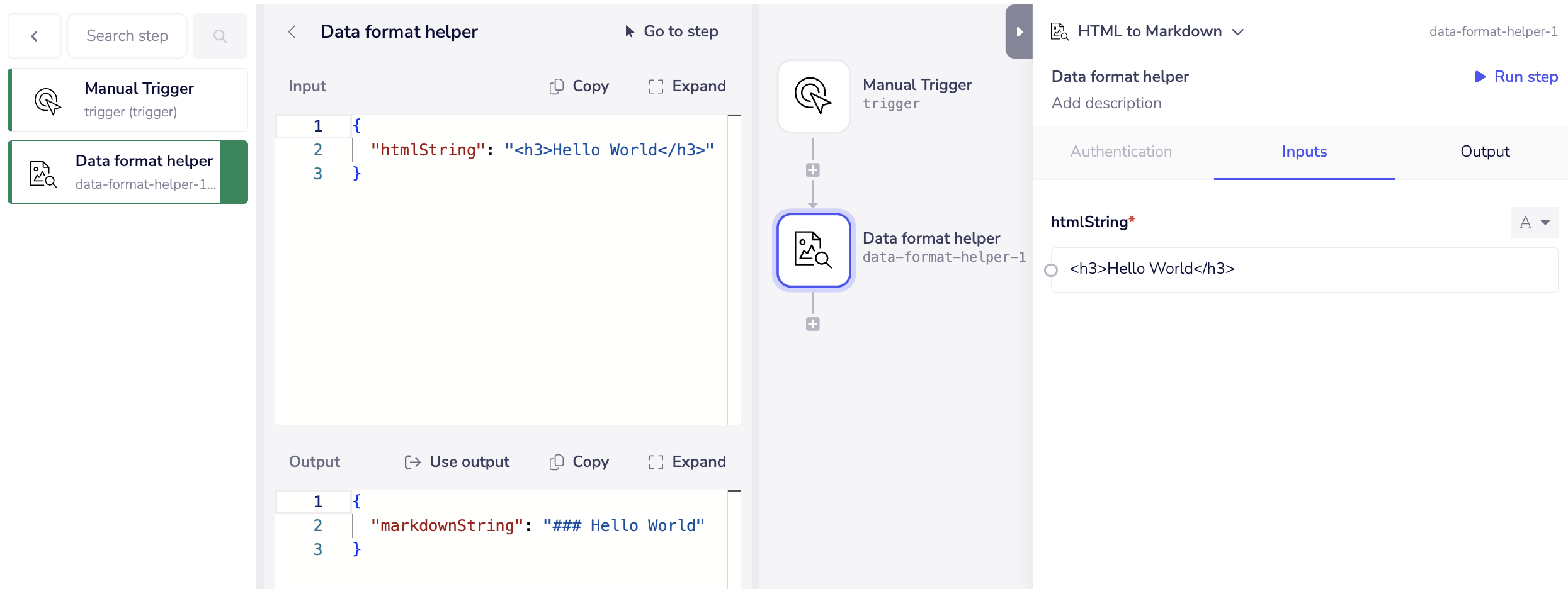
Add the connector to a existing / new workflow, configure the input panel, and hit run.
Here is the screenshot of the Builder UI logs: