
Overview
The purpose of this workflow is to capture leads from a Google Sheet and use these to create and update leads in Zoho.
This workflow is fired every time a Gsheet ID is entered into a Tray Form:

Prerequisites
To implement this workflow, you will need the following:
- API credentials for Google Sheets and Zoho
- A Google Sheet with the correct column setup as per the template found at https://bit.ly/lead-intake-gsheet-zoho
Getting Live
Click 'Use Template' to deploy the template in your chosen Workspace. Then take the following steps to configure the workflow and start submitting leads for processing:
The workflow will then start the process of pulling the leads into Zoho.
End Result

Key workflow steps
The following diagram gives a simplified breakdown of the key steps in the workflow:

Standardization
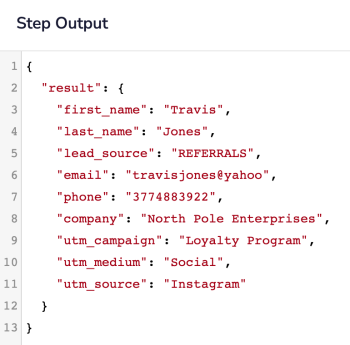
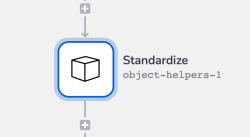 This Object Helpers step transforms the Google Sheet column headers into a standard object with fields in the following format:
First Name --> first_name
Last Name --> last_name
Lead Source --> lead_source
etc.
For each lead we will then have a simple object which can be easily accessed by later Zoho steps using jsonpaths such as $.steps.object-helpers-1.result.first_name:
Email validation
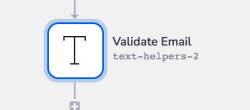 The lead’s email address is validated for the appropriate user@domain.com format
If the email address is invalid, the failure status will be written to the appropriate column in the lead sheet:
The lead’s email address is validated for the appropriate user@domain.com format
If the email address is invalid, the failure status will be written to the appropriate column in the lead sheet:

Create / Update Leads
 A search is made for an existing lead in Zoho using the lead’s email address as the unique identifier.
If a Zoho lead does exist, the lead record is updated and the status of 'Success' is added to the 'Import Status' column in the Google Sheet.
If a Zoho lead does not exist, a new lead record is created and the status of 'Success' is added to the 'Import Status' column in the Google Sheet.
A search is made for an existing lead in Zoho using the lead’s email address as the unique identifier.
If a Zoho lead does exist, the lead record is updated and the status of 'Success' is added to the 'Import Status' column in the Google Sheet.
If a Zoho lead does not exist, a new lead record is created and the status of 'Success' is added to the 'Import Status' column in the Google Sheet.
Updating UTMs
 For simplicity this template adds the UTM information into the Zoho 'message' field for each lead (rather than using Zoho custom fields).
utm_medium and utm_source are all picked up from the standardized object:
For simplicity this template adds the UTM information into the Zoho 'message' field for each lead (rather than using Zoho custom fields).
utm_medium and utm_source are all picked up from the standardized object:
