










.DkNUKaKx_ZLAT4m.webp?dpl=dpl_Au634qxtCnaGHwTSpukv8FwHxmQD)








Shadow MCP servers and tools are appearing inside organizations faster than IT can manage or secure them. In this on-demand Tray First Look session, Product Director Tom Walne and Senior Product Marketing Manager Michael Douglas show how Agent Gateway for MCP brings all MCP work into one managed place with guardrails, clear ownership, and full visibility.
You will see how teams replace scattered, developer-built MCP servers with governed MCP tools built on Tray. The session also explains why raw API-wrapped MCP servers fall short for agents and how composite tools make actions easier to support and guide across your systems.
What you’ll learn
- What drives MCP sprawl: How private MCP servers built across different teams create gaps for security, support, and ownership
- How to bring MCP work into one place: How Agent Gateway for MCP gives IT rules, permissions, and version control for every MCP server and tool
- Why agents need clearer MCP tools: Why raw API-wrapped MCP servers create confusion and how composite tools make actions easier to guide and support
- What teams gain by centralizing MCP: How early users reduced duplication, removed shadow MCP work, and improved reliability across agents
For every stage of the process, the systems it runs on and a guide to building each one, see MCP governance, end to end.
Session chapters
- Why MCP adoption is creating new risk for IT: Shadow MCP servers, private builds, and why IT is struggling to manage them
- Technical gaps in today’s MCP servers and tools: Why raw API-wrapped MCP servers fall short and why agents need more structured tools
- Introducing Tray Agent Gateway for MCP: What Agent Gateway for MCP solves and how it centralizes MCP servers and tools under clear IT control
- Building and exposing composite MCP tools: How Tray workflows become MCP tools, how inputs are structured, and how guardrails are applied
- Enabling connector operations as MCP tools: How individual connector operations are exposed safely and selectively through the gateway
- Running MCP tools from an MCP client: Invoking tools in the client, seeing results in real time, and viewing execution logs inside Tray
- Agent-to-agent orchestration with MCP: How sub agents are exposed as MCP tools and invoked through the same gateway
Transcript (auto-generated)
Hi. Good morning, good afternoon, good evening, wherever you might be. My name is Michael Douglas, and welcome to Tray First Look: Agent Gateway for MCP. Thank you so much for being able to give us your time today and join this very exciting webinar around our newest release on Agent Gateway for MCP. I’m joined by, my colleague, Tom Walne. Hey, Tom. How are doing?
Hey, Michael. Good to see you again. Getting quite a quite a theme this, me and you, tag teaming these events.
Isn’t it? Isn’t it, Tom? So, Tom, I know that we’ve got a number of new people that are new to Tray, and I was looking to see if you could just give a bit of background into yourself, for anybody who’s not familiar with you.
Yeah. Of course. I’m the product director here at Tray. I’ve been working very closely on what we’re gonna be going through today. Really excited to kinda get this in front of you all. So, yeah, got a lot to kinda squeeze in and, you know, some really interesting stuff to show off.
Great. Thanks, Tom. And, by the way, for anybody who has any questions along the way, feel free to put them in chat, and we will answer them towards the end of the presentation. So without, further ado, let’s just jump into it.
So as I said, this is all around our release, our MCP, release. And before I get into that, we just want to take a moment to kind of, sort of set up of of why we’re here, why we’re releasing Agent Gateway for MCP. And this is a quote from our CTO, Alistair Russell, and it really speaks to the adoption challenges that organizations are facing around MCP. Right?
There is really a looming crisis that that’s coming, from the race to adopt MCP and build tools and servers, and it’s creating a sprawl of technology that’s really going to add on to the the future technical debt of an organization.
And, really, why this is happening is because since the protocol first came out, developers and shadow IT are off building these, private MCP servers and tools in the likes of JavaScript, Python, TypeScript, and so on. And these tools are interacting with very sensitive, systems and data, and, really, users are accessing unchecked, public MCP servers. Now what does that do?
That really, creates a major headache for the enterprise because now they’re they have, tools that have no guardrails, no controls, and no, business logic built in. It’s really kind of dealing with a black box. You’re not really sure what went in to actually build it. And now that is creating a major headache, and how do you debug? How do you test for these? Right? And so IT teams are now trying to get their arms around how do we bring rigor and management, and how do we ensure proper levels of security and governance that are gonna go into this MCP adoption.
So that is the main reason, main challenges why we’re here from adoption perspective, but, also, there’s a lot more technical challenges from the fundamentals of MCP. So, Tom, I know you’ve been out in the, you know, out in the wild talking to customers and have a lot more experience than than I do in terms of some of these technical challenges. So I just love to get your input here on some of the the challenges you’re seeing from a security and governance perspective.
Yeah. Well, you kinda touched on quite a few of the the challenges just just in the kind of the intro there. You know? And this, this is a rapidly evolving, you know, protocol that is changing very frequently.
You know, we’re monitoring and keeping an eye on those changes as is everyone else. You know? And whilst there’s a kind of a a a shift towards a focus on security and governance, you know, a lot of that isn’t available right now. And this is really where Tray comes in because we can actually offer that out the box, and you’ll see that as we go through the demo, what we have in place to kind of bring in that kind of those guardrails and those security and governance procedures that aren’t available natively now and are becoming a risk for the reasons you gave in the previous section.
Yeah. And so when we talk about you know, we’re saying about MCP servers can’t be trusted, what do what do we mean by that, Tom?
Well, I mean, there’s been a big proliferation of, you know, vibe coded, MCP servers. There’s servers that are running locally, servers that, you know, can perform very kind of sensitive actions as you kinda touched on before. And you can actually see this in a lot of clients now where they’re, you know, really kind of cautious about people, you know, implementing and interacting with MCP because of the risks, you know, with, actually accessing and making changes into downstream systems. So having somewhere to kind of centralize all that and expose it kind of to your organization is is is really kinda key, and that’s, really what the, the Agent Gateway for MCP provides, particularly when it comes to MCP.
Yeah. And when we’re talking about, the many of these MCP servers that are out there are just, you know, wrapped APIs. And I know that agents need a lot more than just a raw API.
So where is the kind of the delta here between what are a lot of these raw API, MCP servers are versus what they need to be, in order for agents to to to properly work?
Yeah. So I think this is the this is probably one of the real key areas. You know, there’s a lot of dialogue going on around this now. You know, there’s been discussion for a while how the first iteration of of MCP server, either one’s built, by individuals for kind of different services or the ones provided by, you know, vendors themselves have essentially just been a kind of an API wrapper.
And that’s not how agents work. It’s not how human beings work. You know, when we’re interacting with systems, we don’t just go through the list of APIs and start performing actions that way. You know, we do it through an interface, and we perform kind of contextual actions based on the results we’re trying to achieve.
And agents essentially operate in the same way. So if you have just a list of tools, you know, the agent’s gonna have to work sequentially. It’s gonna have to look up information. It’s gonna have to find more information.
It’s gonna have to ask more information.
And that could be five or six different tools to even do something as simple as creating a Jira ticket or sending a Slack message. So you have that real kind of problem of, you know, essentially equipping an LLM with, you know, contextual tools to perform the tasks that we would be doing in these applications directly. But this then creates a secondary problem, and we’ll actually touch on this as we go into the demo around, like, composite tooling and how you know, the more tools you expose, the more context window you actually use, and this obviously increase cost and increases the risk of hallucination.
And there was actually an interesting article, from Anthropic earlier in the week about, you know, introducing, more code potentially into MCP to actually link tools together and, you know, reduce remove some of that kind of, determinism from the LLM. And, obviously, that creates an additional challenge because, you the only thing probably scarier than five coded MCP servers that wrap APIs is five coded MCP servers that wrap APIs and execute arbitrary code. So, you know, it’s it’s interesting to see that kind of direction. We’ll actually go into that when we look at the composite tool offering with Tray.
Yeah. So, we’ve thanks so much for that, Tom. So we’ve looked at the adoption challenges.
We’ve looked at the technical challenges. So now without further ado, we’ll do an intro to Agent Gateway for MCP and how Agent Gateway for MCP is able to address a lot of these challenges.
And, Tom is going to kinda give you guys an overview of Agent Gateway for MCP and how it’s gonna help your organizations with the MCP adoption.
Yeah. So I’ll just kinda introduce the core components ahead of the kinda demo before we get kinda stuck in. We’ve already touched on some of these, but, essentially, the Agent Gateway for MCP, you know, allows you to kind of expose Tray assets using, using MCP, and you can go and consume them with a client, and that’s what we’re gonna kinda show you in the demo. But, obviously, this means you can essentially publish Tray composite agent tools.
These are these are these are Tray workflows, essentially, and this actually handles some of the kind of challenges I was touching on before around exposing a large number of tools, but also equipping tools and ensuring tools can perform certain actions without kind of pushing that work onto the LLM. So that’s a real kind of key kind of point of the of the of the offering. We’ve also got the option to kind of publish Tray connector operations. So we obviously have our extensive library of connectors, and each and every single operation within that kind of connector library can be exposed as an individual, MCP tool.
That’s obviously incredibly powerful because there are some APIs where it does just make sense. And the example I’m gonna show you is one of those that I think very much fits in that category, so where you can expose just a static operation. It’s very clear what it’s used for, the LLM can use it effectively. It doesn’t need any kind of additional context.
So we’ll show you some examples of that. I think going beyond that, you know, there’s a reason we wanna this is gonna become a kind of gateway is because you have the ability to actually connect to existing MCP servers and access a range of MCP servers that we’re hosting. So this is essentially allows you to have that true gateway functionality, and that really starts to address that shadow IT problem you touched on earlier where, you know, we’ve got organizations, and essentially, every IT leader I speak to is facing the same problem where, you know, various members throughout the organization are spinning up their own tooling, spinning up their own MCP servers, and it’s really hard to kind of get a kind of grip of what’s going on.
And, obviously, they wanna centralize that some way without kind of, you know, stifling that innovation piece. So having a centralized gateway and allowing people to kind of, you know, expose their MCP servers and connect them via Tray adds that kind of security layer in place.
And finally, the kind of the piece, and we’ll kind of touch on this as well, is the orchestration piece. You know, this essentially allows you to kind of, build out agent orchestration in a way that you can, you know, expose agents sub agents to essentially an orchestrator agent to allow that that kind of agent to agent communication.
We’ll touch on that as well in the demo.
Great. Thanks, Tom. And so before we jump to the demo, just to kinda give you guys a understanding of the core benefits that, the Agent Gateway for MCP release is is doing is really allowing you to have an ability to maintain security and compliance when you’re creating all of these servers and tools in a centralized managed environment that is enterprise ready, that can be, have full observability by, IT. And secondly, you’re really bringing all of that shadow IT that we talked about from the, you know, the the far corners of the enterprise. You know, all of the dark corners, you’re getting all of that duplication across departments completely out of the way, and you’re able to, being able to reduce a lot of the, the the duplication and the the, the technical debt, that is coming from the current situation.
And lastly, really setting up your organization, with a future proof, ecosystem to adopt, you know, agent to agent and other new capabilities that will be coming down the track, you know, in a matter of weeks and months as we have seen the rapid development, of agentic move forward.
And, really, the the the MCP, the the Agent Gateway for MCP is all about bringing order to the, the the the development chaos. Right? So on the left hand side, we’ve seen here what I talked about earlier in building all of these different solutions that are interfacing with the back end systems and exposing to ChatGPT in very, ad hoc, unsecured ways, and you’re shifting everything into a central orchestrated platform, that is secure, approved, managed, and being able to really bring order to that chaos. And I think a great example of that is one of our customers, a leading music publish publisher, were really, are really on the, bleeding edge of technology, especially around agents and and MCP. And they were going through all of those trials and tribulations, adopting MCP.
And with being able to bring in Agent Gateway for MCP, they’re really able to enforce those policies, permissions, and versioning all on a single platform with centralized visibility and traceability and being able to reduce a lot of the risk that comes with MCP adoption. So without further ado, I’m gonna hand it back over to Tom, and he’s gonna walk you through the demo.
Brilliant. Yeah. Thank you, Michael. I think that’s just an excellent excellent quote there. And I think it you know, there’s a lot of kind of, technical discussion going on with MCP, and I think sometimes it’s good to kind of remember that the real real life use cases and the real the need for fast adoption is essentially this gets you closer to your customers.
Right? So it’s a it’s a a way of kind of getting that interaction to your customers. And this is why in certain industries, we’re seeing that kind of rapid adoption for industries that need to move quickly. So really interesting quote there.
Right.
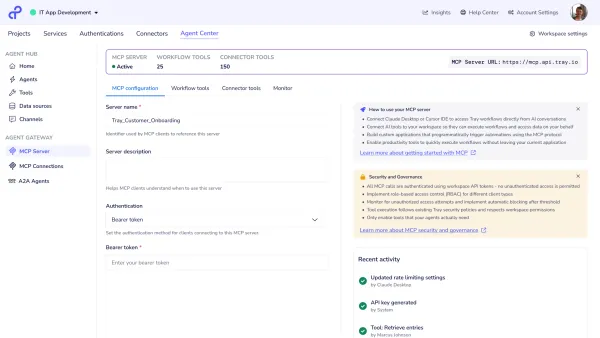
I’m gonna kinda share my screen, and then we will be able to dive straight in. So we’ll start you off within the Tray platform. So what you are seeing here is, essentially the the Agent Gateway for MCP within the product itself. And this is a Tray workspace, which I’m exposing, essentially, via MCP.
And, essentially, this is where the configuration URL is available for you to actually connect to an MCP server. So all the information you need to actually connect to the server is available here, and that’s essentially on this page. You can also give the server a name, so you can, you know, reference it and see when once you’ve connected to it. So really quite simple kind of setup.
What this actually does is then essentially expose any tools within this workspace. And what I mean by tools are essentially Tray workflows that are triggered using our tool trigger. These are the same, triggers that are used with the Agent Builder product. So any tools that are built using the Tray Merlin Agent Builder can actually be exposed as MCP tools as well.
So you can you’re you can essentially you expose them as an agent via Tray or expose them to a a a client directly, and you will see that as kinda later on in the demo. So what I’ve got here is I’ve essentially got four composite tools, these workflow tools, and I can show you kind of how these look. Let’s open up this one so I can view the workflow logs there. So this is where this observability piece really comes in.
You can actually dive into the underlying tools, open those up. As you can see here, it’s taking me through to this workflow, and this is essentially what’s happening when this tool is invoked. And as you can see on the left hand side, I’ve got this full logs of actually what’s happening when this tool is invoked. So this really kind of touches on that observability piece.
You can see exactly what is happening in here. You can see which steps are kinda taken out when the tool is invoked, and this kind of eliminates some of that kind of that black box that Michael described earlier, you know, where the MCP server is going running something, and, you know, it’s quite hard to get any kind of visibility and traceability of what’s actually going on there. So you have that within the kind of Tray interface for individual MCP tools.
So they’re the workflow tool we’ve got there. As you can see, there’s a selection here of composite tools performing very different functions.
Also, we have
I mentioned in the kind of in the previous slide section, we have the ability to actually add connected tools as well. I’m gonna do that just now. So, basically, I’m not using any connectors right now, but let’s add in this Salesforce tool.
By default, when I add a tool and this is, like, another really kind of powerful feature. You know, there are some MCP servers, I think that the get everyone’s currently exposing around 800 tools, expose a lot of capability, which, again, obviously, you don’t wanna expose that entirely to to to to the context window of an LLM because you’re quickly gonna overwhelm it. So you’re actually gonna wanna necessarily control what people can do. So this is really powerful because I can go in here, and I can manage the operations.
And all I’m gonna do with this one is actually enable the ability for the the the to to run SOQL queries. So if I turn that on now and save that, now that operate operation is enabled, and the only tool that is exposed via Salesforce is that ability to run SOQL. And, obviously, this is quite powerful because it allows you to kind of develop servers to regulate the level of control that people have. So this may be fine to expose to an organization because it’s only running queries, so it can only access data.
But if you had some like, let’s say, a sales agent of some kind or you want to give access to a sales team who are actually changing and modifying data in Salesforce, you could enable other operations or, as I’ve done here, actually build in the composite tools that perform those particular actions, so for creating leads and and updating leads.
So now as you see, I’ve exposed my four workflow tools, which I’ve got right here. I’ve got one connector tool, and let’s
jump over to my client over here and where you can actually see the server in action. So you can see I’m connected to the server. There it is.
DemoMCP a to a server, and you can see the tools that are available. And, obviously, these tools that are available here map the tools I’ve exposed through the MCP server or the MCP Agent Gateway for MCP configuration in Tray. So let’s kick something off there, and then we can see how it kind of how everything kind of manifests in Tray. So if I ask for my get me top five accounts by ARR and send them to Tom, on Slack.
So this is gonna obviously use a range of kind of tools that I’ve got available within the kind of product. So okay. Firstly, it’s gonna actually run that kind of SOQL query. So, you know, again, LLMs are really kinda good at this kind of task. So it’s gonna run that query, and it’s then gonna get the data that I’ve asked for.
So it’s picked up information. It’s got my kind of five records, and now it’s actually gonna send them to to Tom on Slack. We can actually see that happening in real time because it’s gonna invoke this workflow here. You can see it’s already been successful.
What it’s done is it’s tried to send it to Tom, but it doesn’t actually know who Tom is. And this is, again, how this kind of composite tool piece comes into play.
I’m able to actually expose this information this this is the single tool which actually looks up the Slack user before sending the message. So instead of having two tools to look up a user or getting the user to provide the exact email address or something like that, I’m able to do a kind of lookup, and it’s gonna find out, you know, multiple Toms. So I’ve asked to send it to Tom. There’s a two couple of Toms in this workspace.
I’m gonna send it to myself, so I just wanna send it to two. So if I do that, it can then actually go back to the tool with the correct information and send that Slack message directly to myself. So that should do that now. You should see the execution coming through.
Again, too quick. It’s already through. There it is at the bottom. So now it’s been able to successfully send that message, and there they are, my top five accounts by ARR.
So, yeah, that’s the real power of composite tools. I’ve got complete visibility of what’s happened here. I’ve been able to expose a range of functionality to the LLM through a single tool where if I was using a kind of MCPs over directly, I’d probably use multiple tools in place right there. I’m not running arbitrary code.
As you can see, everything I’m kind of running is right here. So you’ve got full visibility of that, full traceability of what’s actually happening here. So you can actually follow that through the process that has happened once the tool has been invoked.
And, yeah, that’s essentially the kind of real kind of core power of that. So as you can see, we’ve got a combination of tools here. The SOQL query that it ran is using a connector operation. So if I show you that again here, that’s within my connector tools.
That’s a SOQL operation there. That is just exposed to be using our connectivity API, so it’s a direct call to the underlying API via Tray. And, essentially, that’s just exposed out of the box. No configuration needed there.
And then I’m using a selection of composite tools to perform actions off the back of that. So that’s really kind of what the Agent Gateway for MCP enables you to do. Just finally, let’s try something else. Like, you might have seen that I had and, obviously, this is using within the same kind of chat, so slightly different kind of context.
But this
agent also actually has all this the the tools exposed here actually include the ability to invoke HR agent, and that actually exists within a separate Tray workspace. It exists over here. So this is an agent that’s been built using the the Merlin Agent Builder. And because of the kind of the the nature of Tray, I’m able to actually able to expose that capability via API, and therefore, I can consume it as a an MCP tool.
So we’re a bit slow over the only sent now. There’s been a bit of delay of some of these tie some times with the with the clients, but, essentially, here we go. It’s gonna check the balance, the HR balance. It’s now gonna invoke that HR agent via my MCP tool here in this project.
So it’s using this tool, which is exposed to the client I’m using, and it’s actually gonna route that request to the the sub agent, which in this case is essentially the underlying HR agent. You should be able to see that kicking off. As you can see, it’s running over here. So oh, it’s already got the information.
You can see it’s it’s selected kind of the the employee details, and it’s gonna kinda perform some more action. So this is the agent itself performing that, so the sub agent, HR agent, performing these capabilities. And once that’s complete, it’ll return the information to the client, and then the client will be able to tell me exactly how much PTO balance I have. And So waiting for the information to kind of be rendered, but that’s coming back.
And, you know, that will be kind of made available. So you can see it performs a range of functions. So I’ve shown you here both the the composite tool capability, you know, the ability to kind of expose Tray workflows, the connect operation piece, so being able to expose operations directly where it makes sense, and the ability to actually, you know, choose which operations you’re exposed to have that kind of really kind of control, you know, which isn’t available kind of out of the box, you know, with a lot of kind of clients. You actually have to go into the tool itself, you know, and potentially disable various kind of tools, turn them on or off.
You can actually control what is exposed to your end user. And finally, this kind of orchestration piece where I’m actually able to kind of you expose another agent as a tool and then consume it within my client. So if a simple request like this, as you can see there, it’s told me how much PTO I have available using this agent, which has information that’s available in our kind of human resources system. So, yeah, there’s a a lot there I’ve kinda covered.
So I’m gonna hand back over to Michael. And, yeah, any questions, just get them in the chat.
Great. Thanks so much, Tom. So I’m just gonna go back and and share my my screen in terms of, you know, how we’re how we’re different, from a lot of vendors out there in the marketplace. I think, you know, we we have a unified platform.
Right? So we have the the agent development combined with the AI ready intelligent iPaaS, and we have built native functionality specifically for AI. So native vector databases, smart data sources for anybody that’s been following our webinar webinars throughout the year with our release of smart data sources earlier in the year with over 700+ connectors. We really have the ability to have a breadth of integrations, right across the enterprise.
And then with the the the release of Merlin Agent Builder, being able to create, agents, with a lot of agentic AI tools and being able to govern that all, with that secure, fundamental iPaaS, underneath it all. So with that, I’m gonna,
How does the MCP client, Claude, for example, know which MCP tool to use? Is it based on tool details we provide?
Yeah. Actually, that actually could have probably shown that. So, actually, if Mike, if you let me share again, I’ll actually show that quite quickly. Think it’s a really good question.
Yep.
So yeah. So, essentially, the the information again is because because we, you know, we extensively use JSON schema to expose information in Tray. This is why we’re able to use connectivity API because it’s very close to the existing, you know, MCP schema. So we can actually map really quite closely there.
And the reason you need to use a kind of a a tool trigger is because this is how we expose the information in the correct format. So to kinda get the details of the tool that uses the workflow name and the description, so this is what’s exposed to the LLM, the name, the description, so it knows exactly what to do. You can see that within the client as well. It’s obviously kind of identical to what’s available here.
But within the agent tool trigger itself, this actually you can define the schema of the input here. So for the for the Slack one, really simple, just the content you wanna send and the recipient. And I’ve actually got additional instruction there to kind of use the other name or channel ID, and that’s how the kind of composite tool works. Either it looks for a user, if it finds one, sends the message.
But if it doesn’t, it returns the available users. So, essentially, yeah, the schema is just defined in Tray, and this is what’s exposed, you know, using the kind of scheme using the protocol effectively to the, to the end user. So, yeah, this is exactly what the LLM sees when these tools are listed.
Great. Thanks, Tom. The second question we have is:
You showed a front end UI from Anthropic to interact with your Tray MCP. Is that stood up within Anthropic, or is it a UI this MCP tool offers?
Yeah. I’m just using, like, Claude desktop there. Obviously, the the protocol we we we’re adhering to the kind of protocols. You can actually use this with with any client. We have a kind of range of ones supported by default out of box, but, you know, our implementation of MCP adheres to the latest, spec, which, which means, you know, it’s it’s it will kinda work with any client you kinda have, whether that’s a existing kind of internal client like Claude desktop or one you’ve built yourself. You’ll be able to connect to to Tray’s MCP service using your client.
Got it. Thanks. And so we have a a question: When is this gonna be available?
So we’re currently in, early access mode. So, please reach out. If you’re a customer, please reach out to your, account team, and they will be able to get you access to this. If you’re a prospect, please, reach out to us on our on our website, and we will, be in contact with you, fairly shortly.
And then, we have one more question:
What’s the overhead of integrating Agent Gateway for MCP into existing observability stacks like Splunk or Datadog?
Yeah. That’s another good question. Obviously, I showed you the the visual logs in the Tray Builder there, but we actually support log streaming as well. And this obviously adheres to exactly the same kind of, sort of process.
You can actually stream Tray logs to any system of your choice just as long as it’s exposed, you know, via a URL.
So you can stream Tray logs and consume them there. So you could have full visibility existing tools. So you can look and see them in Tray, but you can also stream into a a system of your choice.
Great. Thanks. And then another question come through.
Are these connectors used for MCP use cases different from standard Tray connectors, or is there just a feature flag? Wondering how one Salesforce connector can be used for MCP versus standard workflows?
No.
So the just I think if I got that right, we will follow-up if I if I don’t answer this clearly.
These are no. They’re they’re essentially not. So the the the kind of the SFDC connector I was using there is just the standard tray SFDC connector.
The operations are available, the operations that are available in the connector. So, essentially, you can access the entire connector library directly using you know, with with with within the kind of MCP server configuration.
Great. Thanks, Tom. So that is all the questions we have right now, and that I think we’re nearly out of time anyway. So, I wanna take this opportunity to thank everybody for their attendance. You will get a, this will be available on demand as well. And, you know, we hope you enjoyed the presentation, and, hope you enjoy the rest of your day. And then thank you once again.
Bye now.

Tom Walne
Director, Product

Michael Douglas
Sr. Product Marketing Manager