Agent Gateway demo
Watch how to mitigate shadow MCP risk and move organizations to managed and approved MCP tools
Transcript
We'll start you off within the Tray platform. So what you are seeing here is essentially the agent gateway within the product itself. And this is a Tray workspace, which I'm exposing via MCP.
Tthis is where the configuration URL is available for you to actually connect to an MCP server. So all the information you need to actually connect to the server is available here. And that's essentially on this page. You can also give the server a name.
You can reference it and see once you've connected to it. It's a really quite a simple kind of setup. What this actually does is then expose any tools within this workspace.
And what I mean by tools are essentially Tray workflows that are triggered using our tool trigger. These are the same triggers that are used with the Agent Builder product. So any tools that are built using the Tray Agent Builder can actually be exposed as MCP tools as well.
So you can expose them as an agent via Tray or expose them to a client directly. And you will see that later on in the demo. So what I've got here is I've essentially got four composite tools, these workflow tools.
And I can show you how these look. Let's open up this one. So I can view the workflow logs there.
So this is where this observability piece really comes in. You can actually dive into the underlying tools, open those up. As you can see here, it's taken me through to this workflow.
And this is essentially what's happening when this tool is invoked. And as you can see on the left-hand side, I've got these full logs of actually what's happening when this tool is invoked. So this really kind of touches on that observability piece.
You can see exactly what is happening in here. You can see which steps are kind of taken out when the tool is invoked. And this kind of eliminates some of that kind of that black box that Michael described earlier, where the MCP server is running something.
And it's quite hard to get visibility and traceability of what is actually going on there. So you have that within the Tray interface for individual MCP tools. So they're the workflow tools you've got there.
As you can see, there's a selection here of competent tools performing very different functions. Also, we have, I mentioned in the previous slide section, we have the ability to actually add connected tools as well. I'm going to do that just now.
So as you can see, I'm not using any connectors right now, but let's add in this Salesforce tool. By default, when I add a tool, this is another really powerful feature. Some MCP servers, I think that the one's currently exposing around 800 tools, expose a lot of capability, which again, obviously you don't want to expose that entirely to the context window of an LLM because you're quickly going to overwhelm it.
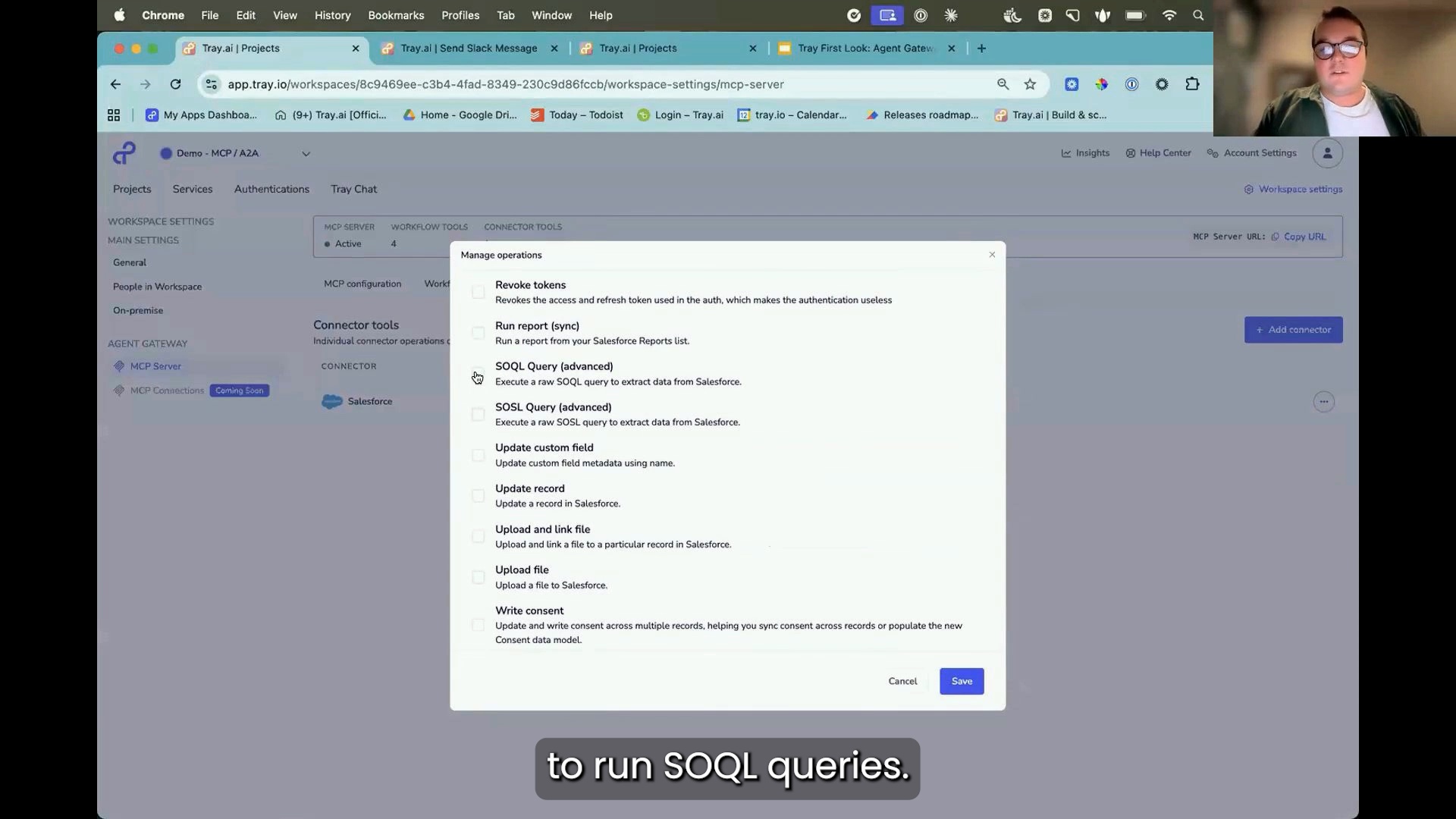
So you're actually going to want to necessarily control what people can do. So this is really powerful because I can go in here and I can manage the operations. And all I'm going to do with this one is actually enable the ability to run SOQL queries.
So if I turn that on now and save that, now that operation is enabled and the only tool that's exposed via Salesforce is that ability to run SOQL. And obviously, this is quite powerful because it allows you to develop servers to regulate the level of control that people have.
So this may be fine to expose to an organization because it's only running queries, so it can only access data.
But if you had something like, let's say a sales agent of some kind, or you want to give access to a sales team who are actually changing and modifying data in Salesforce, you could enable other operations, or as I've done here, actually building the composite tools that perform those particular actions. So for creating leads and updating leads. So now, as you see, I've exposed my four workflow tools, which I've got right here.
I've got one connected tool. Now let's jump over to my client over here and where you can actually see the server in action. So you can see I'm connected to the server.
There it is. Demo MCP A2A server. And you can see the tools that are available.
And obviously these tools that are available here map the tools I've exposed through the MCP server or the MCP agent gateway configuration in Tray. So let's kick something off there and then we can see how it kind of, how everything kind of manifests in Tray. So if I ask for my “Get me top five accounts by ARR and send them to Tom on Slack.”
So this is going to obviously use a range of tools that I've got available within the product. So, okay, firstly, it's going to actually run that SQL query. So, you know, again, LLMs are really good at this kind of task.
So it's going to run that query and it's then going to get the data that I've asked for. So it's picked up information. It's got my five records and now it's actually going to send them to Tom on Slack.
We can actually see that happening in real time because it's going to invoke this workflow here.
You can see it's already been successful. What it's done is it's tried to send it to Tom, but it doesn't actually know who Tom is.
And this is again, how this kind of composite tool piece comes into play. I'm able to actually expose this information. This is the single tool, which actually looks up the Slack user before sending the message.
So instead of having two tools to look up a user or getting the user to provide the exact email address or something like that, I'm able to do a lookup and it's going to find out multiple Tom's. So I've asked to send it to Tom. There's a couple of Tom's in this workspace.
I'm going to send it to myself. So I just want to send it to two. So if I do that, it can then actually go back to the tool with the correct information and send that Slack message directly to myself.
So that should do that now. You should see the execution coming through. Again, too quick.
It's already through. There it is at the bottom. So now it's been able to successfully send that message.
And there they are, my top five accounts by ARR.