Deploy Slack agents in minutes
See how Merlin Agent Builder connects an agent to Slack through a guided setup with centralized control.
Transcript
Hi everyone, I'm very excited to show you our native Slack interaction channel release, an upgrade to Merlin Agent Builder that makes it easier for teams to deploy Tray AI agents directly inside Slack. Let me show you how.
I have an HR agent I've created that has access to data sources and a variety of tools. So navigating to interaction channels, I'm going to add a Slack interaction channel. So out of the box, you can see that we support a number of Tray side configurations.
This allows you to scope your Slack app directly within the Tray platform. So for example, if you want to scope your agent to specific Slack channels or just the DMs, as well as enable and configure advanced options like action buttons, Slack bot kit, and more. So I'm going to go ahead and create a new Slack app.
I'm just going to call this, give this a name and the configuration token. In the background, Tray has automatically created and set up the manifest. Now importantly, you do need admin permissions to install an app to a workspace.
So if you need to get your IT team or admin to install the Slack app, that's not a problem.
Simply close the dialogues and carry on with your work. When you come back and follow the same journey, you can pick up from where you left off.
What I now want to do is jump over into Slack and show you what the experience looks like.
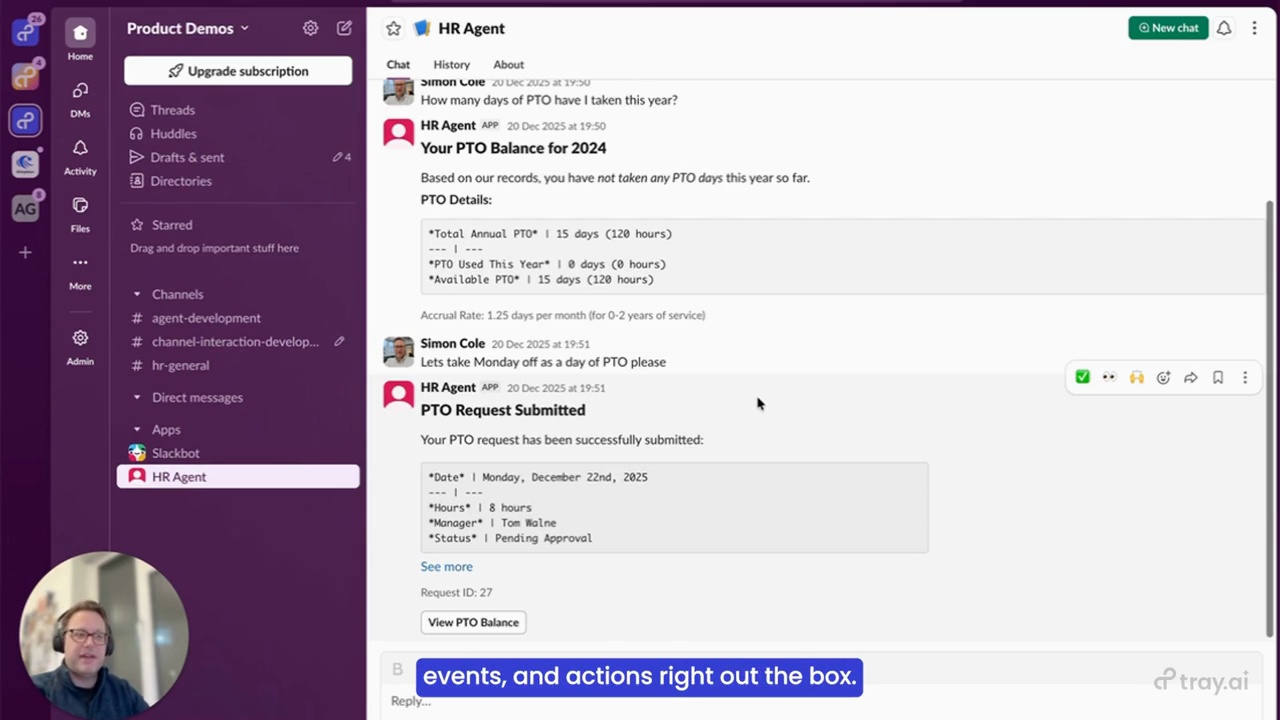
So jumping into Slack, I can now start interacting with my HR agent. In this case, I'm going to ask it how many days of PTO have I taken this year.
Now I've chosen the default configuration options. And so you'll see that I am provided with interactive style updates, which is which tools my HR agent is using within Tray. And I'll just give it a few seconds to start calling those tools.
And it's given me a breakdown of the number of days that I've taken. I've actually taken zero days. So let's take Monday off as a day of PTO, please.
And let's get it to carry out this specific action for me. Kindly, it's also given me background information from its knowledge sources in the previous answers, such as how much my cure
rate for PTO is over the year, based off of information it has access to. And let's go ahead and get it to carry out this action for me.
Again, it's provided me with interactive style updates. And it's kind of said to me that a PTO request has been successfully submitted to my manager, Tom. And it's also provided me with an action button at the end.
So quickly recapping what we've covered. Firstly, guided setup of Slack apps directly within Merlin Agent Builder. No more manual configuration.
Secondly, prebuilt workflows that give you the full control directly within Tray. And thirdly, native support for block kit, interactivity events, and actions right out the box. Everything that you need to build rich, interactive Slack experiences for your AI agents.
For implementation details, please do check our documentation or reach out to your account team. Thank you very much.