
Platform / Tray iPaaS
Build and govern every integration in one place.
An 8-person team at IBM cut 40 hours a week of data integration to 5 minutes a day. Build visually or from code, connect to 12,000+ apps, databases, APIs, and services, then make any workflow or connected app a governed MCP tool.
Thanks. Someone from our team will be in touch soon.
- apps, databases, APIs, and services
- 12,000+
- processes / year
- 1T+
- execution uptime
- 100%
One platform for all four
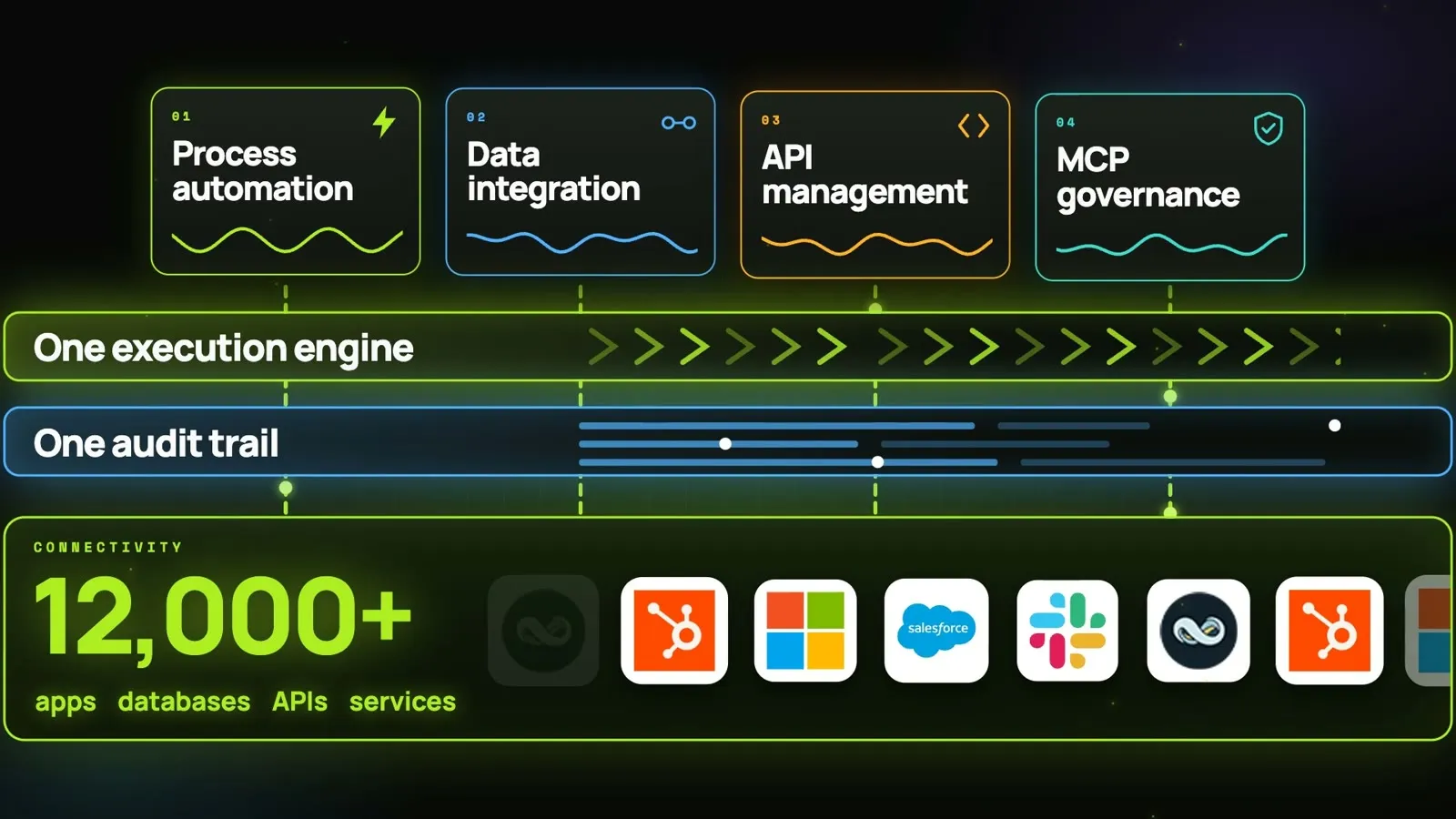
Every workflow, API and MCP tool shares one connectivity layer, one engine and one audit trail.
Process automation, data integration, API management and MCP run on the same connectivity and the same execution engine. A workflow you build once can run on a schedule, sit behind an API or answer an agent's tool call, and every run lands in the same audit trail.
How it works
From first workflow to production, in one project
Build workflows
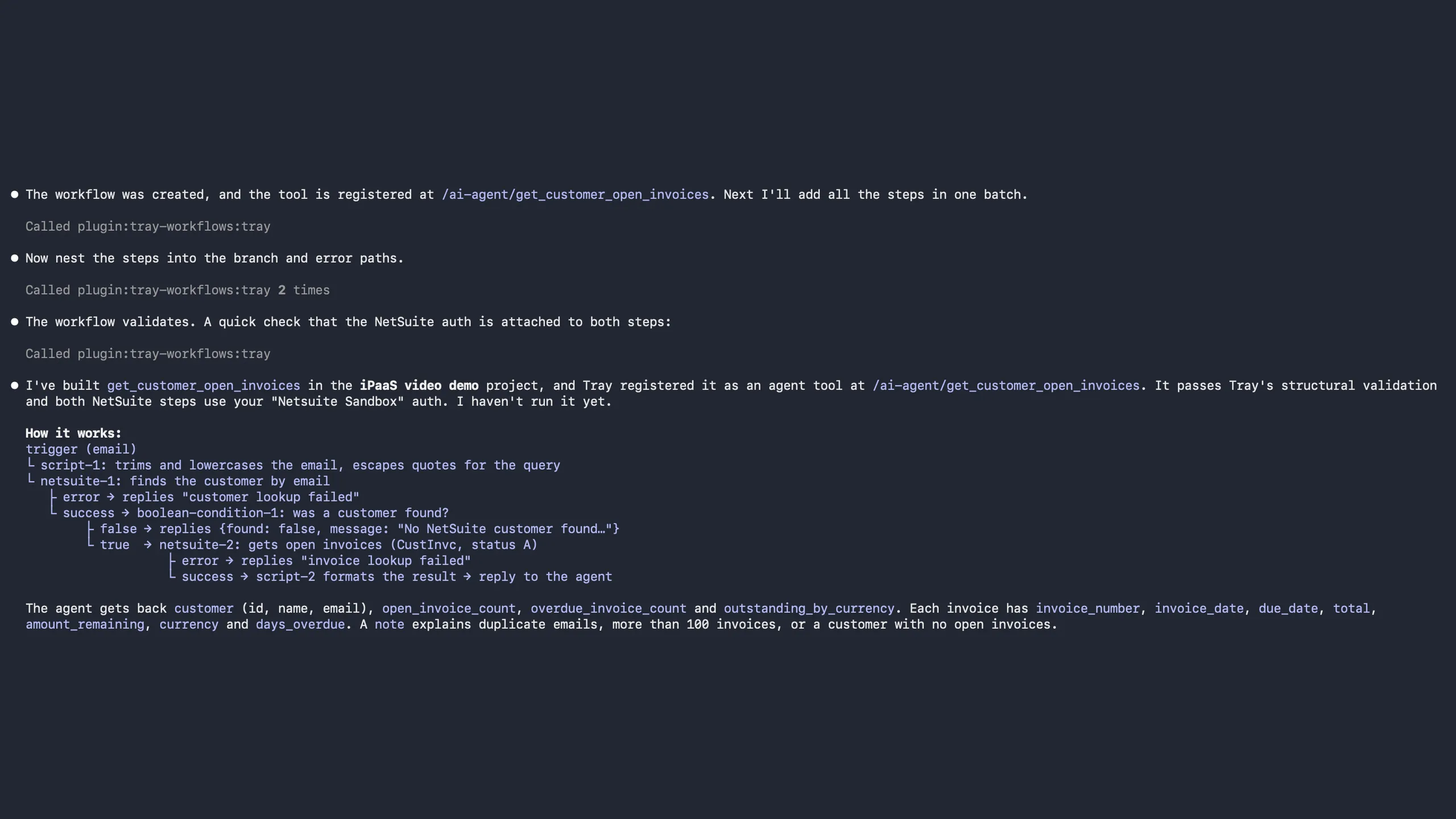
Design integration and automation workflows across 12,000+ apps on the Tray Build canvas, or have Claude Code or Codex build them with Tray Headless.
Promote to production
Move a whole project from dev to production in a few clicks, or from the command line. Mappings are checked before anything changes.
Scale and monitor
Workflows scale with your volumes, with nothing to provision. Insights and logs show every run, Tray streams your workflow, agent and audit logs to Splunk, Datadog or any SIEM or log tool you use, and the Insights API feeds run data to your own dashboards.
Capability
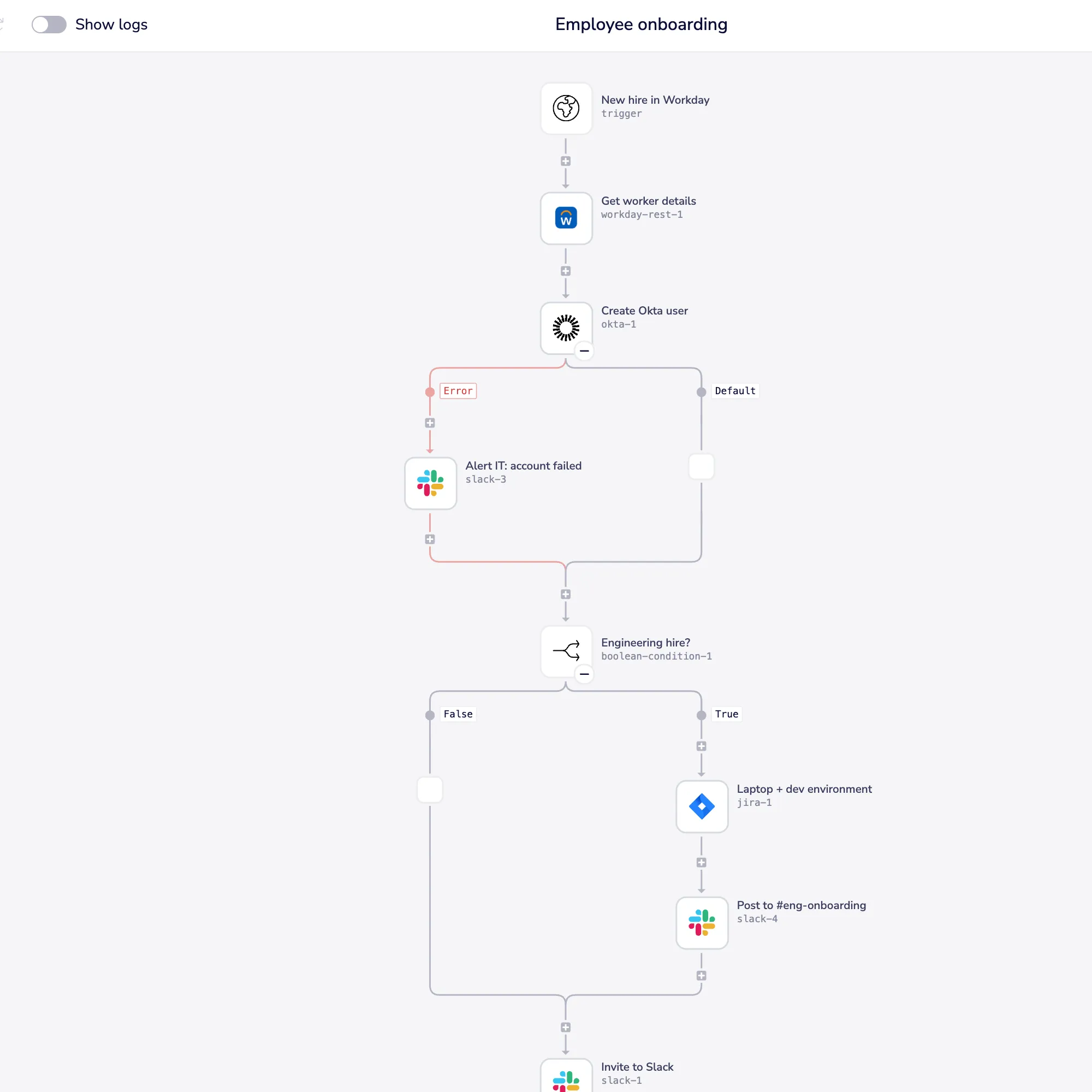
Process automation
Visual workflows with branching, approvals and error handling. Ship a process without custom code.
- Approvals and human steps built in
- Error paths and retries on every step
- Start from a webhook, a schedule or an event
Capability
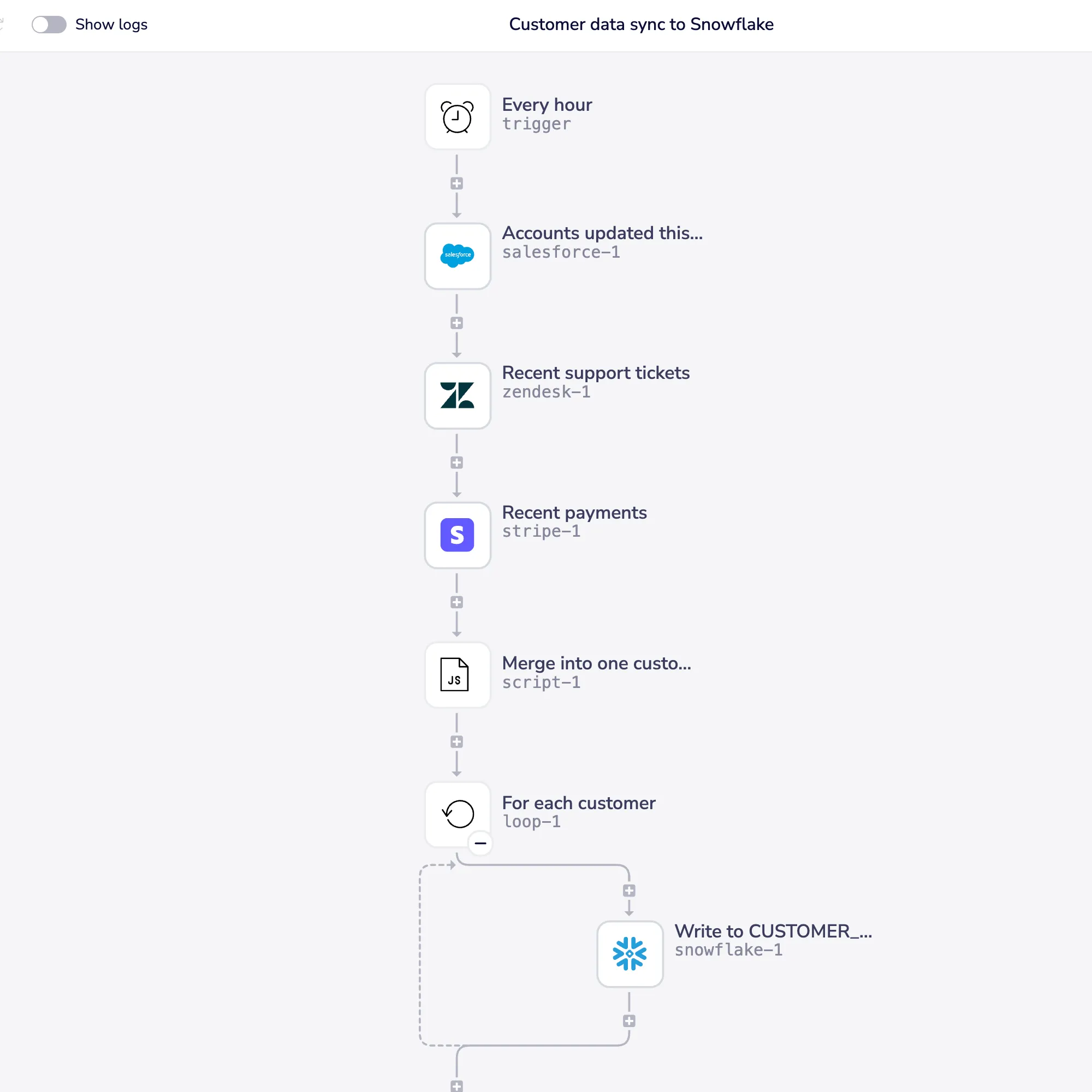
Data integration
Real-time syncs, change data capture and batch pipelines between every source, the warehouse and back.
- Real-time syncs and change data capture
- Batch pipelines across SaaS and the warehouse
- Transform data on the way through
Capability
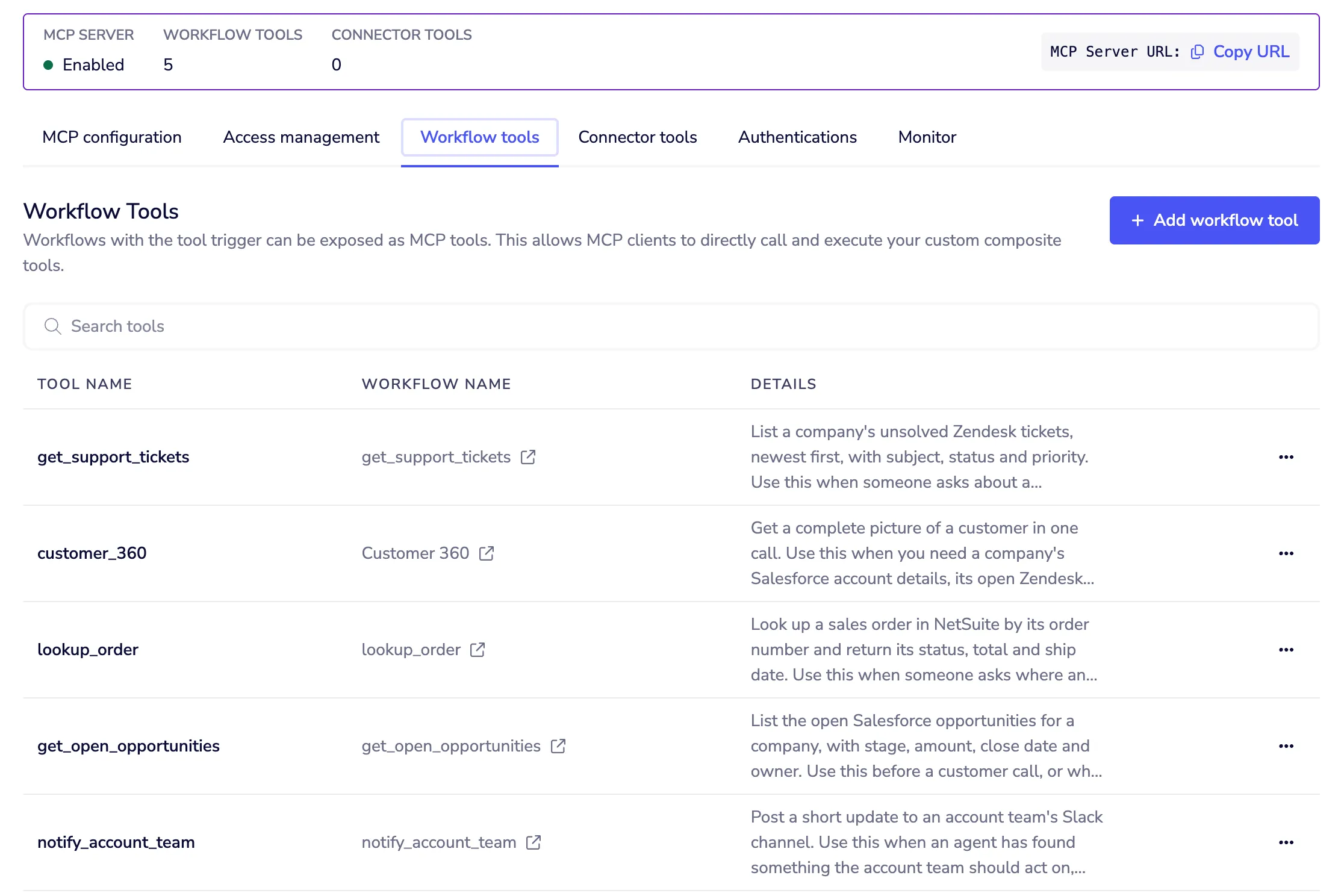
API management and MCP
Publish, version, rate-limit and govern APIs, and serve your workflows to agents as MCP tools.
- Publish any workflow as a governed API
- Serve workflows to agents as MCP tools
- Authentication and rate limits built in
Capability
Connectivity
Connects to 12,000+ apps, databases, APIs and services, with every integration maintained by Tray.
- Every one listed and searchable in the directory
- All 12,000+ available to every Tray Helix app and agent
- An on-prem agent for systems behind your firewall














12,000+
apps, databases, APIs and services Tray connects to.
Capability
Embedded integration
Native integrations inside your own product, with a white-label UI and OAuth handled for your customers.
- White-label UI in your product
- OAuth and tenancy handled for you
- The same connectivity and governance
4×
faster customer integrations at HackerOne.
Capability
Document processing
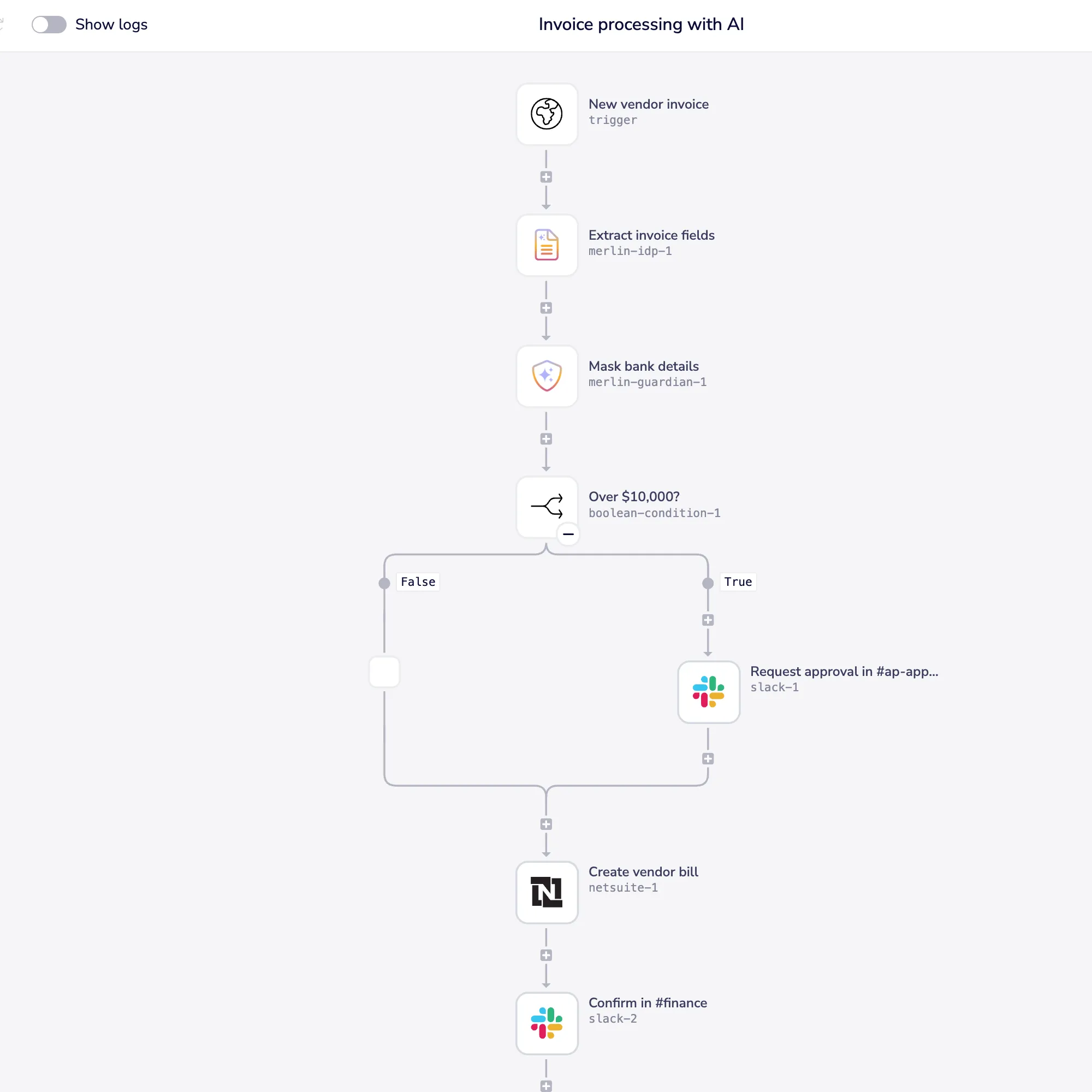
Turn invoices, contracts and forms into structured data inside your workflows, then route it to the right system.
- Extract fields, tables and forms
- Mask sensitive data before it moves
- Route results to ERP, CRM or a person
Capability
Development
Two ways to build: the Tray Build canvas, or Claude Code and Codex with Tray Headless.
- Tray Build: a visual low-code canvas
- Tray Headless: build from your coding assistant
- One workflow, editable either way
Customer results
What teams get back with Tray iPaaS.
- of leads to sales in under 3 minutes, up from 90% in under 10
- 99%
-

- faster customer integrations
- 4×
-

- an 8-person team's weekly data pull at IBM
- 40 hrs a week → 5 min a day
-

- to prepare a customer brief from CRM, support and usage data
- 23 hrs → 5 min
-

Frequently asked questions
What is an iPaaS?
An iPaaS (integration platform as a service) is a cloud platform that connects your apps, databases and APIs and automates the work between them, with the hosting, scaling and monitoring handled for you. Tray iPaaS connects to 12,000+ apps, databases, APIs, and services, runs process automation, data integration, API management, MCP, connectivity, embedded integration, document processing and development, publishes any workflow as an API, and turns any workflow or connected app into a governed MCP tool for AI agents.
What are the best enterprise iPaaS platforms in 2026?
Enterprise iPaaS shortlists usually include Boomi, MuleSoft, Workato, Informatica, Microsoft and Tray.ai. Gartner named Tray.ai a Visionary in its Magic Quadrant for iPaaS for the third year running in 2026, and Nucleus Research has named Tray an iPaaS Leader in its Value Matrix seven years in a row. The right pick depends on your center of gravity: Boomi for ERP and EDI depth, MuleSoft for API-led Salesforce shops, Microsoft if you are standardized on it, and Tray.ai for integrations, automations, APIs and MCP governed on one platform. Tray is free to start, with no per-user or per-connection fees.
We already have a point solution for integration. Why do we need this?
Point solutions don't run under one governance model, one identity system or one connectivity layer, so every new capability means a new vendor, a new audit scope, and more to manage. On Tray iPaaS, process automation, data integration, API management and MCP run on one connectivity layer under one governance model, so the next capability is a workflow on what you already run.
How is this different from MuleSoft or Boomi?
MuleSoft and Boomi both ship agent and MCP tooling now. The difference is how the platform is put together: MuleSoft pairs with Agentforce and Informatica, each priced separately, and Boomi added API management and data movement by acquisition with an Atom runtime someone has to operate. Tray iPaaS builds integrations, automations, APIs and MCP tools in one codebase, under one governance model, with no runtime to run. Yext moved off MuleSoft, delivers integrations 3× faster and cut costs by 60%.
How do we move to Tray iPaaS from Workato, MuleSoft or another platform?
Move one process at a time, and keep the old platform running until each one is live on Tray. Claude Code with Tray Headless rebuilds a workflow from a plain description: one enterprise moved 7 workflows in 30 minutes, about two days of work by hand. Yext moved more than 100 services off MuleSoft in 3 months. Tray connects to 12,000+ apps, databases, APIs, and services, and the HTTP connector or a connector you build with the CDK reaches anything else.
Where is Tray iPaaS hosted?
Tray is fully managed, so there is no runtime for you to install, size or patch. Your workflows run in the region you choose: US, EU or APAC. To reach systems behind your firewall, you install an on-premise agent, which connects those systems to Tray. It does not host Tray.
Is there a sandbox for testing before production?
Yes. Teams run separate development, staging and production workspaces, with approval gates between them. Build and test in development, then promote the whole project in a few clicks or with the Tray CLI. Tray checks the mappings before anything changes.
Can I see each iteration of a loop in a run?
Yes. Tray iPaaS keeps a loop-level audit trail, so a run's history shows each iteration of a loop and what happened in it. When one record in a batch of 500 fails, you open that run, find the iteration and see why, without rerunning the batch. Tray streams your workflow and audit logs to your own SIEM or log tool.
Can I stream logs to my SIEM?
Yes. Every run and every change reaches the tools your security team already watches. Tray streams your workflow, agent and audit logs to Splunk, Datadog or any SIEM or log tool you use. Tray offers longer log retention, and the Insights API returns run figures to your BI tool or an alert.
Can we start with one capability and expand?
Yes. Most customers start with one integration or automation, then add the next on the same connectivity, governance and execution engine, so each one ships faster than the last.
How is Tray iPaaS priced?
By usage, with no seats. One usage balance pays for integration tasks, AI-built apps on Tray Helix and document AI, in any mix, and every plan includes unlimited builders and end users. You can start free, prices are listed on tray.ai/pricing, and committed volumes run at lower rates.
Can a team without developers run Tray.ai?
Yes. Business and operations teams build in the drag-and-drop builder, starting from pre-built templates, and every integration can be published as an API or an MCP tool. Teams that move fastest still have one technical owner for the complex API work, such as custom authentication or heavy data transformation. Developers can build the same workflows from code with Tray Headless in Claude Code or Codex, so both kinds of team work on one platform.
How is Tray iPaaS different from Tray Helix?
Both are built with AI. Tray iPaaS runs workflows, including the APIs and MCP tools you publish from them. Tray Helix runs the code your teams build, such as apps, agents, dashboards, functions, jobs and APIs, with no workflow needed. Each works on its own, and every plan includes both. Together they do more: Helix apps and agents call iPaaS workflows as tools, and workflows call Helix apps with an API token.
See one of your workflows running on Tray iPaaS.
Tell us the systems you connect today, and we'll show you the workflow on Tray, or compare the alternatives first.
Thanks. Someone from our team will be in touch soon.