.DkNUKaKx_ZLAT4m.webp?dpl=dpl_8yJRSbiE1G6s3QrAKF7yU51bW2sQ)









People are hearing “agent,” “copilot,” and “chatbot” everywhere, but understanding the difference between an AI agent vs copilot vs chatbot isn’t always clear. Are these different names for the same thing? Different names for different things? By looking at the marketing alone, it can be nearly impossible to make any distinction between the three.
For teams trying to build a real AI strategy, that noise creates confusion and sets the wrong expectations. So before we dive in deeper, here’s the truth up front about the difference between agents, copilots, and chatbots: These are not interchangeable ideas. They represent three different levels of capability, autonomy, and architectural requirements.
We’ll get into those levels below, but if you’re responsible for or actively working on AI strategy, IT operations, or enterprise architecture, it’s important to get these definitions right. Being well-informed on the differences will help you scope projects correctly and avoid calling a chatbot an “agent” and then wondering why it can’t actually do anything.
At a high level, the difference between an AI agent vs copilot vs chatbot comes down to autonomy, capability, and how each interacts with systems.
So let’s cut through the confusion. Here is the clean, practical breakdown.
What is an AI agent (vs copilot vs chatbot)?
An agent can reason, decide, and act across systems within defined guardrails. Rather than following a rigid script, it pursues an objective using the knowledge it has, the tools it’s allowed to access and use, and what it learns along the way. Kind of like, well, people do.
Agents plan, call APIs, read results, iterate, escalate when needed, and keep going until the job is done or they hit a policy boundary. This is the pattern enterprises mean when they talk about multi-step workflows, autonomous IT operations, or production-grade AI automation.
The TL;DR: Agents act.
What is a copilot?
A copilot is assistive, not autonomous. It sits inside an application or workflow and helps you work faster. It does this by pulling context, drafting content, summarizing conversations, and suggesting next actions. That’s a big distinction from agents. It suggests actions, but it doesn’t take them. Ultimately, a person owns the final decision.
One way to think of a copilot is that it’s like your tool on “expert mode.”. It helps you work faster, but it doesn’t do the work for you.
The TL;DR: Copilots assist.
What is a chatbot?
A chatbot is a conversational interface. It answers questions, collects information, routes requests, and handles predictable flows. It can be scripted, intent-based (meaning it recognizes a few preset phrases or topics), or LLM-powered, but its world is narrow.
Chatbots don’t reason across systems or take multi-step action. They handle interactions. not operations.
The TL;DR: Chatbots chat (and not much else).
Why these terms get mixed up
The market stretched the word “agent” beyond recognition. Chatbots got better. Copilots appeared inside SaaS apps. Automation tools added LLM steps. Suddenly everything is an “agent.”
This confusion in the market has lead to teams expecting cross-system action and decision-making…from tools that can’t do either.
That’s where projects slip off course. Once you separate the labels from the capabilities, it becomes much clearer which problems agents solve and where copilots or chatbots are a better fit.
How they differ in practice
To make the differences between an AI agent vs copilot vs chatbot clearer, here’s how they compare in practice.
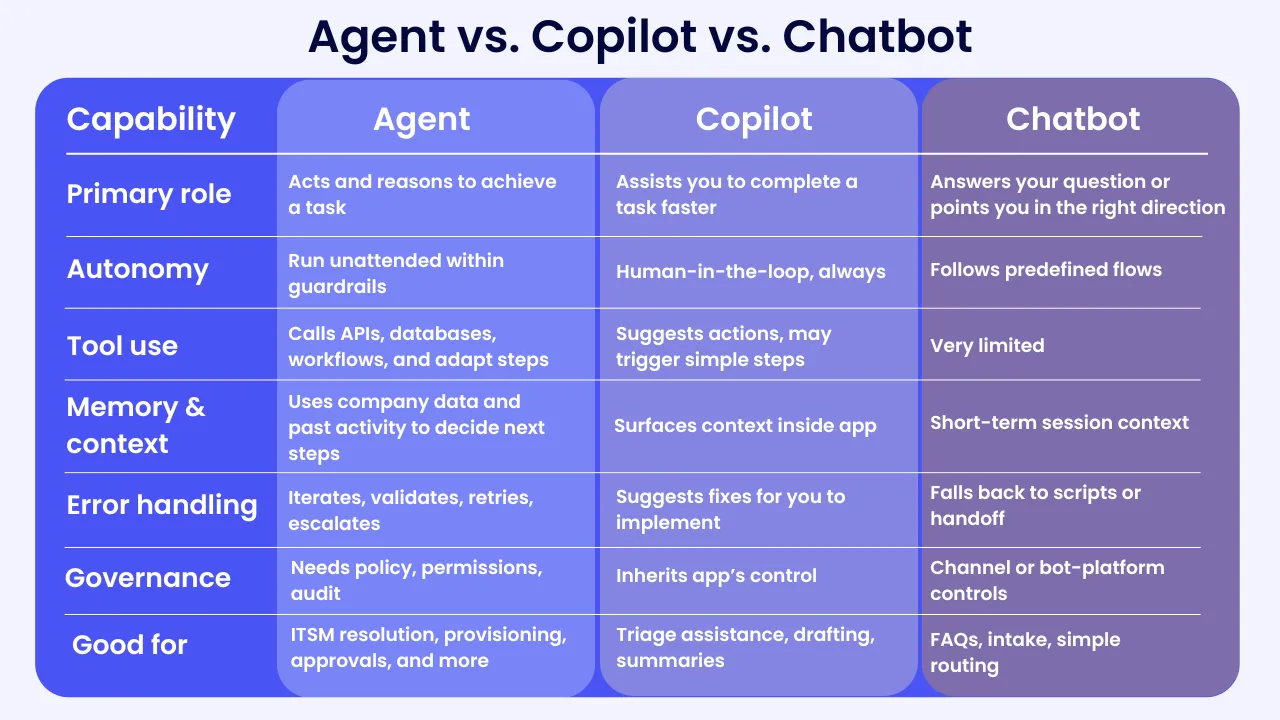
How to know whether to use an agent, copilot, or chatbot
First, start with the outcome you want and the constraints you must meet:
Choose an agent when:
- The task requires cross-system action
- Decisions must be made independently
- You need audit trails and policy enforcement
- The workflow should run with minimal supervision
Choose a copilot when:
- A person remains accountable for the outcome
- Work depends on context, drafting, or summarization
- You want to speed up existing tools, not automate end-to-end
Choose a chatbot when:
- The interaction is predictable and conversational
- The task is FAQ, intake, or routing
If you’re still unsure, there are two questions that settle most debates:
Does this need to act across systems with minimal supervision? → Agent
Is a human still making the final decision? → Copilot
If neither is true → Chatbot
Architecture implications
One big difference between agents, copilots, and chatbots is the amount of prep and work goes into building and deploying one. To state the obvious, agents require a lot more work than copilots and chatbots simply because they can do a heck of a lot more.
They need access-controlled retrieval (RAG), reliable tool use with schema validation, policy checks, and full audit. This is where an orchestration layer comes in handy. An AI orchestration layer can coordinate model calls, tools, retries, and fallbacks, plus have an identity layer that scopes what they are allowed to do.
If you want to go deeper on how enterprises approach this, we break down five common ways teams build LLM-powered agents in a separate guide.
Copilots are more contained and, therefore, a tad easier. They need context windows tuned for the app, fast summaries, and guardrails that respect the app’s permissions. They rely on the host application’s governance and logging. But since the copilot is mostly confined to the app it lives in, the plumbing is less complex.
Chatbots are the most confined. They sit in channels and need things like intent handling, grounding for knowledge answers, handoff to humans, and integration to the few systems they touch.
How you may see an agent, a copilot, or a chatbot in the wild
- Agent: An ITSM agent receives an incident, checks configuration data, queries logs, runs a remediation script, verifies the result, and closes the ticket with a summary and evidence. It runs within defined guardrails and escalates when confidence drops.
- Copilot: A finance copilot drafts a vendor-dispute email, inserts key contract terms from the repository, and suggests supporting documents. A human reviews and sends.
- Chatbot: An HR chatbot answers PTO policy questions, updates a simple request, or routes the employee to the right form or human.
How agents, copilots, and chatbots differ in terms of governance and safety
Agents need permission-aware tool access, change logs, human-in-the-loop for high-risk steps, and clear rollback. They should enforce structured outputs and refuse actions that violate policy.
Copilots should inherit the host app’s permissions, avoid leaking sensitive context, and mark generated content clearly for review.
Chatbots need rate limiting, profanity and PII filters, fallbacks, and safe handoffs.
Across all three, measure groundedness and response quality, and keep a clear audit trail. The more autonomy you grant, the stronger your governance needs to be.
How this fits your LLM strategy
In the enterprise guide, we recommended designing for model swap-ability, grounding with RAG, and enforcing policy at every step. That still applies here but the difference is scope and ownership:
- Agents extend your systems by taking action.
- Copilots extend your people by reducing time to complete a task.
- Chatbots extend your channels by answering and routing.
Get the definitions right, and your architecture decisions get easier:
- Agents → orchestration + integration depth
- Copilots → context + UX
- Chatbots → conversational routing
Enterprises that distinguish these patterns build more predictable, governable AI programs. More importantly, they avoid “agents” that never act, “copilots” that overreach, and “chatbots” that disappoint.
Looking to dive deeper? See how different LLM vendors compare when powering agents: ChatGPT vs Claude vs Gemini.