Composite Quickstart
Create a helper/utility connector with a composite operation that converts HTML to Markdown
This guide will show you the steps to deploy a helper / utility connector with a composite operation.
We will build a operation that converts HTML to Markdown using turndown package.
Pre-requisite
Follow the Introduction to install the CDK, obtain a namespace and initialize a connector project.
1. Rename the connector (Optional)
Since, we are building a helper / utility connector. We can give the connector an appropriate name e.g. [Namespace]-data-formatter-helper to indicate the purpose of the connector.
2. Delete the test operation
Connector projects are initialized with a dummy test operation get_post. Delete the get_post operation folder from src directory.
3. Install turndown
Install turndown and it's types using:
npm i turndown @types/turndown
4. Build a new operation
cd into the connector project and add a new operation using:
tray-cdk connector add-operation html_to_markdown composite
This will add a new operation folder html_to_markdown to the src directory wih the following files:
| File | Notes |
|---|---|
| input.ts | to define input types for the operation |
| output.ts | to define output types for the operation |
| handler.ts | to write the logic of the operation |
| handler.test.ts | to write unit tests for operation |
| operation.json | to define operation name, title, and description |
Here's how you can configure the files to get the operation working:
export type HtmlToMarkdownInput = {
	htmlString: string; // The operation should takes a string in HTML format
};
export type HtmlToMarkdownOutput = {
	markdownString: string  // The operation should return a string in markdown format
};
import { OperationHandlerSetup } from '@trayio/cdk-dsl/connector/operation/OperationHandlerSetup';
import {
	OperationHandlerError,
	OperationHandlerResult,
} from '@trayio/cdk-dsl/connector/operation/OperationHandler';
import { DataConvertorAuth } from '../DataConvertorAuth';
import { HtmlToMarkdownInput } from './input';
import { HtmlToMarkdownOutput } from './output';
// turndown is imported
import TurndownService from 'turndown';

export const htmlToMarkdownHandler =
	OperationHandlerSetup.configureHandler<
		DataConvertorAuth,
		HtmlToMarkdownInput,
		HtmlToMarkdownOutput
	>((handler) =>
		handler.usingComposite(async (ctx, input, invoke) => {
			try {
                // turndown package used to convert HTML to markdown
				const turndownService = new TurndownService();
				const markdownString = turndownService.turndown(input.htmlString);
				return OperationHandlerResult.success({ markdownString });
			} catch (error) {
				return OperationHandlerResult.failure(
					OperationHandlerError.userInputError('Failed to convert HTML')
				)
			}
		}
		)
	);
import { OperationHandlerTestSetup } from '@trayio/cdk-dsl/connector/operation/OperationHandlerTest';
import { htmlToMarkdownHandler } from './handler';
import '@trayio/cdk-runtime/connector/operation/OperationHandlerTestRunner';
import { OperationHandlerResult } from '@trayio/cdk-dsl/connector/operation/OperationHandler';

OperationHandlerTestSetup.configureHandlerTest(
	htmlToMarkdownHandler,
	(handlerTest) =>
		handlerTest
			.usingHandlerContext('test')
			.nothingBeforeAll()
			.testCase('should return ###', (testCase) =>
				testCase
					.givenNothing()
					.when(() => ({ htmlString: "<h3>Hello</h3>" }))
					.then(({ output }) => {
						const outputValue = OperationHandlerResult.getSuccessfulValueOrFail(output)
						expect(outputValue.markdownString).toEqual("### Hello")
					})
					.finallyDoNothing()
			).testCase('should do ####', (testCase) =>
				testCase
					.givenNothing()
					.when(() => ({ htmlString: "<h4>Hello</h4>" }))
					.then(({ output }) => {
						const outputValue = OperationHandlerResult.getSuccessfulValueOrFail(output)
						expect(outputValue.markdownString).toEqual("#### Hello")
					})
					.finallyDoNothing()
			)
			.nothingAfterAll()
);
5. Test the connector
You can test the operation using:
tray-cdk connector test html_to_markdown
Alternatively, you can also run npm test or tray-cdk connector test to test all operations.
6. Deploy the connector
The connector is ready to be deployed. Follow the steps as shown on the Deployment API guide.
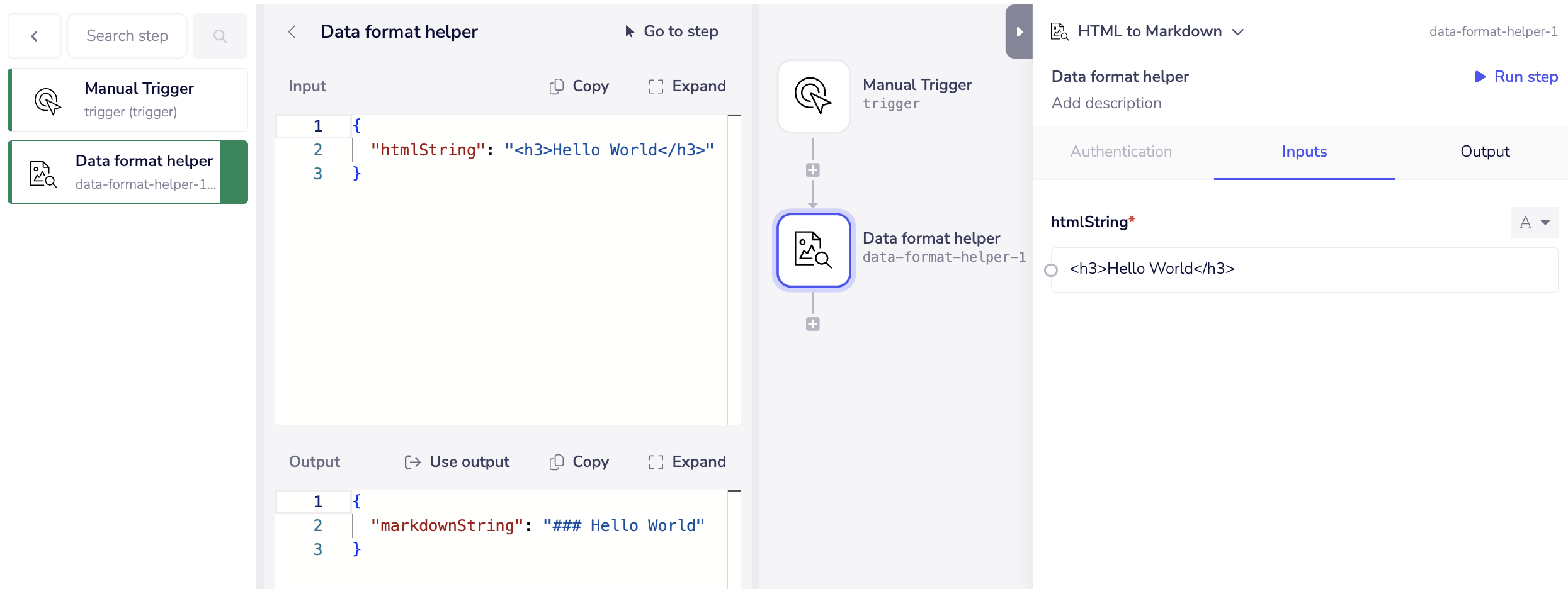
7. Test on Tray UI
Add the connector to a existing / new workflow, configure the input panel, and hit run.
Here is the screenshot of the Builder UI logs: