.DkNUKaKx_ZLAT4m.webp?dpl=dpl_Au634qxtCnaGHwTSpukv8FwHxmQD)









In October 2024, Sundar Pichai told analysts that 25% of new code at Google was being written by AI. By April 2025, that figure had climbed past 30%. By late 2025, Google’s CFO was citing nearly half. At Google Cloud Next this year, Pichai put the number at 75%.
Eighteen months. 25% to 75%. At one of the most complex engineering organizations on the planet.
The Pragmatic Engineer’s February 2026 survey of 15,000 developers puts numbers to what that looks like industry-wide: 73% of engineering teams now use AI coding tools daily, up from 41% the year before. Claude Code and Cursor are each used by 18% of developers at work — tied as the second most-adopted AI dev tools behind GitHub Copilot.
The development environment has changed. Enterprise iPaaS hasn’t kept up.
Enterprise iPaaS — the integrations, automations, MCP services, and agent tools that connect AI to CRMs, ERPs, and the rest of the stack — was built around a different assumption: that developers would come to the platform. Open the visual builder, learn the tooling, work in the environment the vendor designed.
Every time a developer has to stop Claude Code, open a separate integration platform, context-switch into a different mental model, and switch back — an AI project slows down. That’s integration infrastructure being a bottleneck. Tray Headless fixes it.
The architectural problem
Why headless iPaaS is harder than it looks
Every major enterprise iPaaS vendor has now announced some form of headless access or MCP support. Even for legacy vendors, the signal from where developers are working is impossible to ignore.
But announcing headless and delivering it are different things. It comes down to architecture.
When headless access is grafted onto a platform assembled through years of acquisitions and fragmented APIs, what surfaces through the IDE is a subset. You don’t get the full connector library or the governance controls. You don’t get the schema validation or connector intelligence that makes building complex, multi-system integrations tractable.
What you do get is an API layer sitting on top of a platform that was never designed to be consumed this way. Developers hit this ceiling fast. They try it, build something straightforward, run into what isn’t there, go back to the visual builder, or around the platform entirely.
A thin MCP wrapper over a fragmented platform gives you fragmented headless. The depth is in the platform underneath, not the layer on top.
Retrofitting is hard. And the cost isn’t just a degraded developer experience — it’s adoption. Platforms that feel like afterthoughts don’t get used.
The product
Tray Headless: enterprise iPaaS built for the AI IDE era
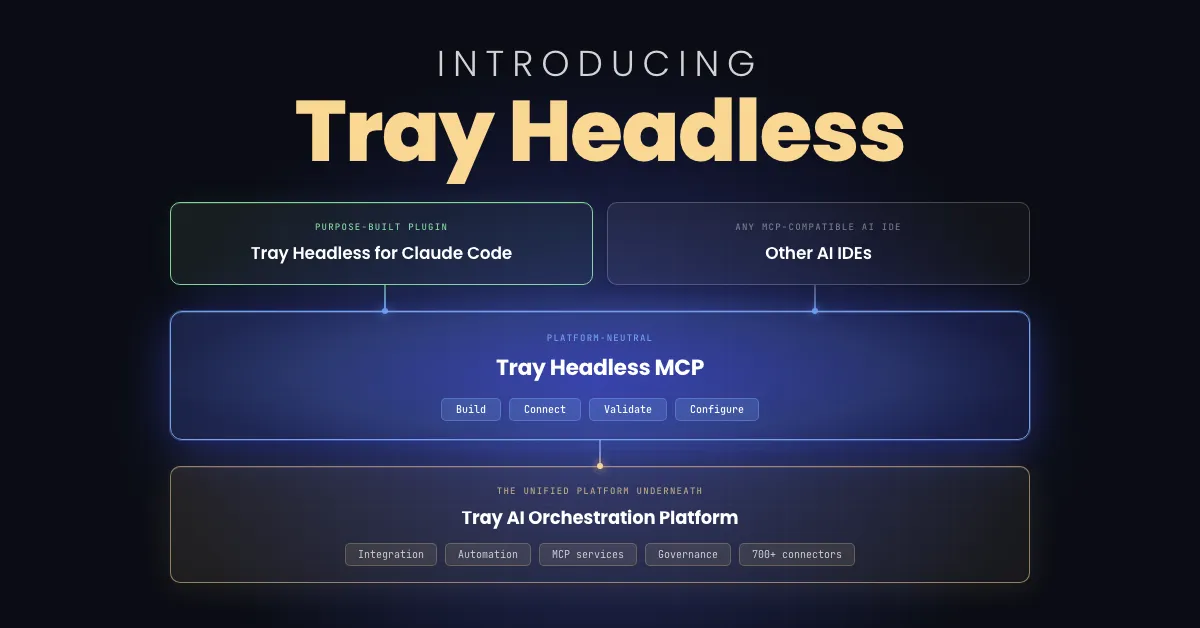
Tray Headless is the complete Tray platform — integrations, automations, MCP services, governance, and 700+ connectors — accessible natively from inside any AI IDE. The whole thing, not a subset.
This is only possible because Tray is a unified platform. Every capability — building workflows, connecting enterprise systems, managing MCP services, enforcing governance — was designed together from day one on a single architecture. When that architecture is exposed as MCP services, developers get access to all of it. There’s no fragmentation underneath to limit what surfaces above.
Tray Headless ships in two layers:
Purpose-built plugin
Tray Headless for Claude Code
The deepest AI IDE experience — config files, typed tool defs, validation hooks, six built-in skills, connector sub-agent & CDK extension
Any MCP-compatible AI IDE
Other AI IDEs
Cursor · Codex · Windsurf · any MCP-compatible AI IDE
Platform-neutral
Tray Headless MCP
The full Tray platform as MCP services — built for developers to unlock its complete power from any AI IDE
The unified platform underneath
Tray AI Orchestration Platform
Developer experience
What building actually looks like
Describe the automation in plain language. Claude researches the connectors, checks what authentications exist in your workspace, proposes a workflow structure, and builds it — without you leaving the IDE or opening a documentation tab. When the workflow is ready, it’s live in Tray’s platform. An ops team member can open the same workflow in Tray Build’s visual canvas, extend it, map fields, adjust logic — no code, no handoff ticket, no waiting on a developer. If something breaks, describe the symptom in Claude Code. It traces the issue, proposes the fix, patches it, and reruns — in the same session.
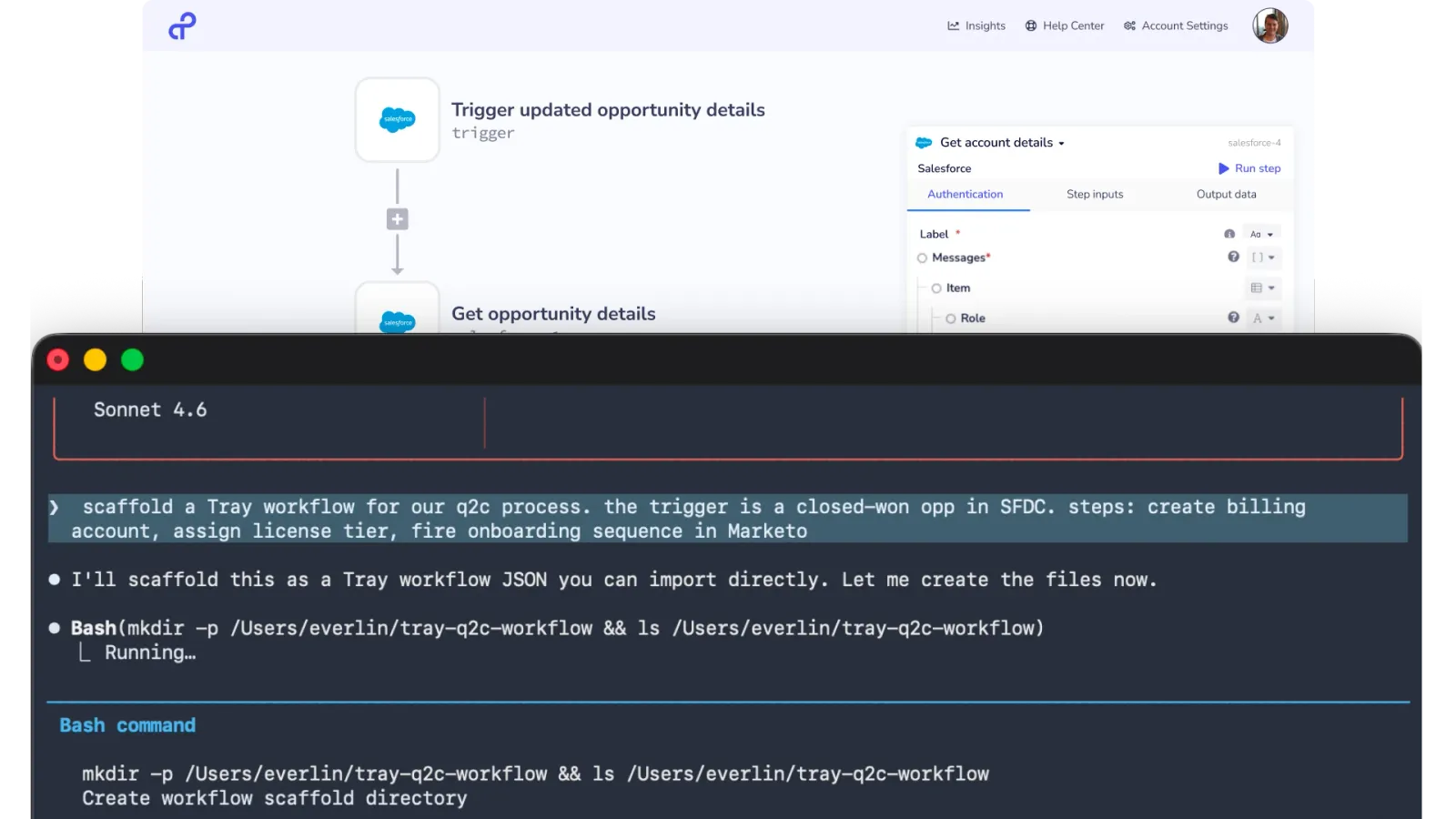
This is what “vibe coding” looks like when it’s connected to production infrastructure. You’re not limited to building a prototype or a demo that needs to be rebuilt before it ships. You can build a workflow that goes from natural language description to validated, deployed, and operator-managed — without the integration layer becoming the bottleneck.
“Tray Headless will change the way we build workflows. I’m super excited about that, because we’re trying to get ourselves to 10x and 100x of what we were doing last quarter, and Tray Headless will enable us to do that.”

Mark Gill
Head of Infrastructure, Zuora
Live demo
See it in action
Niels, our Sr. Director of Automation Solutions, walks through building a Customer 360 MCP tool from scratch in Claude Code — pulling live data from Salesforce and Zendesk, scaffolding and validating the workflow in natural language, testing it against a live account, intentionally breaking it, and watching Claude surface the regression, propose the fix, and redeploy clean. The full build-test-debug loop, without leaving the IDE.
Platform depth
What full platform depth means for enterprise teams
Developers get access to the same 700+ connector library, workflow logic, MCP management capabilities, and governance controls as they’d have in Tray’s visual builder. Need a connector that doesn’t exist yet? Claude CDK turns an OpenAPI spec into a production-grade Tray connector in minutes. For teams who prefer direct API access, Headless Core — Tray’s full RESTful platform APIs — is available alongside MCP.
For IT and security: governance travels with the platform. The same audit trail, the same policy enforcement, whether a workflow was built in Claude Code or Tray Build’s visual canvas. Control that scales with adoption instead of lagging behind it.
Migration
The lowest-friction path off a legacy iPaaS
For teams already on a legacy integration platform, Tray Headless significantly accelerates your migration. Historically, switching iPaaS vendors was a massive project: retraining teams, rebuilding connectors, getting a new platform embedded into established workflows. The bar was high enough that organizations stayed put even when the platform wasn’t meeting their needs.
Tray Headless lowers that bar. Developers can start building in their IDE against the full Tray platform without learning a new visual environment first. The connectors, the governance model, the MCP infrastructure are all there from day one — accessible in the tool they’re already working in. What used to be a platform migration now starts as a workflow migration, at whatever pace makes sense.
One team facing a migration of ~2,000 workflows from another platform used Claude Code and Tray Headless to complete the first 7 workflows in 30 minutes — a job that manually would have taken around 2 days. Auto-generated documentation meant stakeholders had working workflows and a complete audit trail within the hour.
Time to migrate 7 workflows
Manual
~48hrs
Tray Headless + Claude Code
30min
If your current iPaaS wasn’t built to follow developers into the AI IDE era, it’s worth asking whether it ever will be.
Where this is going
The floor has changed
Developers have moved to AI IDEs. The Pichai numbers — 25% to 75% AI-generated code at Google in under two years — aren’t an outlier. They’re a leading indicator of where every engineering team is headed.
Enterprise iPaaS has to work where development happens. Tray Headless is built for exactly that.
On-demand webinar
See Tray Headless built live — from prompt to production
Paul Turner and Niels Fogt run a working session on what it looks like to shift your integration architecture to headless. Live Customer 360 build in Claude Code. Cross-IDE demo across Cursor and Codex. Plus: how to keep governance intact when development moves to the IDE — and the vendor evaluation questions worth asking before you commit.
Watch the on-demand recording →