Skip to content

Solutions / Use case

AI and MCP governance, from the first shadow AI tool to the audit log.

People adopt AI tools, teams run agents, and both reach company systems through MCP faster than IT can review them. Tray.ai finds what is already in use and puts agents and MCP tools on one managed path, so each call is scoped to a job, made as a named person and recorded.

Great — a couple more details

This helps us connect you with the right person. Optional, and you can skip it.

Jump to the stages
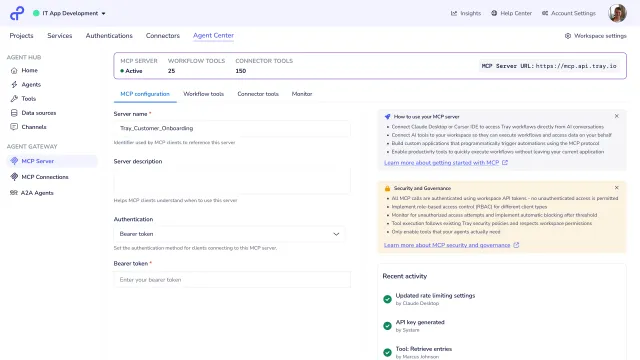
One MCP tool call under governance: Claude asks to move the Northwind Health deal to Proposal, Okta names the person asking, Salesforce confirms she can edit the deal, the stage changes, and the call is logged in Splunk under her name with its arguments and result.

The short answer

What is AI governance?

AI governance is how a company controls the AI it uses: the AI tools people adopt, the agents the company runs, and the Model Context Protocol (MCP) servers and tools those agents use to reach company systems. It runs between the assistants and models people work with, such as Claude or Microsoft Copilot, and the systems they read and change, such as the CRM and the service desk. It breaks where nobody is looking: AI tools nobody registered and MCP servers running on one person's broad credential, logging nothing.

  1. 1 Discover
  2. 2 Grant access
  3. 3 Expose tools
  4. 4 Publish
  5. 5 Approve
  6. 6 Track cost
  7. 7 Audit
  8. 8 Review
raw database access left at J.W. Pepper after moving MCP onto a managed path
Zero
governed workflows in place of 500+ MCP tools at J.W. Pepper
~20
connectors available as MCP tools on Tray.ai
700+
of organizations found AI agents running in their environment that they did not know about (Cloud Security Alliance, 2026)
82%

AI and MCP governance, stage by stage

Eight stages, from finding the AI already in use to reviewing who still needs it, each with what breaks and a how-to guide for building it.

  1. 1

    Discover shadow AI

    Expenses, sign-ins, app grants and device inventories show which AI tools, agents and MCP servers people already run, and who owns each one.

    Where it breaks: A server on someone's laptop holds an admin token to the CRM, and nobody else knows it exists.

  2. 2

    Control who can connect

    Each server is open to named groups from the identity provider, every caller signs in as themselves, and calls are rate limited.

    Where it breaks: A contractor leaves, their account is closed, and the MCP server they set up keeps answering with their token.

  3. 3

    Expose approved tools

    Each tool does one job, such as "update an opportunity stage", with the fewest inputs that do it, in place of a server that wraps the whole API.

    Where it breaks: One general query tool gives an agent everything the credential can reach, so one misread instruction can change the whole CRM.

  4. 4

    Publish and retire servers

    Tools reach agents through managed servers that IT approves, with a version history, a way back to the last good version, and a date for anything being retired.

    Where it breaks: A tool changes its inputs on a Friday and every agent that used it starts failing, with no earlier version to go back to.

  5. 5

    Approve high-risk actions

    Anything an agent does that reaches a customer, moves money or can't be undone waits for the person who owns it.

    Where it breaks: The agent emails four hundred customers and nobody saw the message first.

  6. 6

    Track usage and cost

    Model usage and spend are recorded per agent and per team, with alerts before a budget runs out.

    Where it breaks: The model bill doubles in a month and nobody can say which agent caused it.

  7. 7

    Audit every call

    Every call is logged with who asked, through which assistant, which tool, what went in and what came back, and sent to the security team's own tools.

    Where it breaks: Security asks what an agent changed last Tuesday, and the only log says a service account called the API.

  8. 8

    Review access

    On a schedule, owners confirm who still needs each server, unused tools are retired, and the numbers go to the people who own the risk.

    Where it breaks: A tool nobody has called in three months still holds a live credential to the ERP.

Three ways to govern AI and MCP

  • Leave it to each team. The fastest start. Each AI tool, agent and MCP server holds its own credential and logs in its own way, if at all, and nobody can list them all or say what they cost.
  • Build the controls in-house. Full control, and your team owns discovery, identity checks, approvals, logging, versioning and cost reports for as long as agents depend on them.
  • One managed path for every agent and tool. Discovery, access, approvals, cost tracking and the audit log run on the same connectors and the same rules. On Tray.ai, builders publish MCP tools from 700+ connectors and their own workflows through Agent Gateway, and IT decides who can call them, with the access control and audit logging covered under governance and trust.

This page covers governing every AI tool and agent. For building and running the agents themselves, see AI agent deployment. For agents working in Salesforce and HubSpot, see MCP for CRM.

The Tray.ai platform behind it

Tray.ai is the enterprise orchestration platform for data and AI. These are the parts of it that run AI and MCP governance.

The metrics AI and MCP governance moves

What IT, security and AI teams measure, and which stage each number depends on.

Unmanaged AI tools and MCP servers
AI tools and MCP servers in use that run outside the managed path, with their own credentials and no central log.
What moves it Finding them from several sources, and offering a managed tool that does the same job. How to build shadow AI discovery 
Time from discovery to decision
Days between finding an MCP server or AI tool and deciding whether it stays, changes or goes.
What moves it Routing every discovery to a named owner with the facts already gathered. How to build shadow AI discovery 
Tools per agent
How many tools an agent loads for one job.
What moves it Tools scoped to a single job in place of whole-API servers. How to expose an internal system as an MCP tool 
Time to ship or retire a tool
Days from a change request to the new version being live, or the old one being switched off.
What moves it Versioned servers with a set path for testing, publishing and retiring. How to manage the MCP server lifecycle 
Servers with an owner and an access group
Share of managed MCP servers that have a named owner and access granted through identity provider groups.
What moves it Granting access by group, with ownership checked before a server goes live. How to build MCP server access control 
Approval rate
Share of approval requests that are approved. Near 100% means nobody is reading.
What moves it Sending only the actions that matter for approval, with the real effect shown. How to build human approval for agent actions 
Model spend by team
What each team's agents spend on model calls, against the budget set for them.
What moves it Recording usage and cost on every call, with an alert when spend speeds up. How to build LLM cost and usage tracking 
Calls that name a person
Share of tool calls whose log records the person who asked, not a shared account.
What moves it Making each call as the person asking, and logging it in full. How to build an MCP audit trail 

Connectors for AI and MCP governance

The systems AI and MCP governance runs on, grouped by the seat each one fills. Each links to its connector page.

Identity and devices

Who is asking, which groups they belong to, and what runs on their machine.

Systems agents act on

Where the tools read and change records, reached through job-sized tools in place of a broad credential.

Logging, monitoring and compliance

Where every call lands, where unusual patterns raise an alert, and where audit evidence is kept.

Approvals and collaboration

Where owners approve a new server or a high-risk action, review access and hear about a retired tool.

AI models and assistants

The models and assistants agents run on, the ones discovery looks for, and where usage and spend are read from.

Anything not listed connects through the full connector library, or directly through its API.

Teams running AI and MCP governance on Tray.ai

“IT approves what's built, enforces policies and permissions, versions it, and publishes. We get centralized visibility and auditability across the MCP Servers and Tools we deploy.”

— Marcus Dubreuil, Enterprise Architect, AI & Automation Strategy, J.W. Pepper
Read the study

Frequently asked questions

What is MCP governance?

+

The part of AI governance that covers MCP servers and tools. It decides which tools exist, who and which AI assistants can call them, how servers are published and retired, and keeps a record of every call.

What are shadow AI and shadow MCP?

+

Shadow AI is any AI tool, assistant or agent people use for work without IT knowing. Shadow MCP is the riskiest kind, MCP servers people set up and run themselves, usually on a laptop and with their own credentials. Each one is a way into a company system that nobody reviewed, and most keep no record of what they were asked to do.

Do we have to stop teams adopting AI tools or building their own MCP tools?

+

No. Blocking a tool people find useful moves it somewhere you can't see it. Give builders a managed path instead, where IT approves what goes live. J.W. Pepper took this route and kept its employees in Microsoft Copilot, the assistant they already used, with tools opted in and restricted to reads where that made sense.

Which AI assistants work with Agent Gateway for MCP?

+

Agent Gateway for MCP governs MCP whatever the client. Copilot Studio, Claude, OpenAI and agents built on your own framework all get the same access rules and the same log.

Does access follow Okta groups?

+

Access to each server is set with role-based access control in Tray.ai, and the access control guide shows how to drive it from your identity provider's groups in Okta or Azure Active Directory. Someone who leaves the group loses access to the server on the next sync, without a separate ticket.

Which agent actions need a person's approval?

+

Not all of them. Approval for everything trains people to approve without reading. Agents act on their own for actions that are small and easy to undo, and ask first for anything that reaches a customer, moves money, changes many records or can't be undone.

How do we see what AI is costing us?

+

Record usage and spend on every model call, by agent and by team, in a place finance and IT both read. Alert when spend speeds up, so a runaway loop shows up the same day rather than on the invoice.

Why govern AI and MCP now?

+

Gartner predicts that by 2027, 40% of enterprise MCP deployments will be affected by security incidents, from prompt injection, data access and agent misconfiguration. Each unmanaged server adds one more credential and one more gap in the log.

Is the platform itself audited?

+

Yes. Tray.ai is SOC 1 and SOC 2 Type 2 audited every year, and covers HIPAA, GDPR and CCPA requirements. The reports are available through the trust center.

How is AI and MCP governance different from AI agent deployment?

+

AI agent deployment covers building and running agents, from grounding them in company knowledge to watching every run. AI and MCP governance covers governing every AI tool and agent the company uses, including the ones it didn't build, from finding them to reviewing who still has access. Most teams need both, and on Tray.ai they share the same access rules and logs.


Last reviewed 5 October 2026.

See AI and MCP governance running on your stack.

Walk through your systems and stages with a Tray.ai expert.

Great — a couple more details

This helps us connect you with the right person. Optional, and you can skip it.

Browse the how-to guides