.DkNUKaKx_ZLAT4m.webp?dpl=dpl_B791GEhV8erUTESWzSiuiKwKsq8X)









A rep opens a meeting with a target account in ten minutes. The account brief they need sits across the CRM, the marketing platform’s engagement history, the support queue and product usage in the warehouse. An AI agent can write that brief in seconds, but only if it can reach all four systems, and only if someone has decided what it is allowed to read and change. That is why the useful way to think about CRM and marketing agents is as an integration project first and an AI project second.
The short answer. Pick one measurable workflow. Connect the systems through governed integrations before you add the agent. Give the agent a few narrow tools, not raw API access. Require a person to approve anything that changes a deal or emails a customer. Then measure the workflow before and after.
Step 1: Pick one workflow you can measure
“Automate the GTM stack” is not a project. “Get every inbound lead to the right rep in under three minutes” is. Good first workflows have a clear trigger, a clear owner and a number you already track:
- Lead routing and enrichment. A new lead is enriched, matched to an account and assigned to a rep.
- Account briefs. Before a meeting, the agent pulls CRM history, recent engagement, open tickets and product usage into one page.
- Call follow-up. After a call, the agent summarizes next steps into the deal record and drafts the follow-up for the rep to send.
- Pipeline hygiene. The agent flags deals with stale close dates or missing next steps and asks the owner to fix them.
DocuSign started with routing. Before, 90% of leads reached sales in under 10 minutes. After, 99% arrive in under 3.
Step 2: Connect the systems before you add the agent
Most agent projects stall here, not on the model. The agent needs reliable, permissioned access to the CRM, the marketing platform, enrichment data and wherever else the answer lives. Decide which system owns each field before anything writes, or the CRM and the marketing platform will overwrite each other’s lead status on every sync.
Build these connections as integrations you can test and monitor on their own, not as code buried inside the agent. That way the same connection serves the agent, the nightly sync and the dashboard, with one set of credentials and one log.
Step 3: Give the agent narrow tools
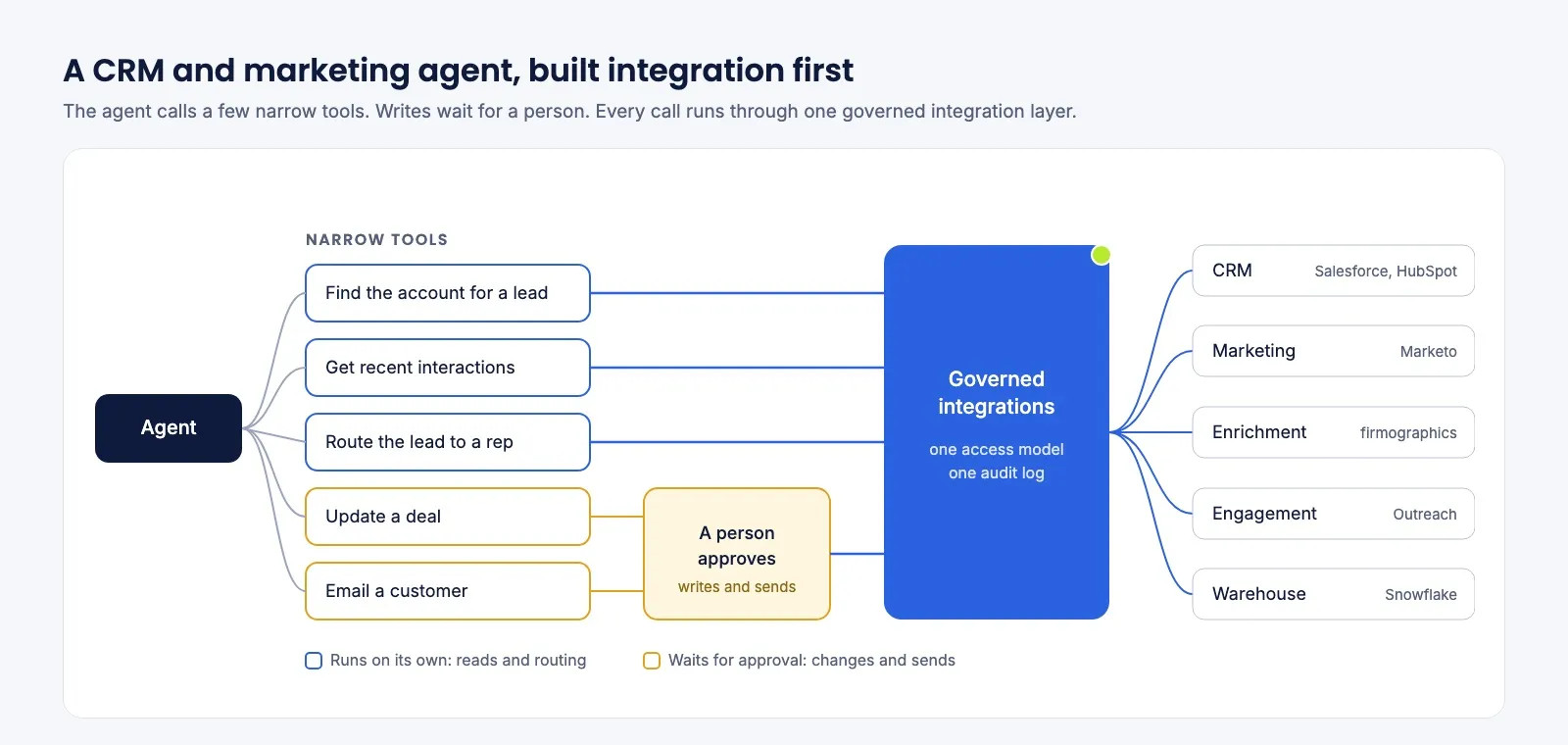
An agent with raw API access to Salesforce can do anything Salesforce allows, including the wrong thing at scale. Give it a few tools shaped by the job instead: “find the account for this lead”, “get the last five interactions”, “update next steps on this opportunity”. Each tool does one multi-step job and returns only what the task needs, which keeps the agent faster, cheaper on tokens and far easier to audit.
Step 4: Gate every write, and log everything
Let the agent read freely within its scope. Make it ask before it changes a close date, an amount, a stage or a forecast, and before it emails a customer. Show the approver exactly what will happen, and let an unanswered request expire without acting. Log every action with the person behind it, the tool and what came back. For the full set of controls, see how to build human approval for agent actions.
Step 5: Measure, then widen
Compare the workflow’s number before and after: time to first touch, leads routed correctly, hours spent on account research. Zuora took a customer brief from 23 hours to 5 minutes. Once one workflow holds up, add the next, reusing the same connections and tools.
Four ways to build it
| Approach | Examples | Best for | Watch for |
|---|---|---|---|
| Your CRM’s built-in agents | Agentforce in Salesforce, HubSpot’s AI agents | Agents that work inside one CRM | Reach outside that CRM needs more products |
| No-code automation tools | Zapier, Make, n8n | Simple, team-level agents and automations | Governance and audit at enterprise scale |
| Developer frameworks | LangChain, CrewAI | Engineering teams that want full control | Your team builds and maintains every connection, credential and log |
| An orchestration platform | Tray.ai | Agents that act across the CRM, marketing, billing and data systems under one governance model | Inside a single CRM, the native agent has more context |
Where Tray.ai fits
Tray.ai builds agents on the same platform as the integrations they act through: 700+ connectors, including Salesforce, HubSpot, Marketo, Outreach and Snowflake, plus the workflows your RevOps team already runs. An agent’s tools are those governed workflows, so there is one access model and one audit log across agents and integrations, and RevOps can change a routing rule without a deployment. GitHub’s marketing team built its marketing automation and CRM integration on Tray.ai with no engineering effort.
IDC named Tray.ai a Major Player in the IDC MarketScape: Worldwide Agentic AI Platforms 2026 Vendor Assessment, and Gartner named it a Pioneer in the 2026 Emerging Market Quadrant for No-Code Agent Builders. Tray starts at $50 a month, and a free trial lets you size your usage.
For the routing build in detail, see how to build lead routing that assigns in seconds, and for the wider picture, revenue operations automation.