"Dana starts Monday. Give her the same access as Sam." An agent in the IT request app looks up both people and waits for the IT desk to approve the grants. Describe it to your AI assistant, and it deploys with the app.
Thanks, keep an eye on your inbox for an invite.
An agent ships like the rest of the app
1
Build
Ask Claude Code for an agent and describe the job. Every Helix project already teaches the assistant how agents and their tools are written. The model, instructions and tools live in the app's code.
2
Deploy
The agent deploys with the app, in the same command. There is no separate agent service to host, and any function or schedule in the app can call it.
3
Run and observe
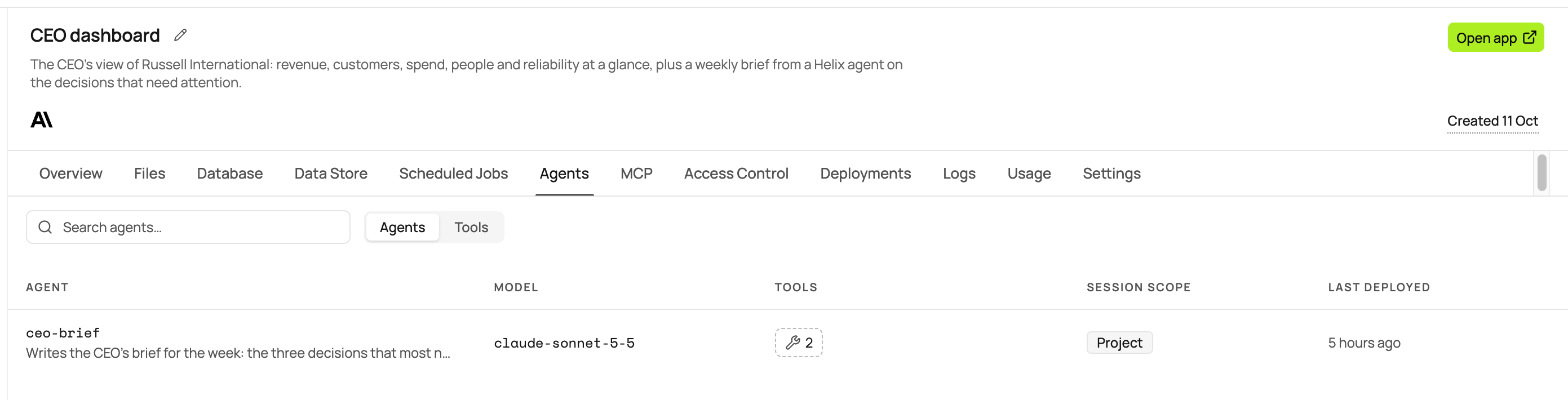
Helix runs the model loop, keeps each conversation's memory and holds the model key outside the code. Every run and tool call shows in the project's logs, and the Agents tab lists each live agent with its model and tools.
Agents for requests that need judgment
The pattern is an app that already has useful actions, plus an agent that decides when and how to use them. In every example below, the tools that change data are marked to wait for a person.
Ops request handler
In an internal tool: reads a request, looks up the records across connected systems and proposes the fix. The fix waits for approval.
CRM data hygiene
In a RevOps app: finds duplicates and gaps in CRM records and lines up corrections for someone to sign off.
Customer onboarding
In a provisioning app: works out the accounts and access a new customer needs, then sets them up step by step, with approval on each write.
Procurement matching
In a finance app: matches vendor payments to their purchase authorizations and flags missing paperwork for the AP team.
What every agent gets
What every agent gets from the app it lives in
The agent proposes. For the tools you mark, a person approves. The agent acts with the app's service credentials and can only use tools the app defines, so the approval is the control. Give it narrow tools.
An owner
The agent belongs to its app, so the app's named owner answers for it.
Access through the app's tools
An agent can only do what the app's tools do: call the connected services and APIs the app uses, and read and write the app's data. It acts with the app's service credentials.
A record of every run and change
Runs and tool calls are in the logs. Adding, removing or changing an agent or a tool, including turning approval on or off, is recorded in the audit trail.
In the Helix console
The agent lives in the app it serves
Each agent shows up under its app with the model it runs on, the tools it can use and how its sessions are scoped, and it ships with the app's next deploy.
app.helix.tray.ai
Limits the builder sets in code, before the agent runs
Mark every tool that writes. Approval can depend on the request, such as refunds over $100. The approver sees the tool and the exact input the model proposed.
Approval on any tool
Mark a tool as needing approval, always or only for certain inputs. The agent pauses before the tool runs and shows a person the tool and its input. They approve or decline, and the agent picks up where it left off, even in a later session. Approval is off unless the builder turns it on.
agent wants to
create refund · netsuite
approvedeny
approval gate
waiting on a person
Step, tool-call and hand-off limits
Each run stops at 25 steps or 50 tool calls by default, so a loop can't run on. An agent can pass work to another agent, up to three levels deep.
Model fallback
If a model errors, the agent tries the next model you listed.
Conversations kept separate per user
Each person picks up their own conversation, and nobody else can open it. Or share memory across the project for back-office work.
Before you build one
If the request is already a form, you don't need an agent. A plain function is cheaper and does the same thing every time.
Agents work through tools, using the app's credentials. They don't search document stores, so a bot that answers from a knowledge base is a different job.
Idle conversations are removed. In Helix's conversation store, a conversation with no activity for 30 days is removed.
Agents use what the app can reach
A Helix agent's tools are the app's functions, so it reaches whatever the app reaches: the systems connected through credentials Tray holds, and any API the app calls.
Helix and iPaaS together, or Helix alone
Every plan includes both. Tray iPaaS connects to 12,000+ apps, databases, APIs, and services, and Helix runs what your team builds with AI.
A Tray Helix agent uses the app's permissions. It acts with the app's service credentials, through the app's own tools, and every action shows in the logs. Approval on any tool that writes means a person checks each change before it happens, if the builder turns it on.
What limits what an agent can do?
On Tray Helix, three things limit an agent. It can only use the tools in the app's code. Any tool can require a person's approval, and the builder decides which. And each run stops at 25 steps or 50 tool calls by default.
Can I see every action an agent took?
Yes. Every agent run and every tool call appears in the project's logs under the request that started it. The Agents tab lists each live agent, its model and its tools, and changes to an agent are recorded in the audit trail. Tray streams agent, workflow and audit logs to Splunk, Datadog or any SIEM or log tool you use.
Where do agents run, and how are they deployed?
Inside the app, on Tray's managed runtime. The agent is defined in the app's code and deploys with the app in the same command, so it runs behind the same login as the app.
Can a person approve an action before it happens?
Yes. The builder marks a tool as needing approval and the agent pauses until someone approves or declines. We recommend it on every tool that writes or changes data.
How is a Helix agent different from other agents on Tray?
A Helix agent lives inside an app you built and works through that app's tools. Agent Gateway is for agents and assistants that live elsewhere, such as Claude: it controls which tools they can call over MCP, with a run log.
Which models can an agent use?
An agent names its model in code and can list fallbacks. Helix holds the provider key so it never appears in the code.
How do I create my own AI agent?
On Tray Helix, you describe the agent to your AI assistant, for example an agent in your IT request app that looks up a new hire and proposes access for approval. The agent is defined in the app's code, deploys with the app and acts through the app's tools. Approval can be required before any write.
What is the best AI agent builder?
The best builder is the one whose agents sit where the work already happens and whose actions you can check. Tray Helix is built that way: agents ship inside your apps, any tool can wait for a person's approval, and every run is logged. In any builder you compare, look for approval before changes, a log of every run and a clear owner.
Can someone trick an agent into doing something it should not?
An agent can only use the tools in the app's code, so it cannot reach anything the app does not already reach. Mark every tool that writes as needing approval and the run waits for a person before it changes anything. Treat the text an agent reads, such as a ticket or an email, as untrusted input, and keep write tools behind approval. Each run also stops at 25 steps or 50 tool calls by default.
Governance
Security, access, audit and compliance for every agent.
Credentials, access control, audit and observability across Helix and iPaaS.