Deploy with one command. Every app gets a live URL, a database, company sign-in and a named owner.
Thanks, keep an eye on your inbox for an invite.
GovernanceSign-inOwnerAudit trailApp Registry
Connectivity12,000+ apps
Data database files schedules
Runtime live URL US · EU · APAC
$helix deploy
An app built on Tray Helix, deployed with one command and turned in 3D to show the layers behind it: a live URL in the US, EU or APAC; a database, files and schedules; connectivity to 12,000+ apps, databases, APIs, and services; and governance with sign-in, a named owner, an audit trail and the App Registry.
From an AI assistant to a live, governed app
1
Deploy
Ask your AI assistant to deploy, or run it from CI on every merge.
2
Run
A real URL on Tray's managed runtime in the US, EU or APAC. A database, file storage, background jobs and model access come built in.
3
Govern
Sign-in, access rules, audit, usage tracking and a named owner from the first request.
Deploy
One command takes an app to a live URL
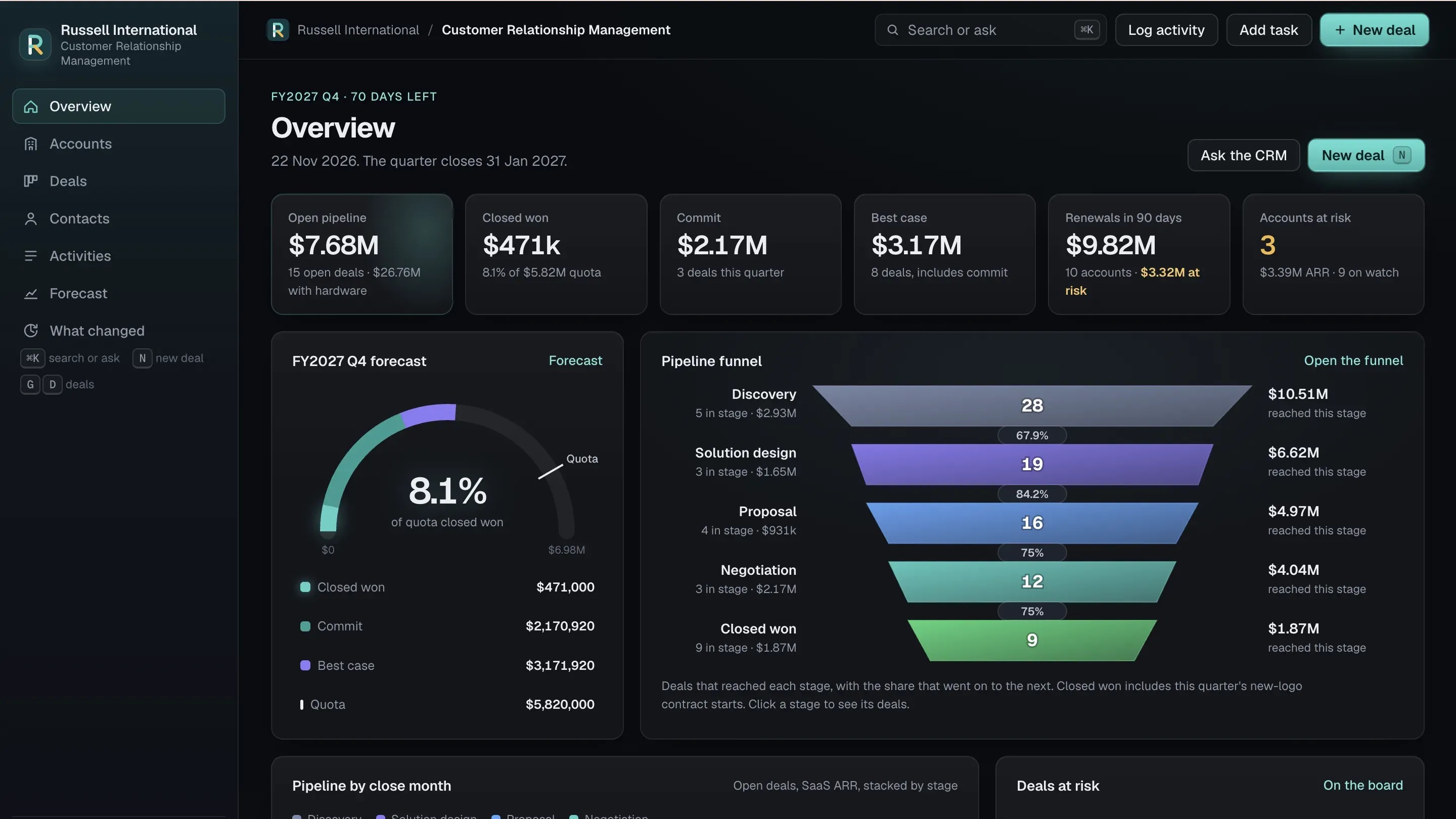
A Customer 360 app goes from a laptop to a live URL on Tray's managed runtime, with managed credentials, sign-in and a registry entry attached as it ships.
From any assistant or CI
One command deploys from Claude Code, Codex, Cursor or your CI, with the same result every time.
Import an app from GitHub
An app that already lives in a GitHub repository can be imported into Helix. It gets the same live URL, managed database, sign-in and named owner in the App Registry as an app built in Helix from the start.
See the Deployment page for restoring a previous deployment, deploying from CI and holding deployments for approval.
App Registry
Every app has an owner, and IT sees them all
Every app deployed through Helix lands in the App Registry with a title, a description and a named owner. IT gets a live list of what is running, and everyone else finds apps in the App Library.
Publish
Deploy, and the app is listed with its owner. Nobody fills in a form.
Find
Click Explore apps in Helix to see every live app shared with you, from every workspace, with search and favorites. One click opens it.
Own
Each app names the person who answers for it, so a question about an app has somewhere to go.
In the Helix console
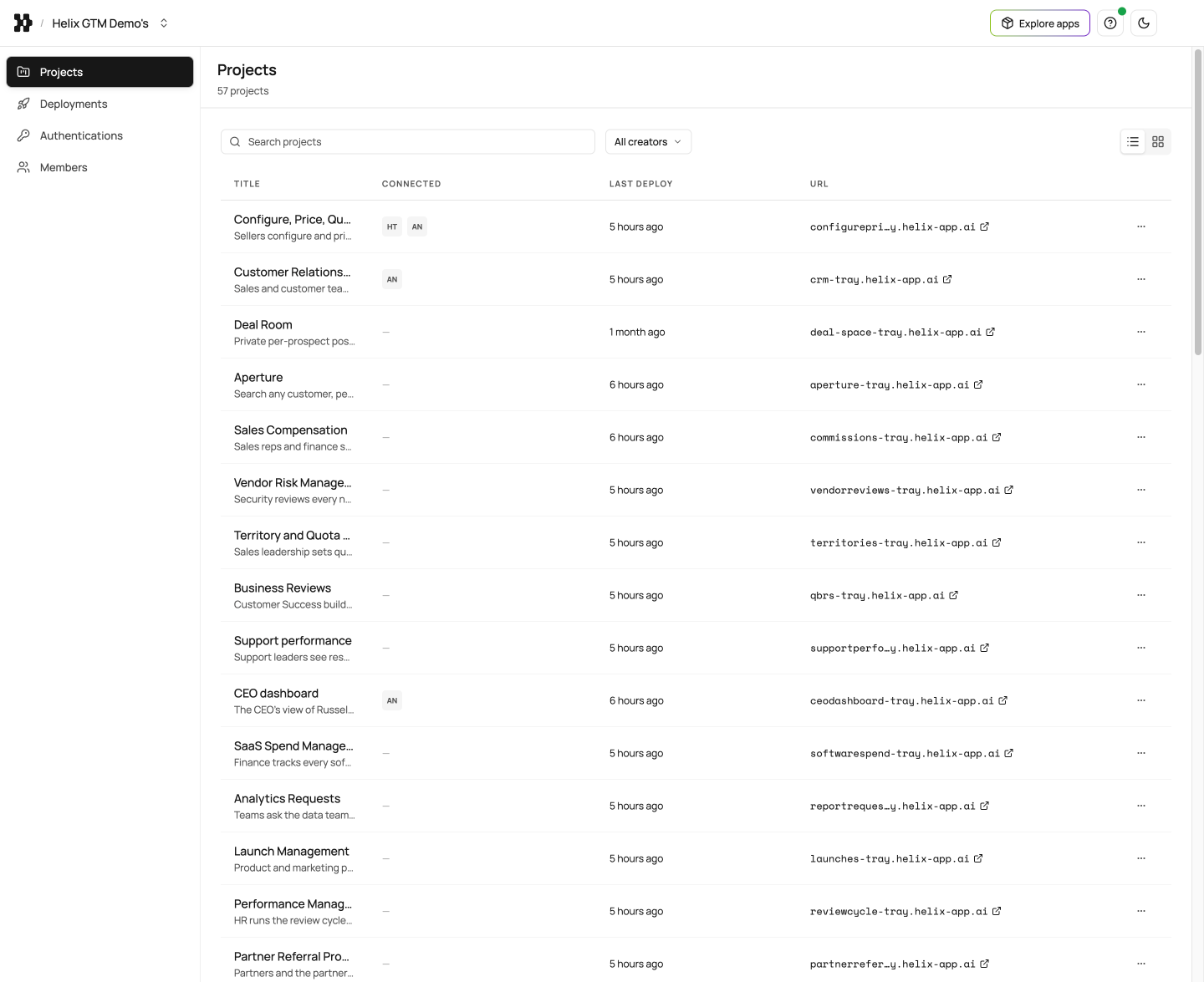
Every app in one place, with its live URL
Each app your teams deploy shows up in the console with what it connects to, when it last shipped and where it runs.
app.helix.tray.ai
Run
Everything an app needs to run, plus its cost
A deal desk app needs a database that is up through the working day, a model call to check each discount against the rules, a nightly job that chases stale requests, and a log of every approval. On Helix, each of those is already there when the app deploys.
A persistent file system for uploads and exports, with its own audit log.
Model access
Functions call AI models through Helix, which holds the provider key so it never sits in your code. Bring your own provider account if you prefer.
Background jobs and schedules
Jobs that run for up to 15 minutes, outside the request a user is waiting on, and functions on a set cadence: nightly pulls, data checks, a Monday digest.
Logs
Every run logged, and helix logs streams them to your terminal as they happen.
Cost, app by app
AI and compute spend is visible per app, so you can see which apps carry the bill. Billing stays per workspace.
Apps reach your systems through credentials Tray holds
The deal desk app reads the opportunity from Salesforce and writes the approved discount back. The builder never saw a Salesforce key, and neither did the AI assistant that wrote the code.
Logins stay with Tray
Helix apps connect to your systems through authentications you create in your Tray account. The builder, the AI assistant and the app code never receive the login.
in the appauth.salesforce
held by the platform••••••••
pasted into a promptnever
Any API you need
Any Helix function can also call an API that isn't on the list.
Use it on its own or with Tray iPaaS
Every plan includes Tray Helix and Tray iPaaS. Use Helix for the apps and agents your teams build with AI, with or without iPaaS for your integrations.
Apps as services
Any app you deploy can become a service
The deal desk app already knows every approved discount. Finance's nightly job reads them from the app's own route, the quoting tool posts new requests to it, and nobody rewrites the app as an API first.
Call any route with a token
Create an access token for the app, and a cron job, a webhook sender, a script or another app can call it. The same routes a person uses in the browser, with no code change.
The token acts as a named user
Each token signs in as an API user in your organization, so the app treats the call like any other user, with that user's access and nothing more.
Expiry you set, revoke in one step
Tokens expire after 30 days, 90 days or a year. Revoke one and it stops working on the next call.
Every token on the record
Creating or deleting a token is logged in your organization's activity trail. The token itself is never stored there.
Every app sits behind login
Sign-in from the first request
Everyone who opens an app must be a user in your organization with access granted.
Logins held by Tray
Tray adds the login to each request on the way out. It is never in the code.
Access by person, workspace or organization
Admin, Contributor and Read-only roles set who can build and deploy. What someone sees once they are inside is the app's own logic.
SSO
Sign in with your identity provider.
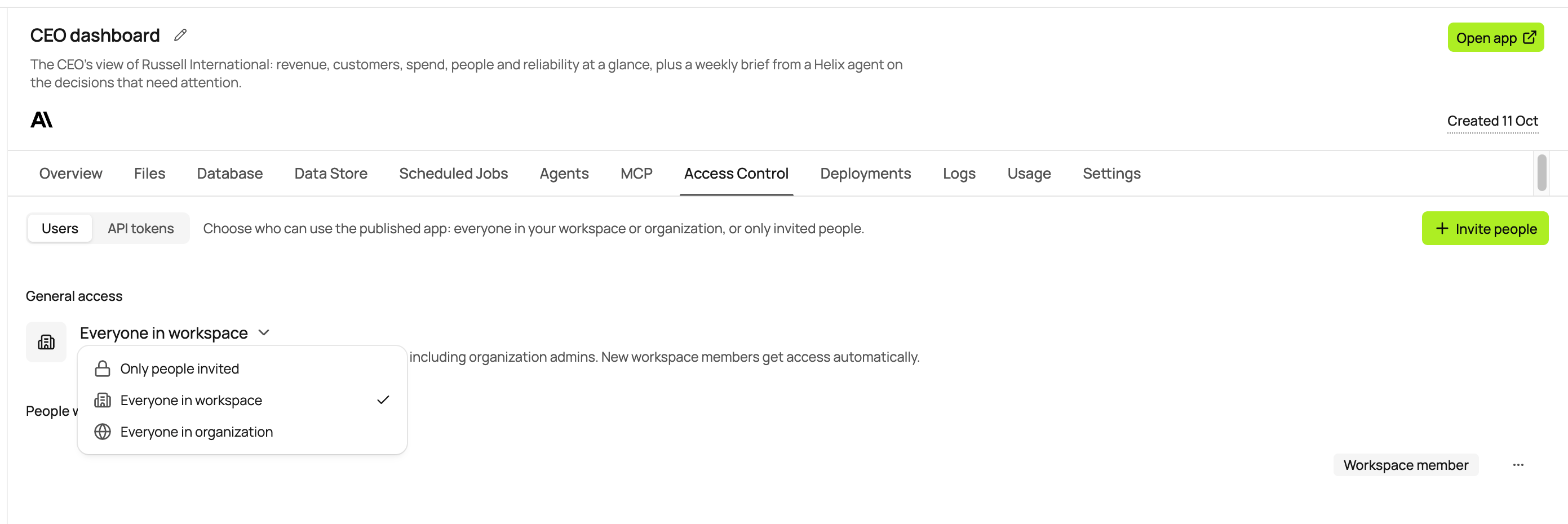
Choose who can open each app
Give an app to everyone in the workspace, everyone in the organization, or only the people you invite.
app.helix.tray.ai
How fast teams got to a live app
A booking system in fifteen minutes. A portal in a day.
“...managed to build a complete clone of our meeting room booking system in about fifteen minutes.”
Cut the bill by about 75%. That is Tray's model for a 2,000-person company that rents 23 common departmental apps, such as performance reviews, month-end close and sales commissions, with the builders' time to rebuild them counted. Your number depends on which apps you pick and how many people you have.
Where it fits
Departmental apps used by your own people, where the app is a form, a list, an approval and a report.
Who uses it
Your own people, signed in with company sign-in, with the app's named owner in the App Registry.
Questions people ask
Can business users really build apps, and who stops them breaking things?
Yes. A business user describes the app to an AI assistant, and the assistant writes and deploys it. Three things keep it safe: every app sits behind login, credentials stay with Tray rather than in the code, and every app has a named owner. IT can also hold new apps for approval and restore a previous deployment.
How do I control who can use a deployed app?
In Helix. You give access to a person, a workspace or the whole organization, and only those people can open the app. Workspace roles (Admin, Contributor, Read-only) set who can build and deploy. What someone sees once they are inside is the app's own logic, which the builder writes. SSO is available.
Where does the app's data live? Can two apps share a database?
In the app's own managed Postgres database, on Tray's managed runtime in the US, EU or APAC. Each app has its own database, scoped to that project. When another app needs the data, the owning app exposes an API and the other app calls it.
Is Helix just a place to host the apps my team builds?
No. Hosting is one part. The same apps get sign-in, access rules, a managed database, credentials kept out of the code, a named owner in the App Registry, IT approval before deploy and audit. Build in Claude Code, Codex or Cursor, then helix deploy puts the app under those controls.
Can IT see every app people build, and who owns each one?
Yes. Every app deployed through Helix appears in the App Registry with a named owner, and AI and compute spend is visible per app.
Can the app use the apps I already connect in Tray?
Yes. Every Helix app and agent can use all 12,000+ apps, databases, APIs, and services Tray connects to, the same connectivity as Tray iPaaS workflows. Apps connect through authentications you create in your Tray account, so the builder, the AI assistant and the app code never receive the login. Any Helix function can also call an API that isn't on the list.
What happens to an app when the person who built it leaves?
The app does not depend on the person's laptop. It runs on Tray's managed runtime and its logins are held by Tray. Helix keeps the source of every deployment, so an earlier version can be restored. The App Registry shows each app's named owner, so IT can find the apps whose owner has left.
Can I replace a SaaS tool with an app built on Helix?
For departmental apps used by your own people, often yes. Tray's model puts the saving at about 75% for a 2,000-person company rebuilding 23 common departmental apps, with the builders' time counted.
Can I bring an app I already built?
Yes, from GitHub. If the app lives in a GitHub repository, you can import it into Helix. Once imported it is an ordinary Helix app: a live URL behind login, a managed database, logs and a named owner in the App Registry. GitHub is the supported source today, so apps that live elsewhere need to be in a GitHub repository first.
What is an AI app builder?
With Tray Helix, the AI app builder is your AI assistant. You describe the app to Claude Code, Codex or Cursor and it writes the code, then Helix deploys the app with one command and runs it. Each app gets a live URL behind login, a managed database, logs and a named owner.
Can I build an app with ChatGPT or Claude?
Tray Helix runs apps built with an AI coding assistant. It works with Claude Code, Codex (OpenAI's coding agent), Cursor, GitHub Copilot, Windsurf and any MCP-compatible assistant: you describe the app, the assistant writes it and one command deploys it to a live URL on Tray's managed runtime.
Governance
Security, access, audit and compliance for every app.
Credentials, access control, audit and observability across Helix and iPaaS.