
Every model call, governed and metered per app.
A contract review app and the agent inside it both call models. Every call passes through Tray's AI gateway, and the app's Usage view shows what each one used.
Thanks, keep an eye on your inbox for an invite.



Model access without keys in the code
- 1
Choose
Name the model for each agent, or for each step in a function, in the app's code.
- 2
Call
The app or agent calls the model through Helix. The AI gateway sits in between and holds the provider key.
- 3
Track
Usage is tracked per app. Open the app's Usage view to see it in HCUs, the unit Helix usage is measured in.
The AI gateway
One path for every model call
The contract review app doesn't hold a provider account. Its calls go through the AI gateway, so there is one place model calls pass through for every app on Helix. If you know the term LLM gateway, this is the same idea: a layer between your code and the models.
Apps and agents, same path
Functions and agents call models the same way, so a call from an agent is no different from a call from a function.
The provider key stays out of the code
Helix holds the key, so it never sits in a file or reaches the AI assistant that wrote the app.
Bring your own provider account
If you prefer, use your own provider account instead of Tray's.
Fallback models
An agent can list more than one model. If a model returns an error, it tries the next.
Why it matters
What the gateway adds over direct model calls
No key to leak
A model key in a repo is a common way AI-built apps leak a secret. Here, the key isn't in the repo.
One place to look
Every model call goes through the same layer, so usage is counted the same way for every app.
A model change is a code change
Switching an agent from one model to another is an edit to the model name, not a new integration.
AI usage tracking
AI usage tracking, app by app
Open the contract review app and its Usage view shows what its model calls used. The view for the expense app shows that app's own.
Per app
Each app's usage is tracked on its own, so you can see which apps use the most.
In HCUs
Usage is shown in HCUs, the same unit as the rest of the Helix bill.
In the app's Usage view
The owner opens the app and sees its usage, with no report to request.
From the command line
Builders can read usage from the terminal as well, next to the deploy and logs commands they already use.
In the Helix console
Each app's usage, next to how it is running
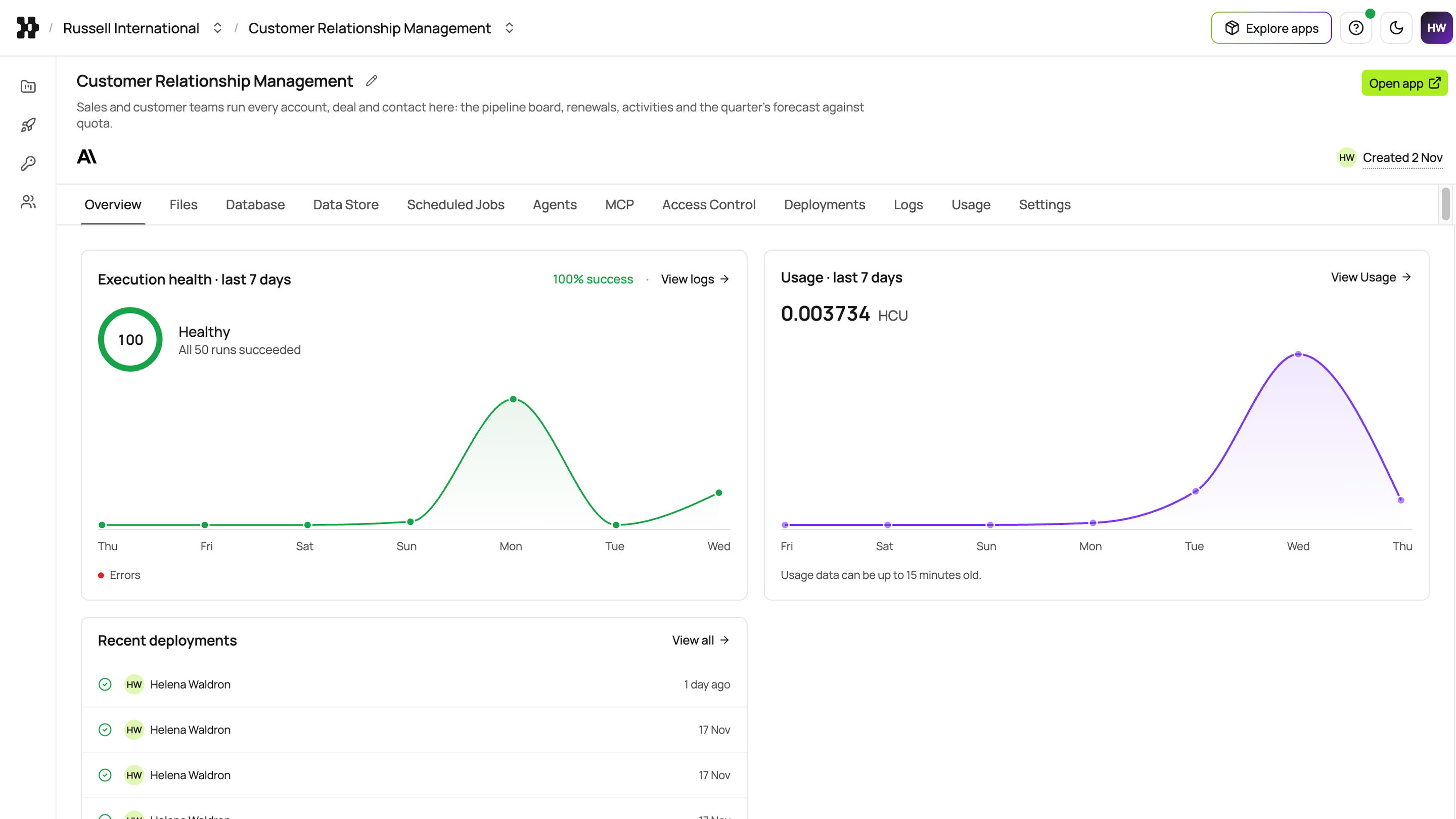
Open an app and its Overview shows usage for the last 7 days in HCUs, beside the app's run health and recent deployments.
Choosing models
Pick the model for the job
Clause flagging and summary drafting are different jobs, and the app can use a different model for each.
Per agent
Each agent names its model in code, so the IT request agent and the contract review agent don't have to use the same one.
Per step
A function can use one model for a quick classification and another for a longer draft.
Controlling AI costs: the contract review app, step by step
- See which app costs the most. The Usage view for the contract review app shows its model calls in HCUs, next to the expense app's own. Most of the contract app's usage comes from flagging clauses across every document that lands in Box.
- Match the model to the step. Clause flagging is a quick yes-or-no on each clause, so that function step moves to a smaller, cheaper model. The summary agent that drafts the Slack post stays on the stronger one, because its writing is what people read.
- Check the result from the CLI. After the change, the owner reads usage from the terminal and in the Usage view, and sees the clause-flagging calls using fewer HCUs.
The levers
What controls AI cost on Helix
Choose the model per agent and per step
Models are named in code, so a cheaper model for a simple step is a one-line edit with no new integration.
Fallback models
An agent can list more than one model and tries the next if a model returns an error, so a failing model doesn't stop the app.
Usage per app, in HCUs
The Usage view and the command line show which apps use the most, in the same unit as the Helix bill.
What the gateway covers today
- Calls and usage. Model calls from apps and agents go through the gateway, and usage is tracked per app.
- Billing is per workspace. Usage is tracked per app, while the bill stays per workspace.
- The wider controls are in Governance. Sign-in, roles and the audit trail apply to every app that calls a model. See Governance.
Questions people ask
What is an AI gateway?
An AI gateway is a layer that model calls pass through between your apps and the AI models. On Tray Helix, calls from apps and agents go through Tray's gateway, which holds the provider key and tracks usage for each app.
What is the difference between an AI gateway and an LLM gateway?
The two terms mostly mean the same thing. An LLM gateway is an AI gateway for large language models, and AI gateway is the broader name. Helix's gateway handles model calls from apps and agents and tracks their usage.
How do I control AI costs on Helix?
Start with usage. Each app's Usage view and the command line show its model calls in HCUs, so you see which apps cost the most. Then choose the model for each agent and each function step, with a smaller model for simple steps like classifying a clause and a stronger one for writing.
What is AI cost management?
AI cost management is knowing what each app and agent spends on model calls and keeping that spend in line with the value it returns. On Tray Helix, model calls pass through the AI gateway, usage is tracked per app in HCUs, and builders pick the model for each agent and step.
What is LLM cost management?
LLM cost management means tracking what large language model calls cost and choosing the cheapest model that does each job well. On Helix, the AI gateway counts every call per app, and the model is a name in the app's code, so moving a simple step to a cheaper model is a small edit.
How do I see what an app uses?
Open the app's Usage view. It shows the app's usage in HCUs, tracked per app.
How does AI usage tracking work on Helix?
Every model call goes through the gateway, so usage is counted per app. The owner reads it in the app's Usage view, in HCUs.
Can I choose which model an agent uses?
Yes. Each agent names its model in code, and a function can name a model for each step. An agent can also list fallbacks to try if a model errors.
Where does the provider key live?
With Helix, not in the code. The builder and the AI assistant never see it. You can bring your own provider account if you prefer.
Do agents and apps use the same gateway?
Yes. Functions and agents call models through the same gateway, and usage is tracked per app.
How is usage billed?
Usage is measured in HCUs. Talk to Tray for current rates.
Governance
Security, access, audit and compliance for every app.
Credentials, access control, audit and observability across Helix and iPaaS.
Bring one app. See its model usage.
Thanks, keep an eye on your inbox for an invite.