
Every AI-built app gets a backend, built in.
A sales commission app needs a database, a folder for signed statements and a monthly recalculation job. On Helix, all three exist when the app deploys, and its agents work on the same data.
Thanks, keep an eye on your inbox for an invite.
A backend for AI-built apps, without a backend project
- 1
Describe it
Tell your AI assistant what the app needs to remember: payouts, quotas, statements. It writes the tables and the code that uses them.
- 2
Deploy it
Helix creates the app's database when the app deploys and applies every table change on each deploy after that. There is no server to size and no connection string to paste.
- 3
Run it
The app reads and writes its own data on Tray's managed runtime in the US, EU or APAC. Key-value storage and files are there from the first request.
- 4
Keep it on the record
File changes go to an audit log. The app's agents read the same data as the app, so there is nothing to export or sync.
Built in
Storage and jobs, built in
The commission app keeps payouts in its database, signed statements in its file system and each rep's last-viewed month in key-value storage. A monthly job ties them together. The builder never files a request for any of it.
Database
Each app gets its own app database. Describe the tables to your assistant and Helix creates the database and applies every change on deploy.
Key-value storage
A simple database for small records you look up by name, such as a setting, a counter or a user's last choice.
File system
A persistent file system for uploads and exports, such as the PDF statement each rep downloads. It has its own audit log of who changed what.
Scheduled jobs
Functions that run on a cron schedule: a nightly pull from NetSuite, a data check, a Monday digest to Slack.
Database for AI apps
A database the assistant can use on day one
The usual way an AI-built app gets stuck is the database. Someone has to pick a service, create it, store a password and wire it up. On Helix, the database is already part of the app, so the first prompt can say what to store and the second can deploy it.
Nothing to provision
No database service to request, no account to open and no ticket for the platform team.
No password in the code
The app talks to its own database through Helix, so there is no database login for a builder to paste into a file.
Changes ship with the app
Add a column to the commission table and the change applies when the app deploys. Restoring a previous deployment brings back the code and leaves the data as it is.
Apps and agents
An app's agents work on the app's own data
An agent in the commission app can answer "why was Maria's March payout lower?" by reading the same payout rows the app shows. There is no second copy to build and nothing to keep in step.
One source of truth
The agent reads and writes through the app's own tools, against the same database the app uses.
Nothing to sync
No export, no pipeline and no separate store for the agent. A change the app makes is there on the agent's next run.
Same login, same record
The agent sits behind the same login as the app, and what it does shows up in the app's logs.
Approval on writes
The builder can mark any tool that changes data as needing a person's approval before it runs.
In the Helix console
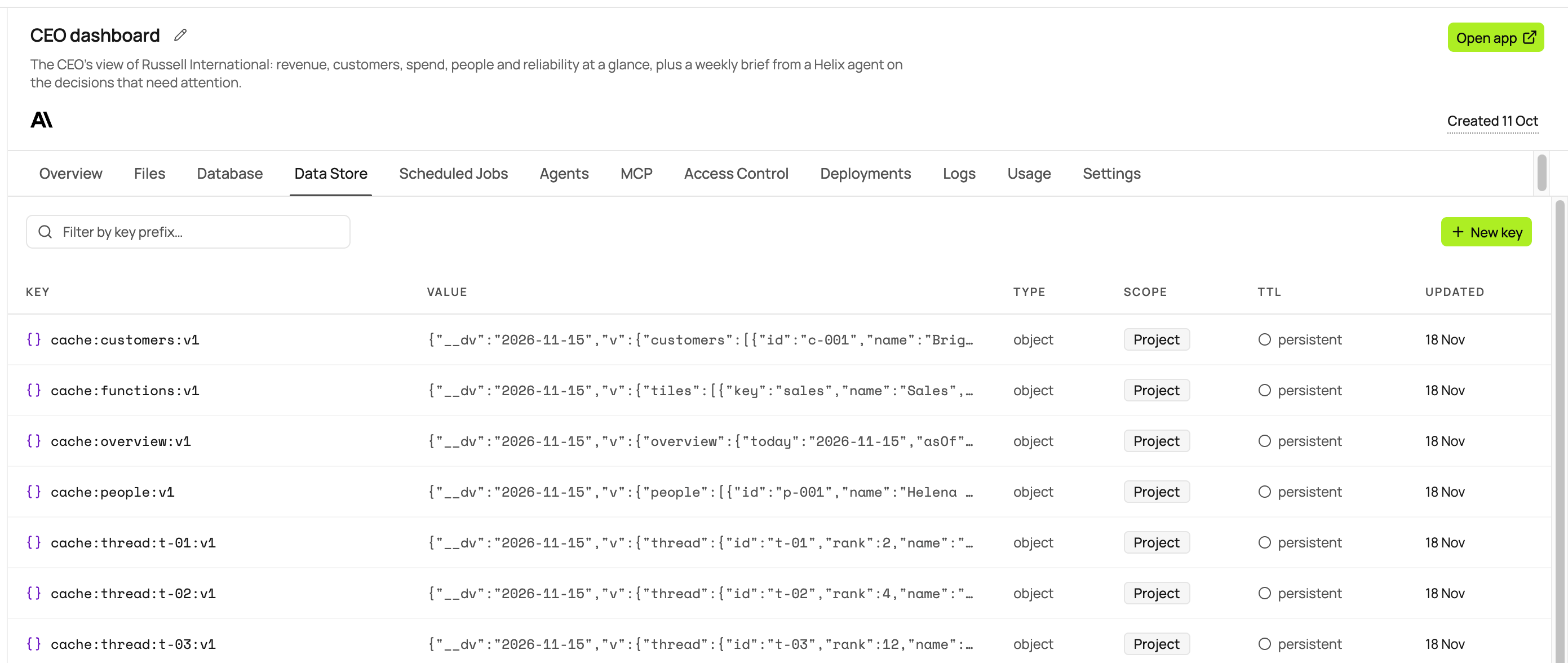
The app’s data, visible in the console
Each app’s stored data sits in its own Data Store, scoped to the app, with nothing to provision.
Scheduled jobs
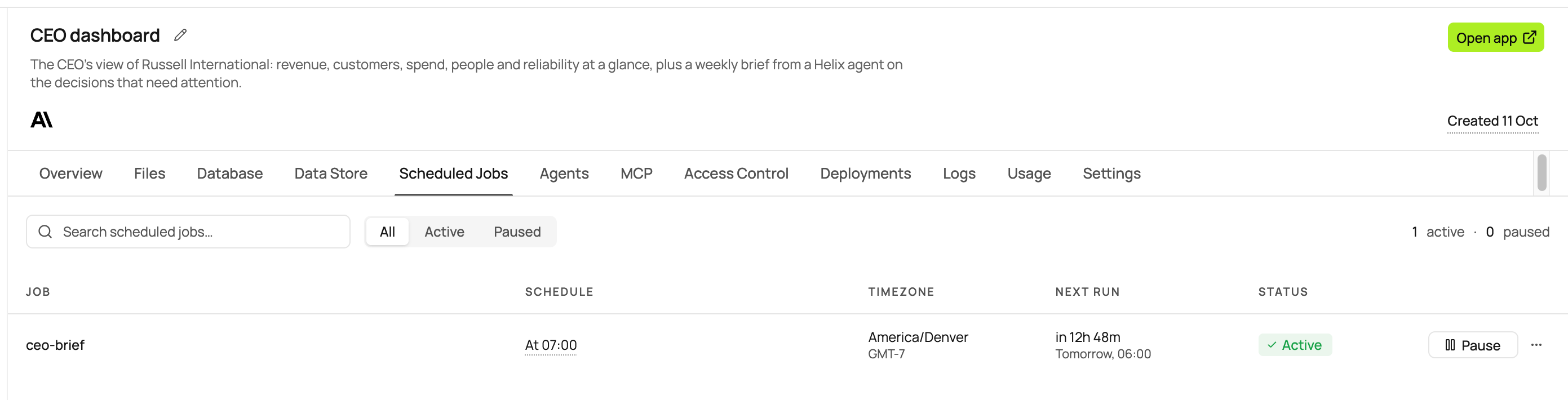
Jobs that run on the app’s own data
Schedule a function and it runs on the same data as the app and its agents, with its next run and status shown.
In practice
What teams keep in an app database
Commissions and quotas
Rep payouts, plan rules and adjustments, refreshed nightly from Salesforce and NetSuite.
Request queues
IT access requests, discount approvals and vendor onboarding, each with status and history.
Review and survey results
Responses, scores and comments from a performance review app, with exports in the file system.
Support triage notes
Zendesk ticket summaries and the agent's suggested replies, kept next to the person who approved them.
Questions people ask
What is an app database on Tray Helix?
It is the database every Helix app gets for its own data, created when the app deploys. You describe the tables to your AI assistant, and Helix applies every change on each deploy. Only that app and its agents use it.
Do I need to set up a backend for an AI-built app?
No. The database, key-value storage, file system and scheduled jobs are part of every Helix app, on Tray's managed runtime. You describe what the app should store, and the assistant writes the code that uses it.
What is key-value storage for?
It holds small records you look up by name, such as a setting, a counter or a user's last choice. Use the database for anything with rows and relationships, and key-value storage for the small things around it.
Can an app store files?
Yes. Every app has a persistent file system for uploads and exports. File changes are written to an audit log, so you can see who changed what and when.
Can two apps share a database?
No, by design. Each app has one database that only that app uses. To share data, the owning app exposes an API or an MCP endpoint, and the other app or agent calls it, so every read and write passes a login and a role.
Do agents need a separate data store?
No. An agent that ships with an app works on the same data as the app, through the app's own tools. There is nothing separate to set up or sync.
Can an app use data that lives in our other systems?
Yes. The app's own database holds what the app creates. For data in Salesforce, NetSuite, Zendesk or Snowflake, the app calls that system through a login Tray holds, so the credential is never in the code and the AI assistant never sees it. A scheduled function can pull the data in nightly.
Can an app run something on a schedule?
Yes. Any function can run on a cron schedule, such as a nightly pull from Snowflake or a weekly summary posted to Slack. The runs are logged like any other.
What happens to the data if I restore a previous deployment?
The data stays as it is. A restore rebuilds the earlier code as a new deployment and does not touch what the app has stored.
Governance
Security, access, audit and compliance for every app.
Credentials, access control, audit and observability across Helix and iPaaS.
Bring one app. Give it a database.
Thanks, keep an eye on your inbox for an invite.