
One command to production, with approvals and restore.
A Customer 360 app goes from a laptop to a live URL with one command. Sign-in and a registry entry are attached as it ships, and IT can hold it for approval first.
Thanks, keep an eye on your inbox for an invite.
AI app deployment, from laptop or CI
- 1
Build
Describe the app to Claude Code, Codex or Cursor. The code lives in a normal project on your machine or in your repo.
- 2
Deploy
Ask your assistant to deploy, run helix deploy yourself or let CI do it on every merge.
- 3
Approve
Hold deployments that need a second pair of eyes. The live version keeps serving while they wait.
- 4
Restore
If a release goes wrong, pick an earlier deployment and Helix rebuilds it as a new one.
Deploy AI apps
Ask for it, run it or let CI do it
A marketing ops lead finishes the Customer 360 app and tells Claude Code to deploy it. A team with a repo has CI do the same on every merge. Both end at the same live URL behind login.
One command
Run helix deploy, or ask Claude Code, Codex, Cursor, GitHub Copilot or Windsurf to run it. The CLI runs on macOS, Linux and Windows.
From CI on every merge
helix ci init writes a GitHub Actions workflow that deploys on merge or on demand. It signs in as a Tray API user rather than a person, and a failed build fails the job.
Attached as it ships
Sign-in, managed logins and an App Registry entry with a named owner are applied during the deploy, not afterward.
No infrastructure to request
The app runs on Tray's managed runtime, with its database, files and schedules built in. Nobody stands up a server first.
Deploy vibe-coded apps
From laptop prototype to something IT can see
A vibe-coded app usually stops at the same point: it works, and nobody knows where to put it. Helix is the answer to that question.
A personal cloud account has no owner
An app on a personal cloud account has no sign-in rules and no record. A Helix deployment has an owner, sign-in rules and a record.
Same path for every assistant
Teams use different tools. Every app, whichever assistant wrote it, ships through the same route.
Fewer steps than the workaround
A deploy is one command, so builders choose the governed path because it is the quick one.
Control
Hold and restore deployments
A change to the Customer 360 app that adds a new Okta-backed sign-in waits for an approver. If a release breaks something, the builder restores the last good one.
Hold for approval
Require approval for every deployment, or only for new apps and deployments that add an authentication.
The live version keeps serving
While a deployment waits, the app people use does not change.
Approvers can't approve their own
A workspace's approvers cannot approve their own deployments, and every approval is recorded in the activity trail.
Restore a previous deployment
Pick an earlier deployment and Helix rebuilds it as a new deployment, while the live version keeps serving. The code comes back and the data stays as it is.
Attributed to CI
Deploys from CI are signed in as a Tray API user, so the record says CI shipped it, not whichever person set it up.
In the Helix console
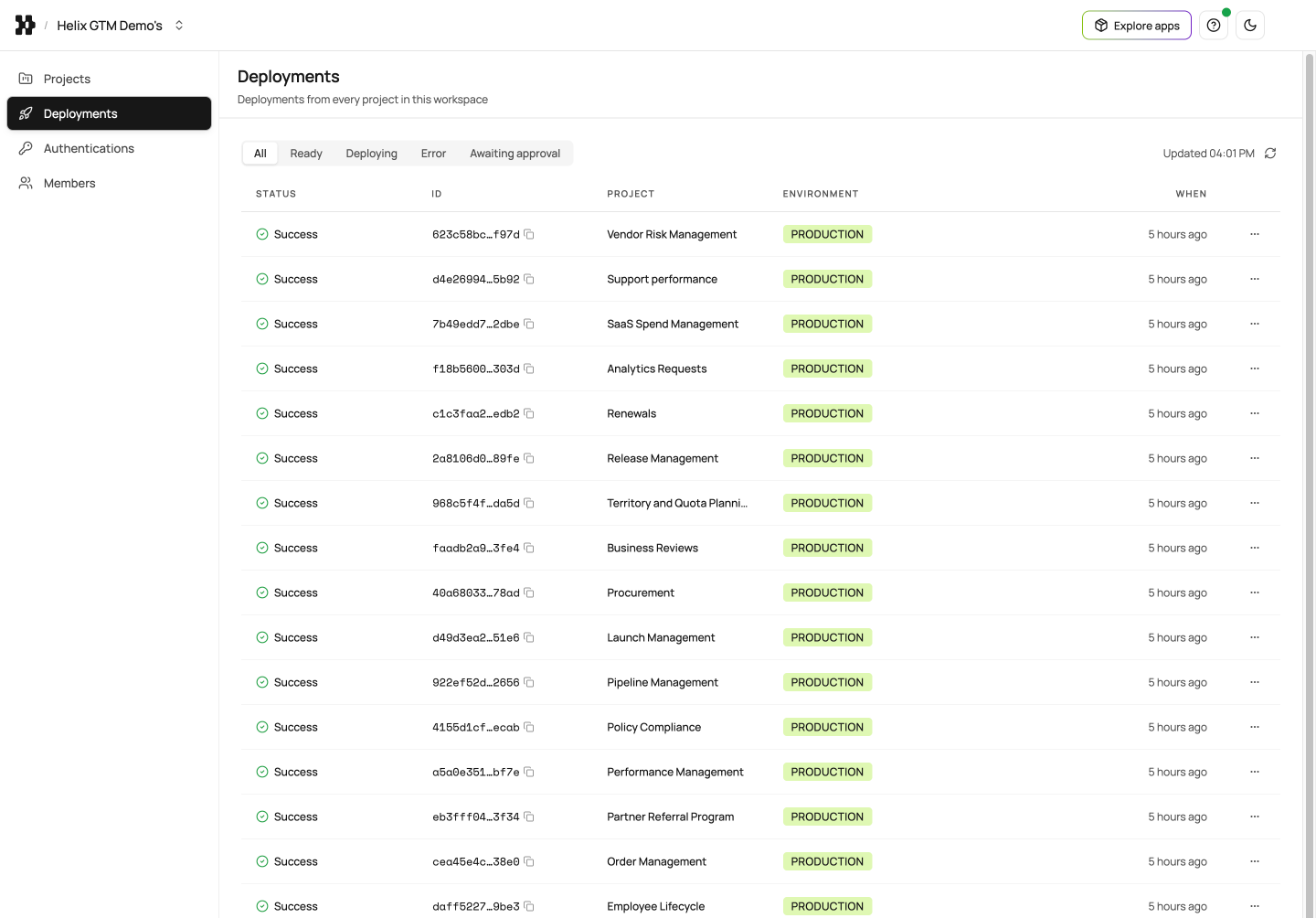
Every deploy in one list, including pending approvals
See each deployment across the workspace with its status and environment, and filter to the ones awaiting an approver.
Who can deploy
Make CI the only way to production
A platform lead puts the CI pipeline's API user on a list and turns on one switch. After that, a deploy from anyone's laptop is refused, and every change reaches production through the pipeline.
Limit who can deploy
Organization owners and admins list the people and API users who may run helix deploy. Anyone not on the list is refused.
Nobody is added automatically
Owners and admins have to be on the list too. Prepare the list while the switch is off, and nothing changes until you turn it on.
Approvals still apply
A deploy by a listed person or by CI still waits for approval if your policy requires it, so CI only plus approvals gives you one gate.
Restores are not blocked
The limit applies to helix deploy only. Restoring a deployment, creating a project and changing settings work for anyone who could do them before.
Approvals in detail
What an approver sees, and what happens next
An admin opens the Review button in the approval email and sees what changed before deciding.
The evidence to decide
Who deployed and when, their note, whether it is the app's first deployment, which authentications it adds or removes and the scopes on each, who can use the app, and the source to download.
Approve or deny
Approve and that exact build goes live. A denial needs a written message, which goes to the deployer by email, and a denied deployment can't be approved later: fix the change and deploy again.
No exemptions
Deploys from CI and deploys by coding agents follow the same policy as a person's, including the owner's and admins'.
Approvers can be the team
A workspace can name its own approvers, such as the team that owns it, so reviews don't all queue with central IT. They can't approve their own deployments.
Owners and admins
The organization owner and admins can approve any deployment. Everyone else sees a read-only preview.
New apps wait to launch
A new app isn't live until its first deployment is approved, and it stays out of the App Library until then.
CI and agents
The same deploy carries the app and its agent
A team keeps its Customer 360 app in a repo. Every merge deploys to staging, and production waits for a reviewer in GitHub.
Staging on merge, production on review
helix ci init writes a workflow that runs helix deploy --wait. Set it to deploy production on demand, on every merge, or staging on merge with production behind a reviewer in GitHub.
Other CI services
Any other CI service runs the same command with the API user's token from its secret store.
Agents ship with the app
An agent is defined in the app's code, with its model, instructions and tools, and goes live in the same deploy. Helix holds the model key, so it never sits in the code.
Pause an agent for a person
Tool approval is separate from deployment approval: an agent can pause before running a tool until a person says yes.
Visibility and location
Every deployment listed, and where it runs
An IT lead asks what shipped on Tuesday and whether anything is waiting. The answer is one list, not a search through chat history.
Deployments per workspace
Each workspace lists its deployments with their status and environment, including any waiting for approval.
US, EU or APAC
Choose where the app runs: the US, EU or APAC. Choose the region when you create the workspace.
Named owners
Every deployed app is in the App Registry with a named owner, so a question about a deployment has somewhere to go.
Logs from the terminal
helix logs streams an app's logs to your terminal while you test a fresh deployment.
Worth knowing before you deploy
- A restore is a new deployment. It takes about as long as any deploy, because Helix rebuilds the code. If the rebuild fails, the version that was live keeps serving.
- A restore brings back code, not data. What the app has stored stays as the newer version left it.
- Approval rules belong to a workspace. A team's rules and approvers don't change another team's. See Governance.
Questions people ask
How do I deploy an app on Helix?
Run helix deploy, or ask your AI assistant to run it. Helix builds the app, puts it on a live URL behind login and adds it to the App Registry with a named owner.
What does the development lifecycle look like on Helix?
Build in your AI assistant, keep the code in your repo, and let CI deploy to staging on every merge. Production waits for a reviewer in GitHub, and for IT approval if your policy requires it. If a release goes wrong, restore an earlier deployment.
How do I deploy a vibe-coded app?
Build it in Claude Code, Codex or Cursor, then run helix deploy. The app gets a live URL behind your sign-in, with its database and logins managed by Tray, so it doesn't have to move to a personal cloud account first.
Can I deploy from CI?
Yes. Run helix ci init and it writes a GitHub Actions workflow that deploys on merge or on demand. CI signs in as a Tray API user, so each deploy is attributed to CI rather than a person, and a failed build fails the job.
Can IT approve deployments before they go live?
Yes. You can hold every deployment, or only new apps and deployments that add an authentication. The live version keeps serving while one waits, and approvers can't approve their own deployments.
Can I restore a previous deployment?
Yes. Choose an earlier deployment and Helix rebuilds it as a new deployment. The live version keeps serving while it builds. The code comes back and the data stays as it is.
How do I see what has been deployed?
Each workspace lists its deployments with their status and environment, including any waiting for approval. Every app is also in the App Registry with a named owner. Tray streams workflow, agent and audit logs to Splunk, Datadog or any SIEM or log tool you use.
How is Helix different from hosting or a CI/CD pipeline I already run?
Hosting runs the app. Helix also decides who can use it, who can deploy it and who owns it. Every app sits behind your sign-in, uses a database and credentials Tray manages, shows up in the App Registry with a named owner, and can be held for IT approval or restored to an earlier deployment. If you already run CI/CD, helix ci init adds a GitHub Actions workflow that deploys through the same controls.
Where do deployed apps run?
On Tray's managed runtime in the US, EU or APAC. You choose the region.
Which AI assistants can deploy to Helix?
Claude Code, Codex, Cursor, GitHub Copilot and Windsurf can all run the deploy command, and so can you from a terminal on macOS, Linux or Windows.
How do I make CI the only way to deploy?
Open Organization settings, then Deployments, then Deploy access. Add the CI pipeline's API user, plus anyone else who may deploy, and turn on Limit who can deploy. Anyone not on the list is refused when they run helix deploy. Owners and admins must add themselves too.
Do deployment approvals apply to CI and to coding agents?
Yes. There is no exemption for CI, for a coding agent or for the owner. Every deployment follows the policy you set, and each decision is recorded in the activity trail.
What does an approver see before approving?
Who deployed and when, their note, whether it is the app's first deployment, which authentications it adds or removes and the scopes on each, who can use the app, and the source to download.
What happens when a deployment is denied?
It never goes live. The approver writes a message, which goes to the deployer by email. A denied deployment can't be approved later, so the deployer fixes the change and deploys again.
How long can I restore an earlier deployment?
Helix keeps the deployment before the live one for as long as it holds that spot, and any other deployment for 30 days. Choose Restore on it in the project's Deployments tab.
Can an app include an AI agent, and does it deploy with the app?
Yes. The agent is defined in the app's code with its model, instructions and tools, and ships in the same deploy. Any function or schedule in the app can call it, and Helix holds the model key.
Governance
Security, access, audit and compliance for every app.
Credentials, access control, audit and observability across Helix and iPaaS.
Bring one app. Deploy it with one command.
Thanks, keep an eye on your inbox for an invite.