A pricing approval app opens only for people you invited, signed in through Okta. It reaches Salesforce through a login Tray holds, so the key is never in the code and the AI assistant never sees it.
Thanks, keep an eye on your inbox for an invite.
Security is applied as the app ships
1
Sign in
Everyone who opens an app signs in with your identity provider. There is no anonymous URL.
2
Set access
Choose who can open the app: invited people, a workspace or the whole organization. Roles set who can build and deploy.
3
Connect safely
The app reaches Salesforce, NetSuite or Zendesk through logins Tray holds and adds to each request on the way out.
4
Audit
Deployments, approvals, access changes and token activity are written to the activity trail.
SSO for apps
Every app sits behind login
Most AI-built apps start life as a link someone shares in Slack. On Helix there is no such link: the first request to any app goes through sign-in.
Require SSO on every app
Sign in with your identity provider, the same way people sign in to everything else. No separate password for each app.
Only your people get in
Everyone who opens an app must be a user in your organization with access granted.
Access you choose
Open an app to invited people, to a workspace or to the whole organization, and change it any time.
Three roles
Admin, Contributor and Read-only set who can build and deploy. What someone sees inside an app is that app's own logic.
Secure AI-built apps
Where AI-built apps go wrong, and what Helix does
A key pasted into a file
Assistants write whatever works, and a Salesforce key in a config file works. On Helix the login lives with Tray, so there is none to paste.
An app nobody can find
Every app deployed through Helix is listed in the App Registry with a named owner, so IT can see what is running and who answers for it.
A link anyone can open
A forwarded link goes to a sign-in page, not to the app.
Logs and your SIEM
Every run and change, in your security team's tools
A finance app approves a discount at 2 a.m. By morning the run is in the same SIEM as everything else your security team watches.
Your logs stream to your SIEM
Tray streams your workflow, agent and audit logs to Splunk, Datadog or any SIEM or log tool you use. Log streaming is a Tray platform capability, so it covers Tray Helix and Tray iPaaS alike.
ranenrich-accounts
reachedsalesforce
triggered byschedule
yourSIEM
Every app and agent run is logged
Each app request and agent run shows in the console Logs tab with its time, status and duration, and helix logs streams them to your terminal.
Keep logs longer
Tray offers longer log retention, so older runs stay searchable.
No secrets in code
Logins stay with Tray, so they never reach the code
The pricing approval app reads the opportunity from Salesforce and writes the approved discount back. The builder never saw a Salesforce key, and neither did the AI assistant.
Held by Tray
Apps connect through authentications you create in your Tray account. The builder, the assistant and the app code never receive the login.
Added on the way out
Tray attaches the login to each outgoing request. If the code is copied or shared, there is no secret in it to leak.
Managed in one place
Change or remove a login in Tray and every app that uses it follows.
Model keys too
Helix holds the model provider key, so it does not sit in the code either.
In the Helix console
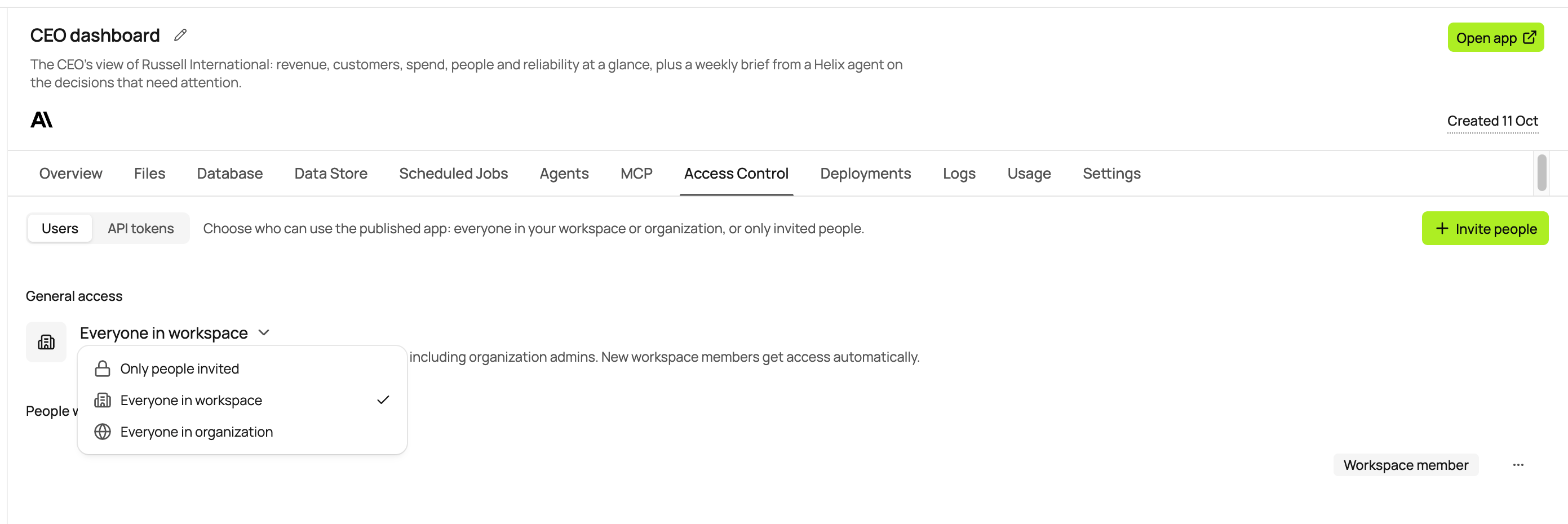
Choose who can open each app
Give an app to everyone in the workspace, everyone in the organization, or only the people you invite.
app.helix.tray.ai
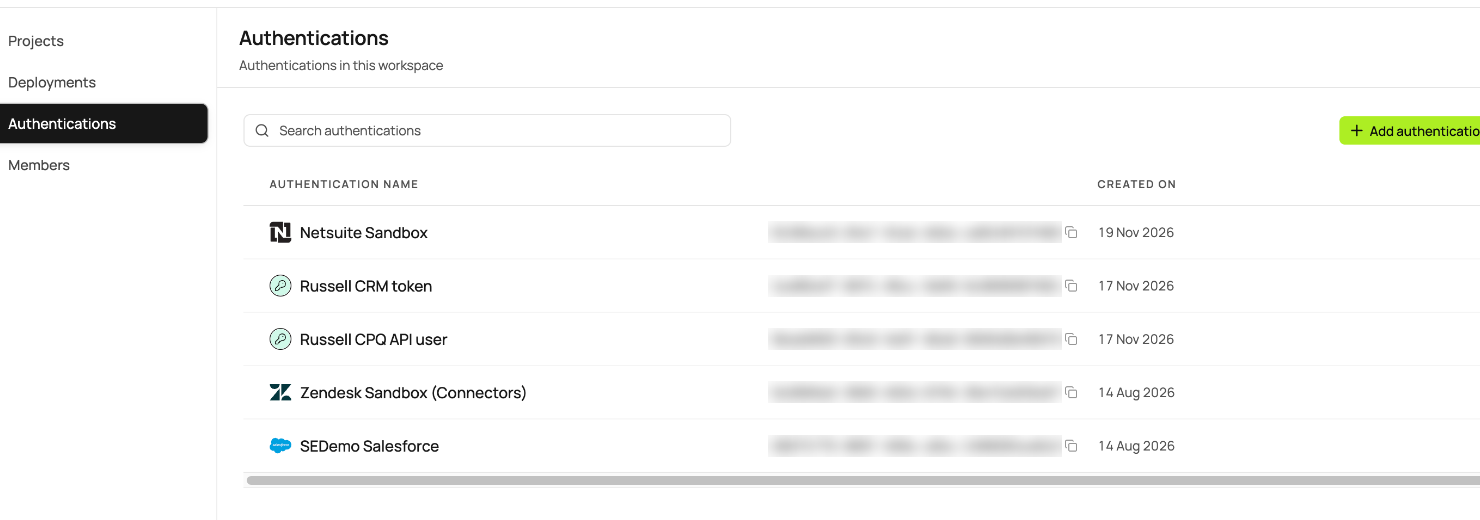
Managed logins
Logins held by Tray, never in the code
Every app reaches your systems through logins the workspace holds, so no secret sits in an app.
app.helix.tray.ai
API tokens
Let other systems call an app, as a named user
Finance's nightly job needs to read approved discounts from the pricing app. It does that with a token, and the token has a name, an expiry and an off switch.
Acts as a named API user
Each token signs in as an API user in your organization, so the app treats the call like any other user, with that user's access and nothing more.
Expires when you say
Choose 30 days, 90 days or one year when you create it.
Revoke in one step
Revoke a token and it stops working on the next call.
On the record
Creating or deleting a token is logged in the audit trail. The token itself is never stored there.
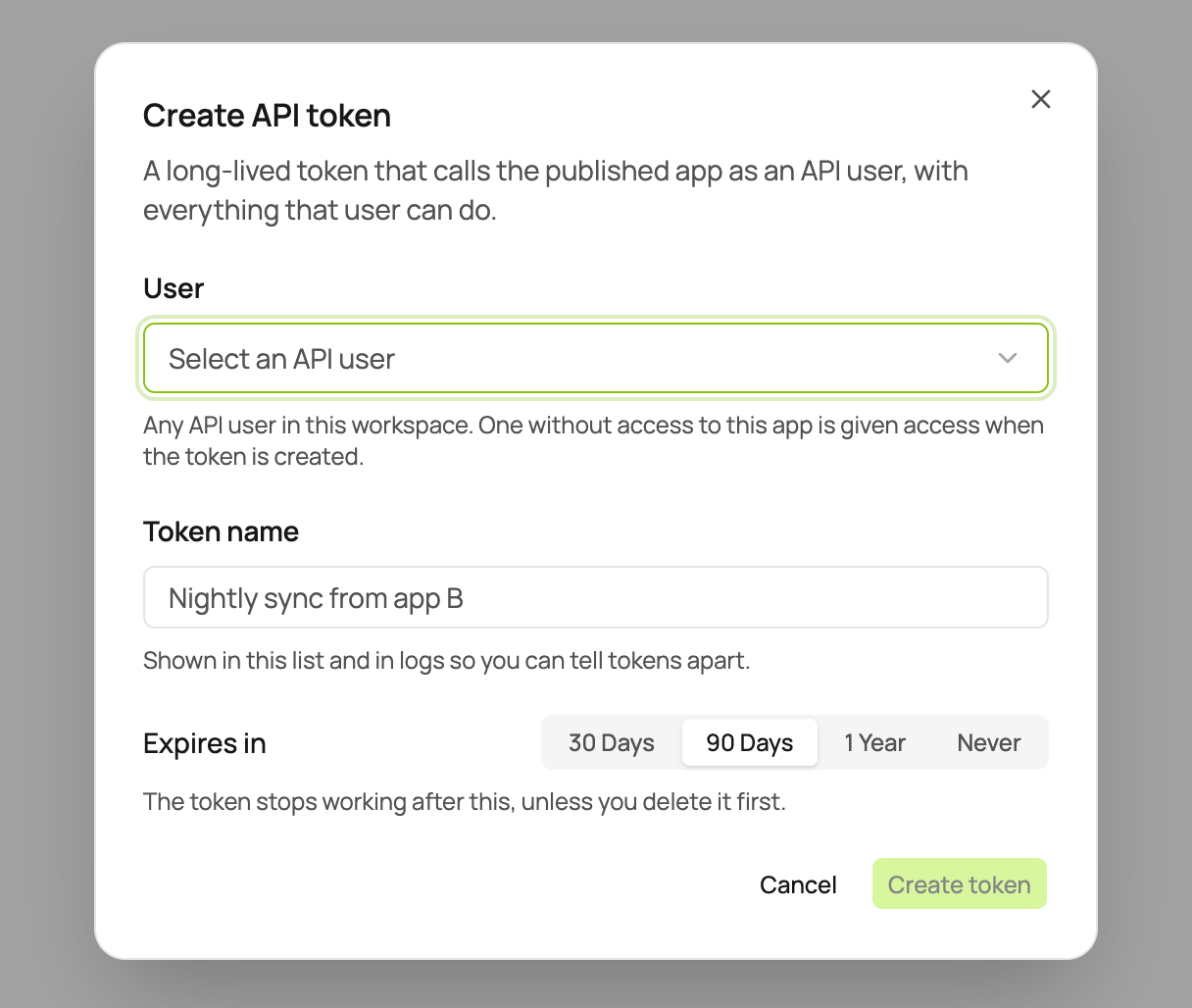
API tokens
Tokens that act as a named user and expire
Create a token for another system, pick the API user it acts as, and set it to expire after 30 days, 90 days or a year.
app.helix.tray.ai
Gates before go-live
A review before a new app or login reaches colleagues
Someone on the finance team adds a Slack alert to the pricing app. Because it adds a new authentication, an approver sees it first.
Hold what matters
Require approval for every deployment, or only for new apps and deployments that add an authentication. The live version keeps serving while one waits.
A reviewer sees the scopes
The approver sees who deployed, their note, which authentications the change adds or removes and the scopes on each, who can use the app, and the source.
Limit who can deploy
Owners and admins can restrict helix deploy to a list of people and API users, so a CI pipeline can be the only route to production.
Agents inside apps
An agent sits behind the same sign-in as its app
A support app includes an agent that drafts refunds. It runs for signed-in users only, and a person approves before it writes anything.
Same front door
An agent in an app runs behind the app's sign-in and access rules.
Approval before it acts
Any tool an agent can call can be set to wait for a person's approval. Put it on every action that writes or changes data.
Its model key stays out of the code
Helix holds the model provider key and the agent reaches your systems through the app's managed logins.
Run logs with a retention window
Every app run is logged, with logs kept for 30 days.
A trail for every change
Who deployed what, and when. Deployments, restores and approvals are recorded against a person or an API user.
Who changed access. Role and sharing changes are logged, so an audit starts with a record instead of a guess.
Who approved. When deployments are held for approval, each approval is recorded, and approvers can't approve their own.
Where to read the rest. Compliance, retention and the wider controls are on the Governance page. See Governance.
Questions people ask
How do people sign in to a Helix app?
With your identity provider, using single sign-on. Every app sits behind login, and nobody can open one without being a user in your organization with access granted.
What can each role do?
Admin, Contributor and Read-only roles set who can build and deploy in a workspace. What a person sees once they are inside an app is that app's own logic, which the builder writes.
How do I secure an AI-built app?
Put it behind sign-in, give access only to the people who need it, keep every login out of the code and keep a record of changes. On Helix each of those is applied when the app deploys, so the builder doesn't have to remember them.
How do I secure vibe-coded apps and stop shadow AI?
A vibe-coded app is one someone built by describing it to an AI assistant, often with no review. On Helix it deploys behind your sign-in, with its logins held by Tray and a named owner in the App Registry, so IT sees every app and who answers for it. IT can also hold new apps for approval before they go live.
Where do the logins to our systems live?
With Tray. You create the authentication in your Tray account, and Tray adds it to each request on the way out. The login is never in the code, and the builder and the AI assistant never see it.
How do API tokens work?
A token lets a script, a webhook sender or another app call an app's routes. It signs in as a named API user, expires after 30 days, 90 days or a year, and can be revoked in one step. Creating and deleting tokens are logged.
Can I control who opens each app?
Yes. Set an app to invited people, a workspace or the whole organization. Roles separately set who can build and deploy.
Can I stream logs to my SIEM?
Yes. Every run and every change reaches the tools your security team already watches. Tray streams your workflow, agent and audit logs to Splunk, Datadog or any SIEM or log tool you use. Log streaming is a Tray platform capability, so it covers Tray Helix and Tray iPaaS alike. Helix app and agent runs are also in the console Logs tab and with helix logs, and Tray offers longer log retention.
Is there an audit trail?
Yes. Deployments, approvals, access changes and token activity are recorded in your organization's activity trail. See Governance for the full picture.
Can an agent in a Helix app change our data without a person signing off?
Only if the team allows it. Any action an agent can take can be set to wait for a person's approval, and we recommend it on every action that writes or changes data. The agent uses the app's managed logins, and its model key never sits in the code.
Can security review an app before it goes live?
Yes. Turn on deployment approvals and choose what waits: every deployment, or only new apps and deployments that add an authentication. The approver sees who deployed, which authentications are added or removed with their scopes, who can use the app and the source, and the live version keeps serving meanwhile.
Can we limit who is allowed to deploy?
Yes. Owners and admins can list the people and API users who may run helix deploy and turn on Limit who can deploy. Everyone else is refused, so a CI pipeline can be the only route to production. Approvals still apply on top.
How long are app logs kept?
Every app run is logged, and the logs are kept for 30 days. Access and deployment changes are recorded in the activity trail.
Where does a Helix app run?
On Tray's managed runtime in the US, EU or APAC, in the region you choose when you create the workspace.
Is Helix audited for SOC 2, and does that make my app compliant?
Tray is SOC 1 and SOC 2 Type 2 audited every year, with HIPAA, and the platform your apps run on is covered by those reports. The reports cover the platform, not what a builder writes: you stay responsible for your app's data and how it is used. Reports, DPAs and penetration-test summaries are on the Tray trust center.
Governance
Security, access, audit and compliance for every app.
Credentials, access control, audit and observability across Helix and iPaaS.