
AI dashboards on your live data.
Describe one to your AI assistant and deploy it with one command. Helix runs it behind company sign-in, with a named owner.
Thanks, keep an eye on your inbox for an invite.



A dashboard built on Tray Helix, turned in 3D to show the layers behind it: the Helix app with its database, scheduled refresh and agent; connectivity to 12,000+ apps, databases, APIs, and services; and governance with company sign-in, a named owner and an audit trail.
From a request to a dashboard people trust
- 1
Describe
Tell Claude Code, Codex or Cursor what the team needs to see: the numbers, the filters, who looks at it and how fresh it must be.
- 2
Connect
The dashboard reads from any of the 12,000+ apps, databases, APIs, and services Tray connects to, through logins Tray holds. Nobody pastes a key into code.
- 3
Deploy
One command gives it a live URL behind company sign-in, its own database and a scheduled refresh.
- 4
Govern
A named owner, access rules and an audit trail are attached as it ships, and IT sees it in the App Registry.
A dashboard is an app
Every dashboard is an app, with an owner
An AI dashboard needs a runtime, not just a chart library. On Helix it gets a live URL, a database, scheduled jobs, logs and access rules.
It can act, not only display
A pipeline dashboard can show a stale opportunity and let the manager assign it to a rep, writing the change back to Salesforce. The same app does both.
It keeps its own history
The app's own database stores a snapshot every night, so the dashboard shows this quarter against last quarter even where the source system keeps only today's value.
It shows when it last refreshed
A scheduled function pulls the data and the page shows the time of the last pull, so nobody quotes a stale figure.
It is built for the people who asked
Finance, RevOps, support and IT each get the view they need, with the definitions they agreed, rather than a generic template.
Data
Data from Salesforce, or any system Tray connects to
Helix apps use the same connectivity as Tray iPaaS, so your data doesn't have to sit in one warehouse first.
CRM and finance
Pipeline from Salesforce or HubSpot next to invoices from NetSuite or QuickBooks, joined on the account.
Databases and warehouses
Query Snowflake, BigQuery or Postgres directly, or read the tables a data team already maintains.
Support, product and people systems
Tickets from Zendesk, usage from your product database, headcount from your HR system, each as a source.
Any API you need
Any Helix function can also call an API that isn't on the list, with the login held by Tray.
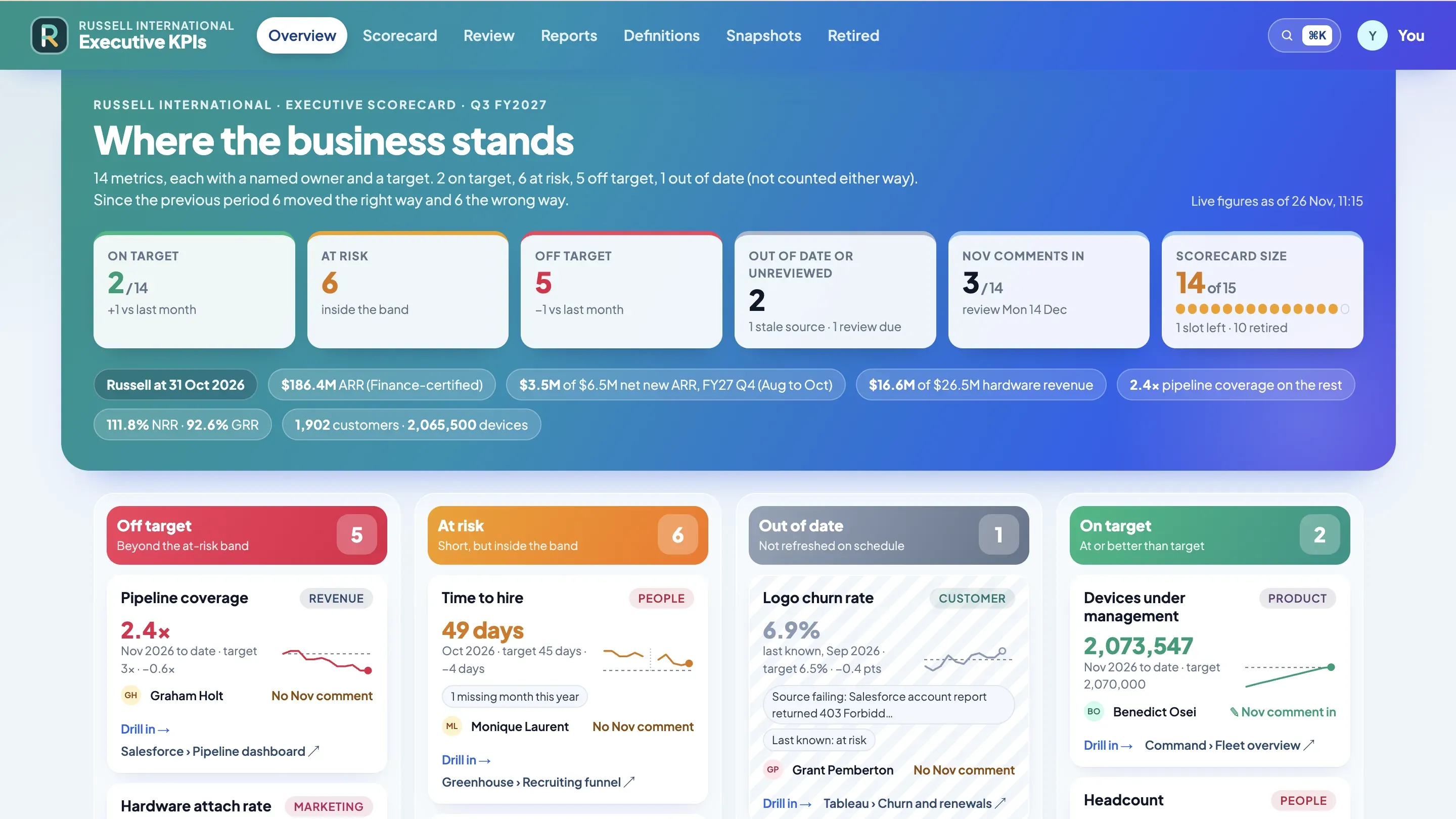
Executive KPI dashboard
Every KPI with a target and an owner
The fourteen numbers that run the company, each with a target, a trend and an owner. Shown with demo data from Russell International, a fictional company.
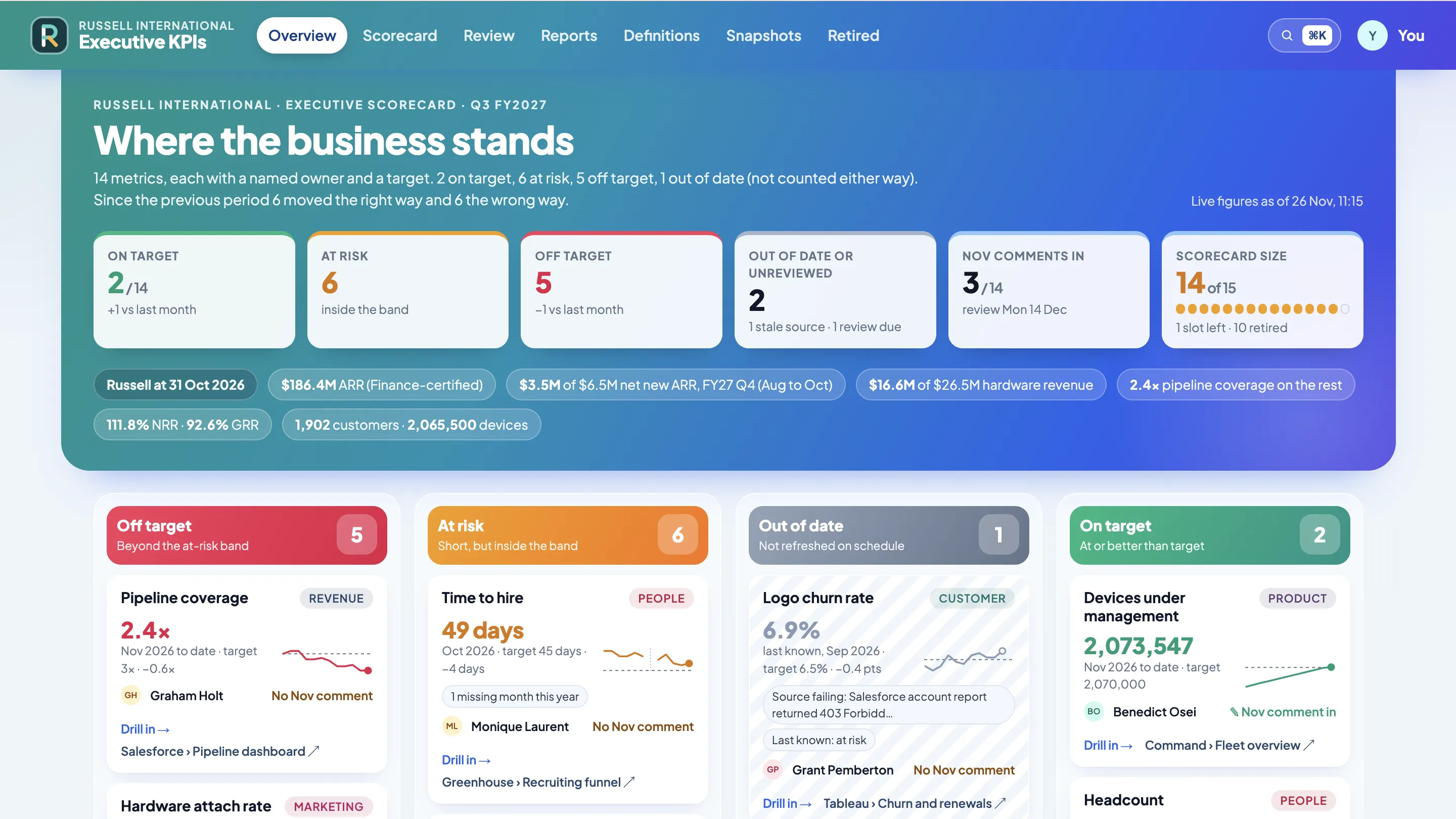
Sales dashboard
A Salesforce dashboard that cleans up the forecast
Every open deal checked against the team's rules, sorted by how badly it bends the forecast. It refreshes from Salesforce every two hours, and managers fix deals from the page.
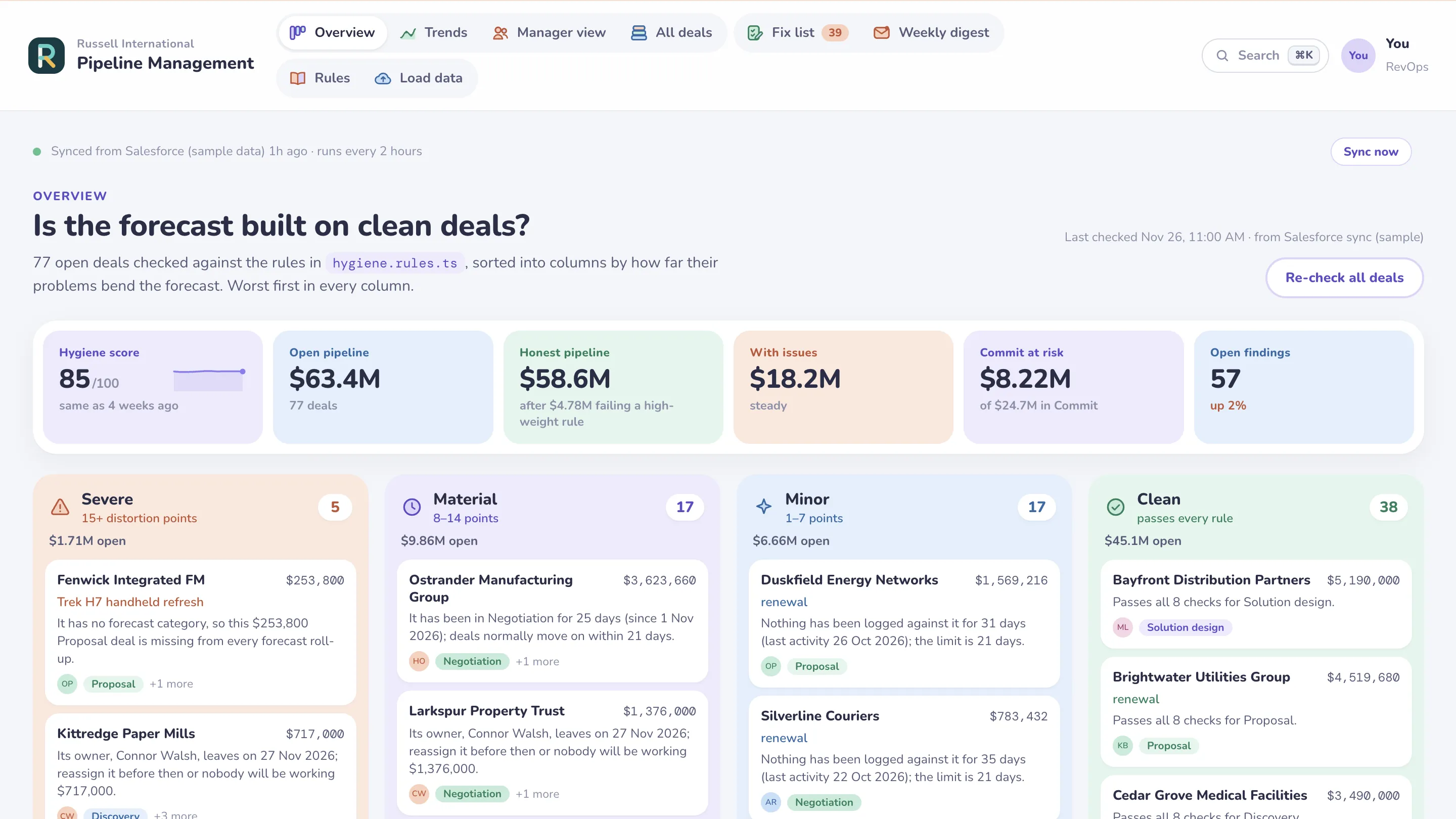
Finance dashboard
Planned, invoiced and committed spend side by side
Budget against actuals, with committed spend from approved POs before invoices arrive. Each cost center owner sees their own lines.
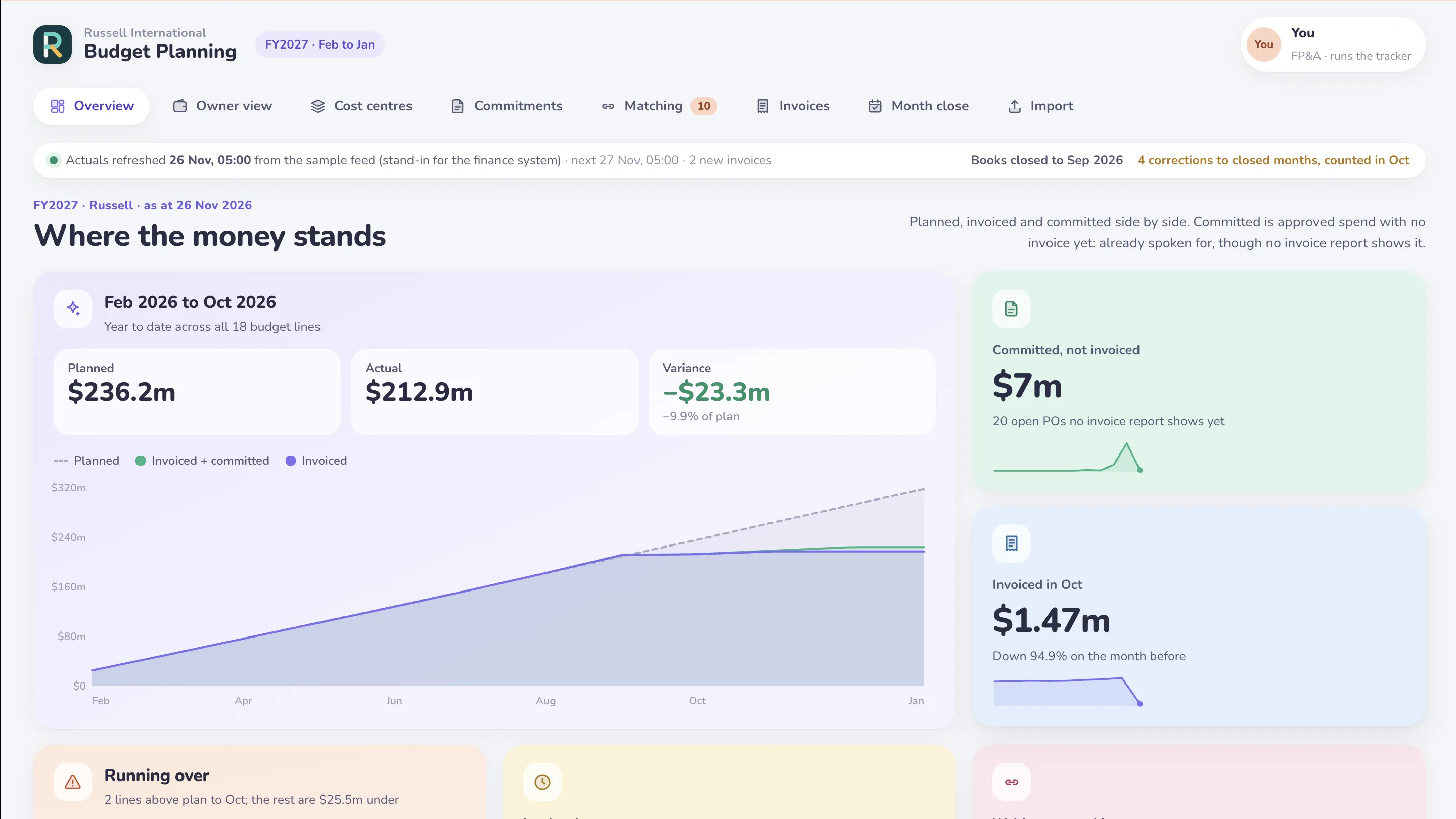
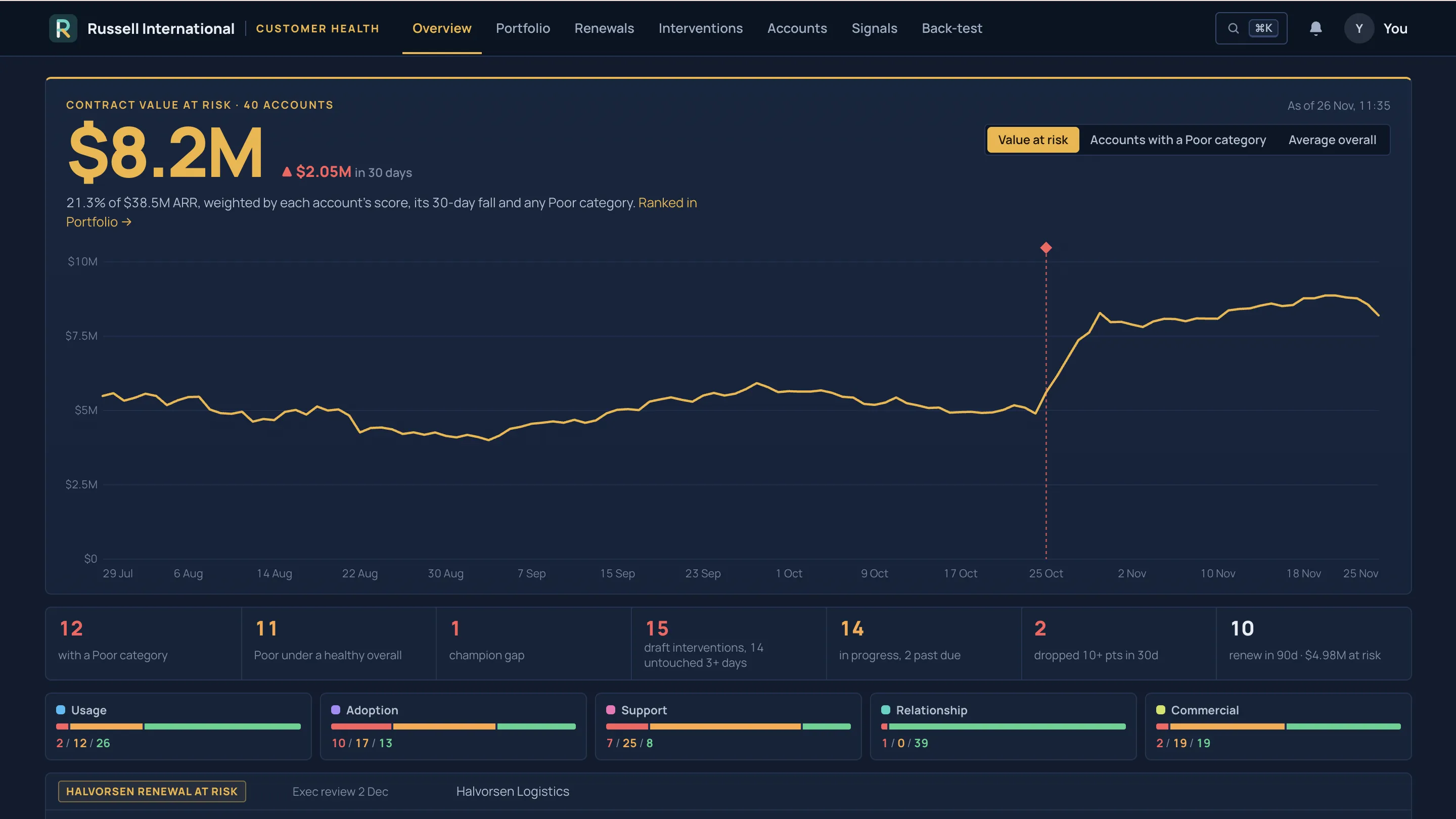
Customer health dashboard
Customer health with a dollar figure on risk
Contract value at risk, weighted by health score, with the biggest drops this month and renewals due in 90 days.
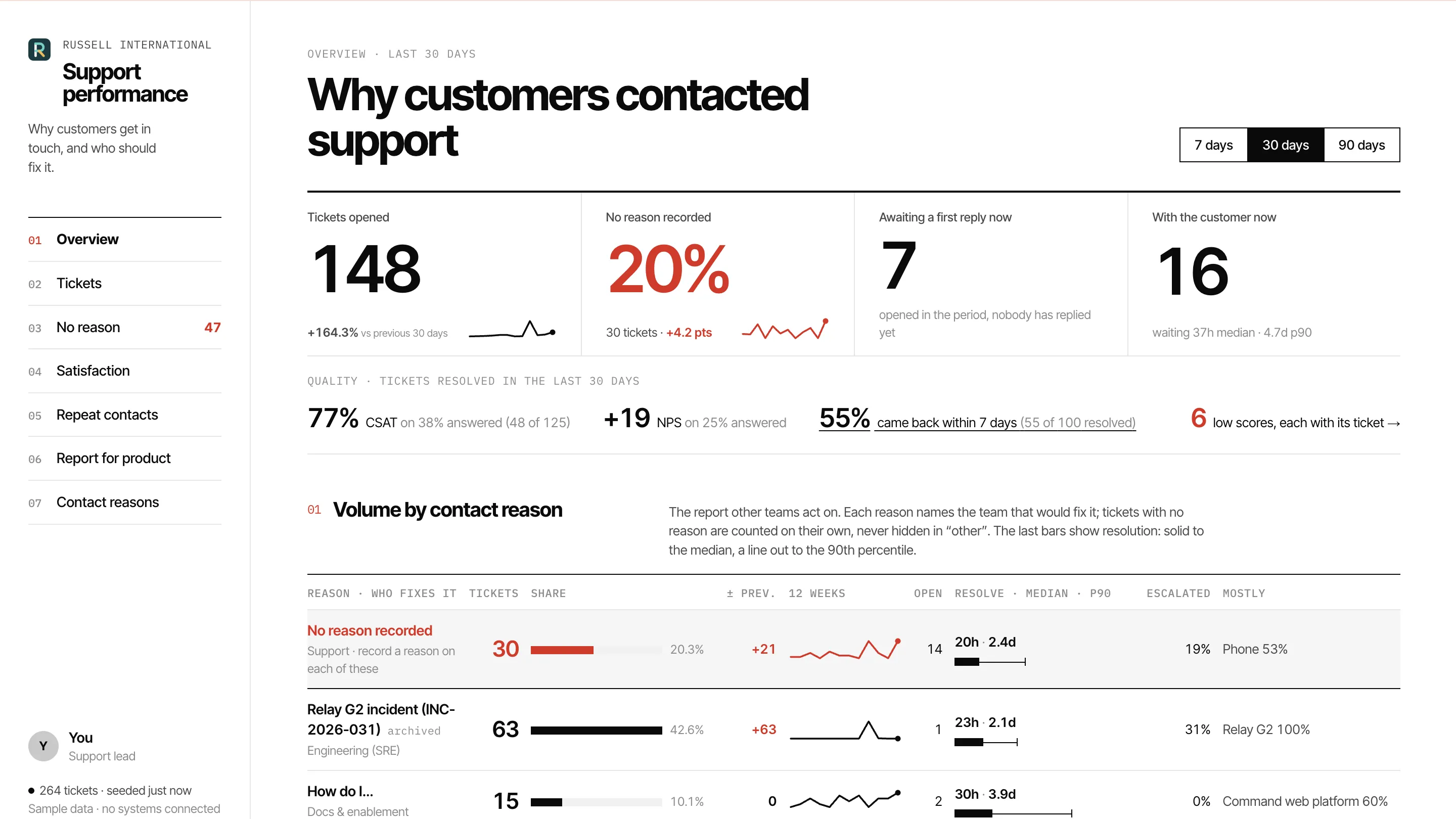
Support dashboard
Why customers contacted support
Ticket volume by contact reason, the team that fixes each one, and every ticket still waiting on a first reply.
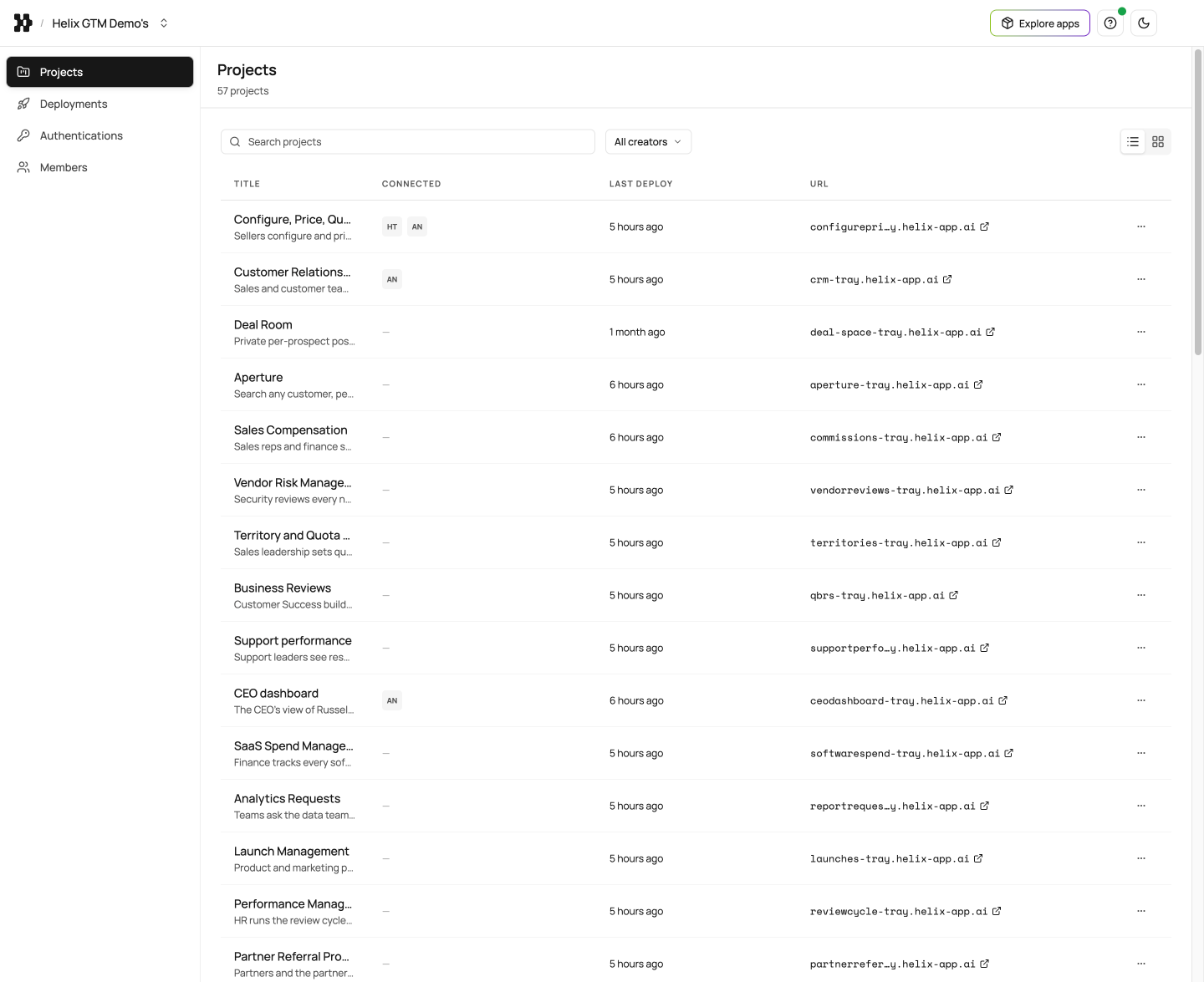
In the Helix console
Dashboards sit in the same list as every app
Each dashboard appears in the console with its live URL, connected systems and last deploy.
Governance
Sign-in, an owner and a record on every custom dashboard
Dashboards show the numbers that matter most. On Helix, every one sits behind company sign-in with a named owner.
Company sign-in only
There is no anonymous URL. Everyone who opens a dashboard is a user in your organization, signing in with SSO through your identity provider.
You choose who opens it
Give a dashboard to one person, a workspace or the whole organization. What each viewer sees inside is the dashboard's own logic, such as one department's rows.
A named owner
Every dashboard is listed in the App Registry with the person who answers for it. A question about a number goes to someone.
Logins stay with Tray
The dashboard reaches Salesforce, NetSuite and your database through authentications held by Tray. The builder, the AI assistant and the code never see the credentials.
An audit trail
Deployments are recorded, and IT can hold a new dashboard for approval before it goes live and restore an earlier deployment if a change goes wrong.
Logs go to your SIEM
Tray streams workflow, agent and audit logs to Splunk, Datadog or any SIEM or log tool you use.
Build one
Dashboard guides, with the prompts
Each guide covers the model behind the dashboard, the prompts to build it and what it takes to run it.
Executive KPI dashboard
A short list of agreed metrics, each with a target, a trend and an owner.
Sales pipeline dashboard
Open opportunities checked against your rules, so the forecast rests on clean deals.
Budget vs. actuals dashboard
Planned, committed and invoiced spend by cost center, with variance for each line.
Customer health dashboard
A health score from signals that predict renewal, with a named action for every red account.
Support performance dashboard
Ticket volume by contact reason, with response and resolution times against targets.
Internal admin dashboard
Named actions against production data for support, with every action logged.
More on how Helix runs a dashboard
Helix Apps
The App Registry, the managed database, schedules and access control every dashboard uses.
Helix Data
How a dashboard keeps its own history in a database, files and scheduled jobs.
Governance
Credentials, access control, audit and log streaming across Helix and iPaaS.
Connectivity
Every app, database, API and service Tray connects to, listed and searchable.
Questions people ask
What is the best AI dashboard builder for business teams?
Look for one that also runs and governs what it builds. With Tray Helix, your AI assistant (Claude Code, Codex or Cursor) writes the dashboard and one command deploys it to a live URL behind company sign-in, with its own database, a scheduled refresh, logs and a named owner. The dashboard reads from 12,000+ apps, databases, APIs, and services.
What is an AI dashboard?
An AI dashboard is a dashboard your AI assistant builds from a description. With Tray Helix, the AI dashboard builder is your AI assistant. You describe the dashboard to Claude Code, Codex or Cursor, it writes the app, and one command deploys it to a live URL behind company sign-in. Helix runs it with its own database, a scheduled refresh, logs and a named owner.
How do I build an AI dashboard?
Describe what the team needs to see: the metrics, where each number comes from, who may open it and how fresh it must be. Your AI assistant builds the app and deploys it with one command. Start with one source system and one audience, check the numbers against the report people trust today, then add the rest.
Can I build an internal dashboard without a developer?
Yes. A business user can describe the dashboard to an AI assistant and deploy it. Three things keep it safe: it sits behind company sign-in, its logins are held by Tray rather than in the code, and it has a named owner in the App Registry. IT can also hold new dashboards for approval.
Where can a dashboard get its data?
From any of the 12,000+ apps, databases, APIs, and services Tray connects to, the same connectivity as Tray iPaaS workflows. A pipeline dashboard can read Salesforce and NetSuite together, and a support dashboard can read Zendesk and your product database. Any Helix function can also call an API that isn't on the list.
How do I build a KPI dashboard or executive dashboard with AI?
Name the five to twelve metrics, the system each comes from, the target and the person who owns each number, then describe them to your AI assistant. Ask it to show trend next to target and to show when the data last refreshed. Helix deploys it with company sign-in and an owner.
How do I build a Salesforce dashboard outside Salesforce?
Describe it to your AI assistant: the opportunities, accounts or cases you want, the filters, and any data from other systems to join, such as NetSuite invoices or Zendesk tickets. The dashboard reads Salesforce through a login held by Tray, refreshes on a schedule, and can write changes back, such as reassigning an opportunity.
Is a Helix dashboard a BI tool?
No, it is an app. It suits the dashboard a specific team asked for, with its own definitions, its own database and actions such as reassigning a record or leaving a comment. Teams that want one governed semantic layer across the whole company can keep their BI tool for that, and still use Helix for the focused dashboards around it.
How do I keep a dashboard secure?
Every Helix dashboard sits behind company sign-in. You choose who can open it, and SSO is available. Logins to Salesforce, NetSuite or your database are held by Tray and never appear in the code. Tray streams audit and agent logs to your SIEM.
Who owns a dashboard, and how does IT see it?
Each dashboard deployed through Helix is listed in the App Registry with a named owner. IT sees every live dashboard, where it runs and what it connects to, and can hold new apps for approval before they go live.
How often does the data refresh?
On the schedule you set. A scheduled function can pull from your systems nightly, hourly or on whatever cadence the dashboard needs, and the page shows when it last refreshed. The app's own database keeps the history, so trends do not depend on the source system keeping old values.
Can a dashboard write back to Salesforce or NetSuite, not just read?
Yes, because it is an app. A pipeline dashboard can let a manager reassign an opportunity and write the change back to Salesforce through the same managed login. Build the dashboard read-only if you want it to only display.
Do dashboards cost per viewer?
No. Tray has no seats, so you do not pay more for each person who opens a dashboard. Usage draws from one balance, and AI and compute spend is visible per app.
What happens to a dashboard when its builder leaves?
It keeps running. The dashboard runs on Tray's managed runtime, and its logins are held by Tray rather than on a laptop. Helix keeps the source of every deployment, and the App Registry shows each dashboard's owner, so IT can find the ones whose owner has left.
Governance
Sign-in, a named owner and an audit trail on every dashboard.
Credentials, access control, audit and observability across Helix and iPaaS.
Bring one dashboard request. See it live on Helix.
Thanks, keep an eye on your inbox for an invite.