










.DkNUKaKx_ZLAT4m.webp?dpl=dpl_8yJRSbiE1G6s3QrAKF7yU51bW2sQ)










Somewhere in your Slack there’s a message that starts with “I built a thing this weekend, tell me if it’s useful.” It’s a lead router that finally handles your territory exceptions. Or a script that cleans an event list in twenty minutes instead of two days. Or a page where reps check their commission without emailing finance.
Nobody raised a ticket for any of it, and nobody bought anything, which is roughly where RevOps is now. Buying a separate tool for each of those stopped being realistic a while ago.
61%
of IT leaders cut projects this year to absorb unplanned SaaS cost increases.1
$27,000
a year for one Salesforce routing app, at 50 routed reps.2
Money is the easy half of the argument. For most of the apps below, you can buy something that does the standard version of the job. Your version has exceptions in it, and the exceptions are where all the work is.
Here are ten worth building, what each one needs to do, and the point where each one stops being something your team can rely on.
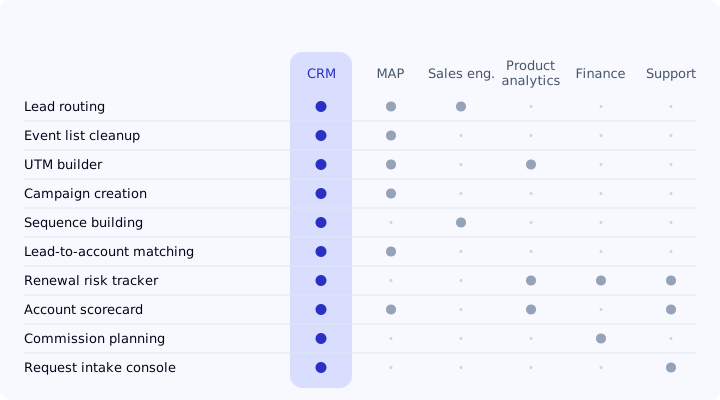
The ten apps and the systems each one reads from or writes to. Every one of them touches the CRM.
Lead routing that handles your exceptions
Your CRM assigns leads by segment and geography. Routing tools add round robin, rep availability, and handoff to a booking link. None of them handle your exceptions, which is why someone still checks the lead queue every morning.
Build: routing that assigns by segment and territory, with the exceptions written into the app instead of living in someone’s head. Named accounts that always go to one rep, whatever the geography. Cover for reps who are out. Partner leads that skip the queue. Answer two questions before you start: where does a lead go when it matches no rule, and which rule wins when two apply. Most of the app is those two answers. How to build lead routing that assigns in seconds
Where it stops: someone in sales ops adds a new value to the segment picklist. The app doesn’t break. It stops recognizing that segment and sends those leads to the default owner instead. You find out when a rep asks why a named account ended up in the general queue.
Event list upload and cleanup
Every marketing automation platform has an import wizard, and it does what it promises. Map the columns, dedupe on email, load the file. A badge scan export is messier than that. Job titles in six formats, inconsistent capitalization, a few hundred current customers in the list, and a couple of competitors.
Build: the pass that runs before the import. Clean the titles up so they match the role values you report on. Dedupe against the CRM, not just against the file. Suppress customers and anyone sitting in an open opportunity. When the app isn’t sure about a row, have it hold the row back rather than guess. How to build lead import and validation
Where it stops: it runs on one laptop, when the person who owns that laptop has time. That person is at the next event. The list sits for a week, and a week is most of what the list was worth.
A UTM builder that enforces the naming convention
The naming convention lives in a doc, and nothing checks it. The first time someone builds a tracking link in a hurry, part of your reporting goes wrong quietly, and you find out when two numbers in the board deck don’t agree. One ops person described setting up UTM sources as not difficult, just annoying. That’s the kind of job that gets automated first.
Build: a form that takes a campaign, generates the links, and rejects anything that breaks the convention. Keep the convention itself in one place the app reads, so changing it later is an edit rather than a rebuild. How to build a campaign attribution pipeline
Where it stops: the convention changes and someone updates the doc. Nobody updates the app, so it carries on enforcing last quarter’s rules, and two reports that should match stop matching.
Campaign creation across the MAP and the CRM
Marketo and Salesforce stay in sync once both campaign records exist. Creating them is the manual part. A campaign in the MAP, a matching one in the CRM, the same name in both, the right folder, the tracking set up. Teams call this a very manual process, and it’s often the second thing anyone builds.
Build: one form that creates both records and links them together. Then make that form the only way to create a campaign. If people can create one another way, some of them will. How to build a CRM to marketing automation sync
Where it stops: the app logs into both systems as the person who built it and creates every campaign under their name. That works until their password resets or their access changes. Then every campaign in the queue fails at once, and one person can fix it.
Sequence building
Your sales engagement tool builds sequences perfectly well. The delay happens before anyone opens it. A rep asks ops for a sequence, ops builds the steps and applies the templates, and the sequence is ready three days later.
Build: a short form that takes the brief, assembles the sequence from approved templates, and loads it. Decide which parts a rep can change and which they can’t. Skip that and you’ve built a faster way to send off-message email. How to build a sales engagement sync
Where it stops: nobody else can open it. Requests still land in Slack and the same person still runs them. The work got quicker and the queue stayed where it was.
Lead-to-account matching
Matching on exact domain is built into your CRM and into the routing tools, and it handles the easy cases. It misses subsidiaries, regional domains, and the buyer at an account you already own who signed up with a personal email address.
Build: matching that uses several signals at once and attaches a confidence level to every result. Send anything below your threshold to a queue someone looks at. Record what the app matched on for every row, including the rows it gets right. How to build lead to account matching
Where it stops: those judgment calls aren’t written down anywhere. When two reps argue over who owns an account on a deal worth arguing about, nobody can see what the app matched on or where it guessed.
A renewal and churn risk tracker
A customer success platform scores health using the data you’ve loaded into it, which is usually tickets and activity. The signals that predict a bad renewal sit somewhere else. Usage in your product analytics tool, invoice history in NetSuite, the last real conversation in the CRM.
Build: one view per account that reads all four, with a risk flag on top. Agree what at risk means with the CS lead before you write any of it, and keep that definition somewhere a non-technical person can read. How to build customer health signals
Where it stops: the flag gets quoted in a QBR before anyone has agreed what it means. Now a number from a side project is in front of the CRO, the definition lives in one person’s code, and nobody can check what the app was reading when it produced last quarter’s version.
An account scorecard
The scoring features in your MAP and your CRM each score what they can see. A fit and engagement score people trust needs firmographics, product usage, support history, and pipeline history. That’s four systems, so it’s nobody’s feature.
Build: one score per account, with the weighting kept in a table rather than buried in the logic, so changing it is an edit. Show the inputs next to the score. Sales won’t trust a number they can’t take apart.
Where it stops: it runs locally, so sharing it means pasting screenshots into a deck every week. Three teams ask for access, and the honest answer is that you have nowhere to put it and no way to let them in.
Commission planning
Commission software handles standard plans well. Yours has accelerators, splits on team deals, a clawback rule, and three exceptions someone negotiated last year. Plenty of teams still run the whole thing in a spreadsheet with a lot of manual approvals.
Build: the calculation first, run against last quarter’s closed deals, so you can check it against numbers that have already been paid. Then the statements. Then move the approvals into the app. How to build a commission data to payroll sync
Where it stops: the approvals stay in email and DMs. Six months later a rep challenges a number, and working out who approved what means searching an inbox. A wrong answer here costs more than anywhere else on this list, and takes the longest to unpick.
An intake console for everything the team gets asked for
Requests arrive in four places, and a ticketing tool moves them to a fifth. It still won’t ask for the right information up front, and it won’t tell you what’s coming in by type.
Build: one front door, with different required fields for each type of request so nothing arrives half-specified. Report on volume and age. The reporting is the real reason to build it, because it’s the only way this team can show what it’s absorbing. How to automate request intake forms
Where it stops: it turns into real infrastructure almost immediately. Four teams route work through it, and it belongs to the person who built it in the gaps between other work. When they change roles, it belongs to nobody.
What decides whether it’s still running next quarter
Every stuck point above happens after the app works. A field gets renamed. A password resets. The person who built it takes a week off. A second team asks for access. The build is finished by then, and the app is on its own.
So that’s the part to sort out before the next one. What has to sit underneath an app so it keeps running when nobody is watching it, and so somebody else can pick it up.
The RevOps guide to vibe-coding GTM apps that last
Before the next app goes live: what has to sit underneath it so it keeps running when nobody is watching, and someone else can take it over.
Download the guide →Sources +
- Zylo, 2026 SaaS Management Index, January 29, 2026.
- Distribution Engine pricing, G2 pricing tab; corroborated at “from $20 per user, per month” by Salesforce Ben, July 10, 2026.

