.DkNUKaKx_ZLAT4m.webp?dpl=dpl_4BmuHqwsegU1qdsYeBJiSqLFL1qp)









Ask an agent to update a customer’s renewal, and in a typical setup it goes through a gateway, then Salesforce’s MCP server, then Salesforce’s API. Before it does anything, it has loaded the tool definitions of every server it can see. Anthropic measured that load on five popular servers, GitHub, Slack, Sentry, Grafana and Splunk: 58 tools and about 55,000 tokens, gone before the conversation starts.
The short answer. An API is how a system exposes its functions to software. MCP is how an AI agent finds and calls tools. Most MCP tools are a layer over an API, so for an enterprise the real question is not MCP or API. It is where the governed layer sits: in front of a separate MCP server for every system, or directly on the APIs.
MCP vs API at a glance
| API | MCP | |
|---|---|---|
| What it is | A system's interface for other software, such as Salesforce's REST API | An open protocol for AI applications to discover and call tools |
| Who calls it | Code a developer wrote for a known task | An agent that decides at run time which tool to use |
| How it is described | Docs or an OpenAPI spec, read by a developer | Tool names, descriptions and schemas, read by the model |
| Where the work happens | In the system behind it | Usually in an API call the MCP tool makes for the agent |
| What it costs to call | The request itself | The request, plus the tool definitions and results the model reads |
Most MCP servers are a layer over an API
A Salesforce MCP server does not hold your opportunities. It describes a set of tools to the agent, and when the agent calls one, it makes a call to Salesforce’s API and hands the result back. The same is true of almost every MCP server for a business system. MCP took away the custom glue each AI application used to need for each tool. It did not take away the API.
That matters because it means there are two ways to give agents governed access to a system. You can run the vendor’s MCP server and put a proxy in front of it. Or you can connect to the API yourself and publish governed MCP tools from one layer.
What stacking MCP servers costs
The first way is the default, because a vendor server is quick to switch on. The costs show up once there are several of them.
- Tool definitions fill the context. Most MCP clients load every tool definition from every connected server at the start of a session. In Anthropic’s measurement, GitHub’s server alone was 35 tools and about 26,000 tokens and Slack’s was 11 tools and about 21,000. Those are thorough servers, which is the point: each tool you might need costs context whether you use it or not. Add Jira, at about 17,000 tokens on its own, and the overhead passes 70,000 before any work begins.
- Results pass back through the model. Anthropic’s engineers put the second problem plainly: “Every intermediate result must pass through the model.” A server that returns a full API response, when the agent needed three fields, fills the context again.
- Every server is its own security domain. The OWASP MCP Security Cheat Sheet treats each MCP server as an untrusted, independent domain to isolate. Four servers means four places your credentials live and four logs to reconcile, plus tool definitions on each one that can change after you approved them.
- One more hop. A proxied call goes agent, gateway, vendor server, API. The vendor server is one more thing to run, patch and trust.
Proxying vs one MCP layer built on APIs
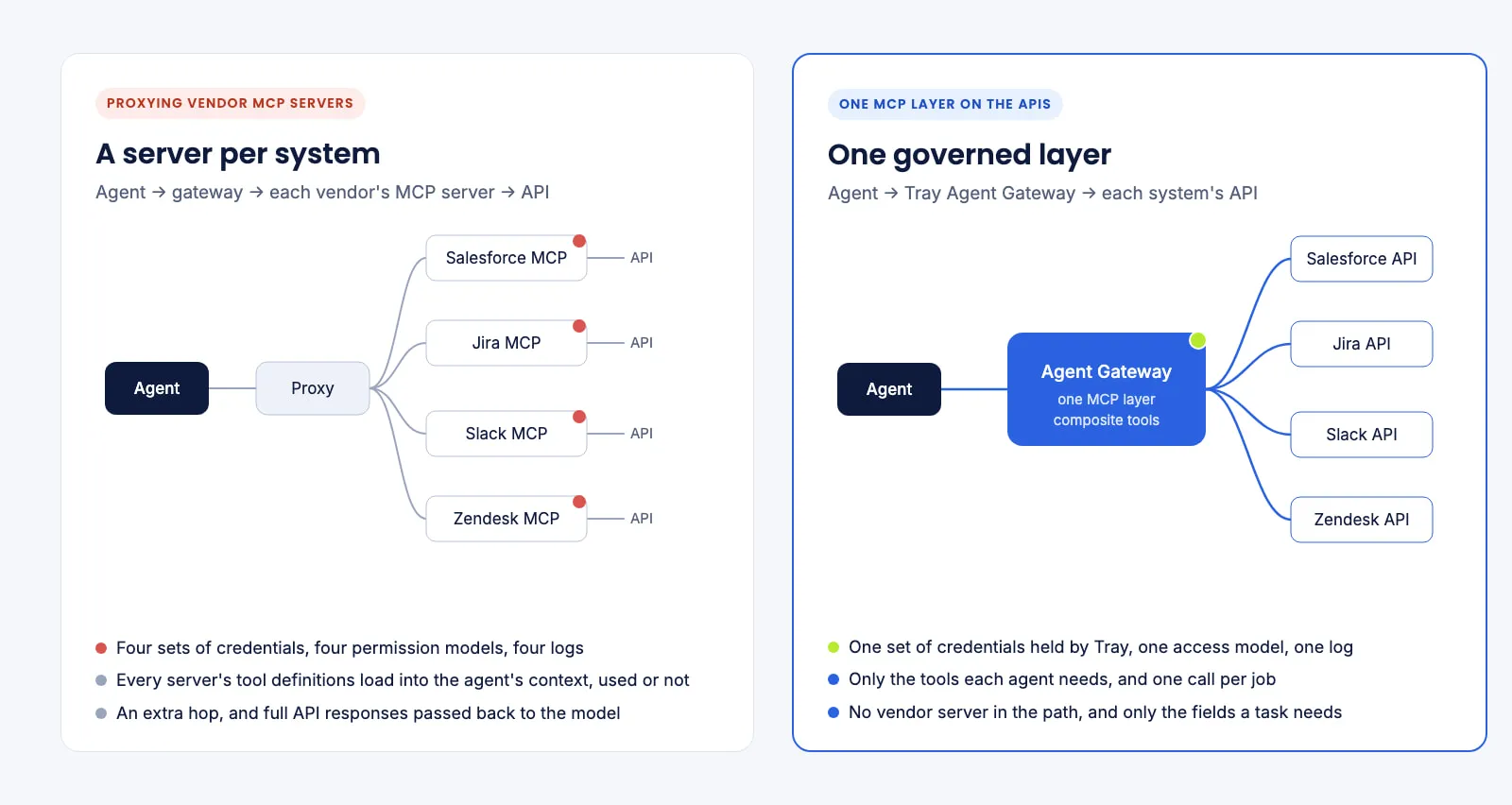
| Proxying a server per system | One MCP layer on the APIs | |
|---|---|---|
| Path of a call | Agent, gateway, vendor MCP server, API | Agent, MCP layer, API |
| Tool definitions loaded | Every tool on every connected server | The tools each agent is given |
| What comes back | Often the full API response | The fields the task needs |
| Credentials and permissions | One set per server | Held and scoped in one place |
| Audit | The gateway's log, plus each server's own | One log for every call |
| Multi-step jobs | The agent chains raw tools and works out the order | One composite tool runs the same steps every time |
| Best when | You depend on servers you already run | You want fewer things to govern |
Building on the API is also how the token cost comes down. Anthropic’s own fixes for the same two problems are to load tools on demand and to let agents run code, and in one of their examples that took a job from 150,000 tokens to 2,000. A composite tool goes after the same waste from the other side: one tool that does a multi-step job in one call, with one definition and one compact result, instead of dozens of raw tools and their responses.
What one layer looks like in practice
Agent Gateway for MCP is built this way. It connects to each system’s API through Tray’s connectors and publishes governed tools from one MCP layer, so each call is tied to a named person, can run on their own credentials, is scoped to its job and lands in one audit log, whichever client makes it. A Customer 360 tool pulls a customer’s Salesforce, Zendesk and Stripe records in a single call, which cuts token use by up to 10× and runs the same steps every time.
J.W. Pepper shows the result at scale: 500+ MCP tools reduced to about 20 governed workflows, with zero raw database access, launched in weeks. As Marcus Dubreuil put it, the workflows started to become “these little drops of determinism into what the agent can do.”
When proxying is the right call
Building on the API is not always the answer. Proxy a server when:
- A team depends on a vendor’s MCP server for a system your layer does not connect to.
- The vendor’s server offers something its API does not.
- It is one developer working in one tool, where a vendor server is the fastest start and governance can wait.
Agent Gateway doesn’t sit in front of vendor MCP servers, because for the systems it connects to it doesn’t need to. For the cases above, a proxying gateway is the better fit. The MCP gateway comparison sets out which products proxy, which publish their own tools, and which do both.
How to decide
- Count the servers. One or two, for a few developers, and proxying is fine. Five or more, across teams, and the credentials, logs and tool definitions multiply.
- Check what loads. Ask how many tool definitions each agent sees at the start of a session, and what that costs in tokens.
- Look at the result size. If a tool returns whole records when the task needs a status, the model pays to read the rest.
- Ask who the call runs as. Every call should run as the person asking, not a shared account. The MCP security checklist covers the rest of the controls.
Sources
- Anthropic, Introducing advanced tool use on the Claude Developer Platform, 24 November 2025: tool definition token counts for GitHub, Slack, Sentry, Grafana, Splunk and Jira.
- Anthropic, Code execution with MCP: building more efficient agents, 4 November 2025: intermediate results passing through the model, and the 150,000 to 2,000 token example.
- OWASP, MCP Security Cheat Sheet: each MCP server as an independent security domain.
- J.W. Pepper figures from Tray.ai’s customer story.