


















If you’re an IT leader, Gartner® has a prediction that should be on a sticky note on your desk right now. By 2027, cybersecurity incidents tied to prompt injection, data access, or agent misconfiguration will impact over 40% of enterprise MCP deployments.
Source: Gartner, “Manage the Cybersecurity Risks of the Model Context Protocol,” November 2025
The short answer. The main MCP security risks are prompt injection through untrusted content, tools with more access than the job needs, and agents that can send data outside the company. To close them, make every call as the user rather than a shared account, scope each tool to one job and start read-only, ask a person before destructive or financial actions, and log every call with its parameters and user. Fewer MCP servers make all of this easier, because one governed layer means one place to set access and one log to audit.
It could happen today. Many organizations are currently deploying MCP and making decisions about how tools are exposed, who controls access, what permissions agents inherit. Those decisions will determine whether an organization is in that 40% or not.
Here’s the scary part: Most of them are not making those decisions deliberately. They are barely making them at all.
How MCP adoption actually happens
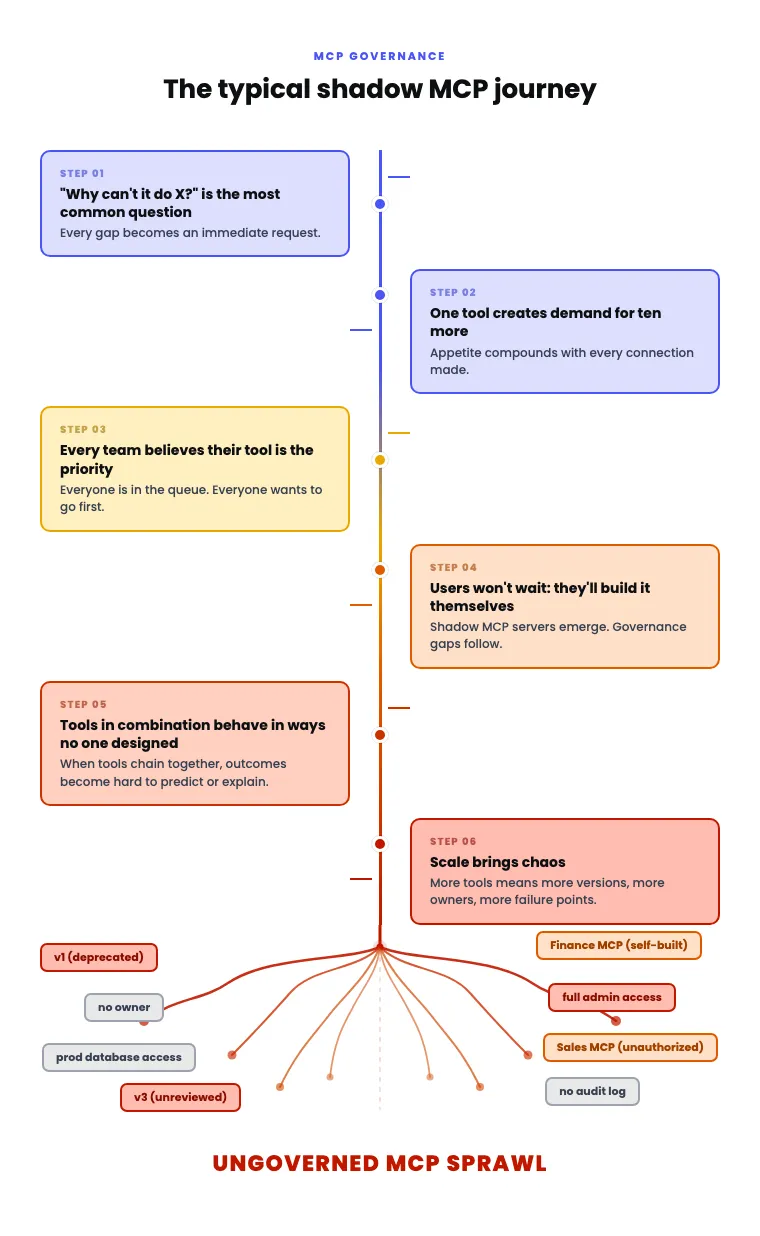
MCP adoption rarely begins with a governance conversation. It begins with someone on the engineering team noticing that their AI assistant can now take action in real systems, not just generate text. Then someone in finance builds their own MCP server to automate a reporting workflow. Then someone in sales connects their CRM. Then the requests start arriving in IT’s queue. But instead of requests for API integrations, they’re for MCP connections.
Marcus Dubreuil, Director of Systems Architecture at J.W. Pepper, saw this first-hand. “What used to be ‘this service has an API, can we integrate it?’ turned into ‘this service has MCP.’”
That change in language represents a change in risk profile. APIs were governed because IT controlled the integration layer. MCP tools, in many deployments today, are governed by no one. They run on local machines, connect directly to production systems, and inherit the full permissions of the user operating them. A researcher at Queen’s University studying 1,000 MCP servers found that 33% had critical vulnerabilities. Another study found a 92% exploit success rate when using just ten unmanaged MCP connections simultaneously.
The scale of exposure is building faster than most IT teams realize.
The three risks that compound each other
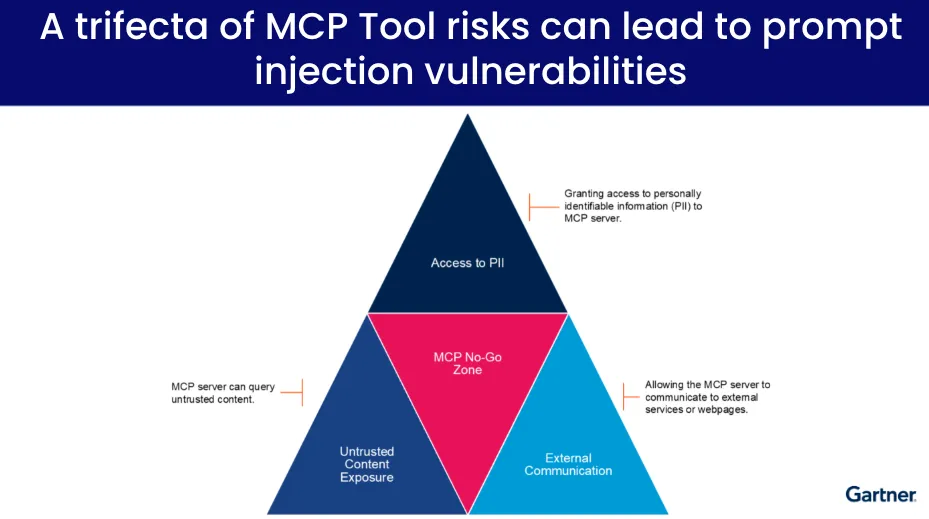
1. Prompt injection through untrusted content.
MCP servers that query external sources, web pages, documents, or user-generated content expose agents to inputs that can redirect their behavior. A well-crafted prompt embedded in a web page or email can instruct an agent to take actions the user never intended. If that agent has broad system access, the damage can be substantial before anyone notices something went wrong.
2. Overprivileged tool access.
Most MCP servers in use today are essentially API wrappers. They expose everything the underlying system allows and leave it to the agent — or the user — to restrict what actually gets used. In practice, that restriction rarely happens. The result is agents operating with far more access than they need for any given task. As Dubreuil put it: “One of the challenges with how MCP works that I learned really quickly is that it effectively forwards any access control that the user has to the AI agent. You’re effectively saying, ‘you’re me now.’”
3. External communication and data leakage.
MCP servers permitted to communicate with external services or pages create a path for sensitive data to leave the organization. This is not a theoretical risk. It is a structural property of how many MCP deployments are configured today.
Source: Gartner, “Best Practices to Counter MCP Security Risks,” 2026
When these three conditions overlap — and they frequently do — Gartner identifies the result as a prompt injection vulnerability. The threat is not a single failure mode. It is a set of conditions that compound each other silently until something goes wrong.
The shadow MCP problem
The security risks would be manageable if the MCP landscape were centrally visible. It is not.
Organizations that spent a decade eliminating shadow IT are now watching a near-identical pattern emerge with MCP. Teams outside IT build their own servers. Developers spin up MCP connections on local machines. Business users grant AI agents administrative access to systems because the alternative is waiting in a queue. Each new connection adds to an invisible inventory of tool access that IT has no way to audit.
The demand dynamics make this worse. Connecting one system to an AI agent immediately generates demand for ten more. Every business unit believes their use case is the priority. Users who can not get what they need through official channels will find another way. And when chained tools start behaving in ways that no individual tool was designed to produce, tracing the cause becomes extremely difficult.
The result is a fragmented MCP landscape — multiple owners, multiple versions, multiple permission surfaces — with no shared visibility into what is running, what it has access to, or what it is doing.
Why “add controls later” does not work
The intuitive response to this situation is to pilot MCP now and layer in governance once the use cases are proven. From a business perspective, that makes sense. Governance can slow things down. Slowing down is never seen as a good business practice.
The problem is that MCP governance is not additive. Once agents are running across the business with broad tool access and no central oversight, the act of introducing controls disrupts the workflows that have already been built around the absence of controls. Users who got used to unconstrained access push back. IT inherits a remediation project instead of an architecture decision.
Then costs begin to compound. Ten unmanaged MCP servers with an average of 15 tools each, at roughly 500 tokens per tool definition, consumes 75,000 tokens from the context window before a single query is answered. That is token spend going directly to overhead rather than to the work the agent is supposed to do. At scale, across multiple teams and agents, the cost impact will start putting on the brakes for you.
The organizations that avoided the shadow IT remediation cycle did not do it by adding governance after the fact. They did it by making governed tooling available before the ungoverned version became entrenched.
The architectural response
The correct response to MCP risk is not to restrict adoption. It is to make the governed path faster than the ungoverned one.
That means IT taking ownership of MCP as an infrastructure layer, in the same way it took ownership of API management and integration. It means providing a centralized environment where tools are registered, approved, versioned, and monitored — so teams can access what they need through a managed path instead of building their own.
Concretely, this looks like:
- A central registry of approved MCP servers and tools
- RBAC controls that determine what each user or agent can access
- Audit logs that capture who called what tool and when
- Rate limiting that prevents runaway token spend
J.W. Pepper took this approach. When Dubreuil implemented centralized MCP governance using Tray Agent Gateway for MCP, things began to accelerate. IT became the team that made MCP adoption possible rather than the team that had to clean it up afterward. “We’ve removed a lot of risk,” Dubreuil said. “There’s governance around that now.”
The other dimension of the architectural fix is tool design itself. Raw MCP tools give agents access to broad system capabilities and rely on inference to determine what to do with them. That is where hallucinations, inappropriate actions, and unpredictable behavior come from. Purpose-built tools that encode specific business logic — look up this order, update this ticket, check this status — remove the ambiguity. The agent gets a narrower set of actions it can call, each of which behaves the same way every time. That is how you get reliability, not just access.
The MCP security checklist
When an agent moves a Salesforce deal to the next stage, Salesforce should see the sales rep who asked, apply that rep’s permissions, and leave a record of the change. Most of MCP security comes down to making that true for every call. These nine controls follow the OWASP MCP Security Cheat Sheet and the MCP project’s own authorization and security best practices guides.
- Make every call as a named person. A server that acts with its own broad privileges, whoever is asking, is what OWASP calls the confused deputy problem. Bind each call to the user’s identity and permissions, never a shared service account.
- Use OAuth the way the spec defines it. Follow the MCP OAuth 2.1 profile, check that each token was issued for that server, and never pass an MCP access token on to an upstream API.
- Scope each tool to one job. Ask for the narrowest scope that works (read-only mail, not full mailbox access), prefer short-lived tokens, and add write access only once the logs show who did what.
- Treat tool definitions as code. Review every tool’s description and schema before approving it, and review again when it changes. A definition that changes after approval, a “rug pull”, can turn a trusted tool into a malicious one.
- Treat every tool result as untrusted. Content returned by a tool, even from an approved server, can carry instructions meant for the model. Enforce authorization in code, not in the model’s reading of the result.
- Ask a person before actions that can’t be undone. Require confirmation for destructive, financial or data-sharing operations, and show the full parameters, not just the tool’s name.
- Log every call. Record the tool, its parameters, the user and the time, send the logs to your SIEM, and redact secrets and personal data.
- Know every server in use. Install servers only from trusted sources and keep an inventory, including the shadow MCP servers teams run on their own machines.
- Run fewer servers. OWASP treats each MCP server as its own security domain to isolate. A team with separate servers for Salesforce, Jira and Slack has three sets of credentials, three permission models and three logs to keep straight.
One MCP layer instead of a server per system
Most of this list gets easier when there are fewer servers to govern. That is the design behind Agent Gateway for MCP. Instead of routing agents through a separate MCP server for each system, Tray connects to each system’s API directly through its connectors and publishes every tool through one governed MCP layer. Each call is tied to a named person, can run on that person’s own credentials, is scoped to its job and is logged in one place, and Tray holds the credentials.
It also cuts the overhead that proxying vendor servers adds. A proxied setup adds a hop, loads every server’s tool definitions into the agent’s context, and often passes full API responses back into it. Anthropic measured the definitions alone for five popular servers at about 55,000 tokens before a conversation starts; MCP vs API walks through the numbers. A composite tool, such as one that pulls a customer’s Salesforce, Zendesk and Stripe records in a single call, returns only what the task needs. That cuts token use by up to 10× and runs the same steps every time. The trade-off: if a team needs a particular vendor’s MCP server to stay in the path, Agent Gateway does not sit in front of it.
What to do now
Three things matter most in the near term.
First, inventory your MCP exposure. That means knowing which MCP servers are running in your environment, who built them, what systems they connect to, and what permissions they operate with. For most organizations, this audit will surface connections that IT did not authorize and did not know existed.
Second, assume prompt injection attacks are coming. Do this as an operational posture. Any MCP server that queries external or user-generated content is a potential injection surface. Controls need to be in place before the first attempt, not after.
Third, enforce a policy approval path for new MCP connections before the backlog makes that impossible. The window to get ahead of shadow MCP is narrow. Once the pattern is entrenched, the remediation cost is significantly higher than the governance cost would have been.
The timer on that Gartner prediction is running. The organizations that manage MCP as infrastructure — with the same rigor applied to any other system access layer — are the ones that will not end up in that 40%.
More in this series:
- MCP explained: Everything you need to know about MCP
- User identity: Your MCP service works. But can you answer this question?
- Shadow MCP: Shadow MCP is the new shadow IT
- Predictable execution: Drops of determinism: the fix for MCP agents that keep getting it wrong
- Token costs: MCP is making your AI bill unpredictable. Here’s why.
- Observability and audit: Flying blind: Why MCP needs its API management moment
- Governance: MCP governance in the enterprise
- The 2026-07-28 spec: The biggest MCP upgrade yet makes MCP harder to depend on
- IT checklist: Back from Gartner App Summit. Here’s your MCP checklist.
- Choosing a gateway: The 11 best MCP gateways for enterprise governance, compared
- MCP vs API: Why you shouldn't proxy every MCP server
Go deeper
Getting MCP right: The five properties every enterprise deployment needs
The framework for evaluating where your current MCP deployment stands, and where the gaps are. Security, execution, token costs, auditability, and governance.
Read the ebook →Gartner, “Best Practices to Counter MCP Security Risks,” Aaron Lord, Keith Guttridge, Alex Coqueiro, February 2026.
Gartner, “Manage the Cybersecurity Risks of the Model Context Protocol,” November 2025.
GARTNER is a registered trademark and service mark of Gartner, Inc. and/or its affiliates in the U.S. and internationally and is used herein with permission. All rights reserved.
Gartner does not endorse any vendor, product or service depicted in its research publications and does not advise technology users to select only those vendors with the highest ratings or other designation. Gartner research publications consist of the opinions of Gartner’s Research & Advisory organization and should not be construed as statements of fact. Gartner disclaims all warranties, expressed or implied, with respect to this research, including any warranties of merchantability or fitness for a particular purpose.


