
Tray iPaaS / Data Integration
Data integration tools that keep Salesforce, Snowflake and every other system in step.
An 8-person team at IBM spent 40 hours a week pulling data. On Tray it takes 5 minutes a day. Visual pipelines, field mapping and in-flight transformation sync in real time, on a schedule or on demand.
Thanks. Someone from our team will be in touch soon.
What it does.
Visual data pipelines
Build data flows without infrastructure code, with filtering, routing and complex transformations in the same view.
Real-time sync
Keep systems in step as data changes, in both directions, with field mapping and deduplication handled for you.
Flexible scheduling
Run on a schedule, start from an event or push in real time, and choose per pipeline.
Mapping and transformation
Map, reshape, enrich and filter data in transit, and use custom logic where the visual mapping stops.
Any source, any destination
Move data from Salesforce, Zendesk and Stripe into Snowflake, Redshift, BigQuery or Databricks.
Reliable at volume
Pagination, rate limits, retries and partial failures are handled for you, so large loads finish without babysitting.
Every source in, one table out, every hour
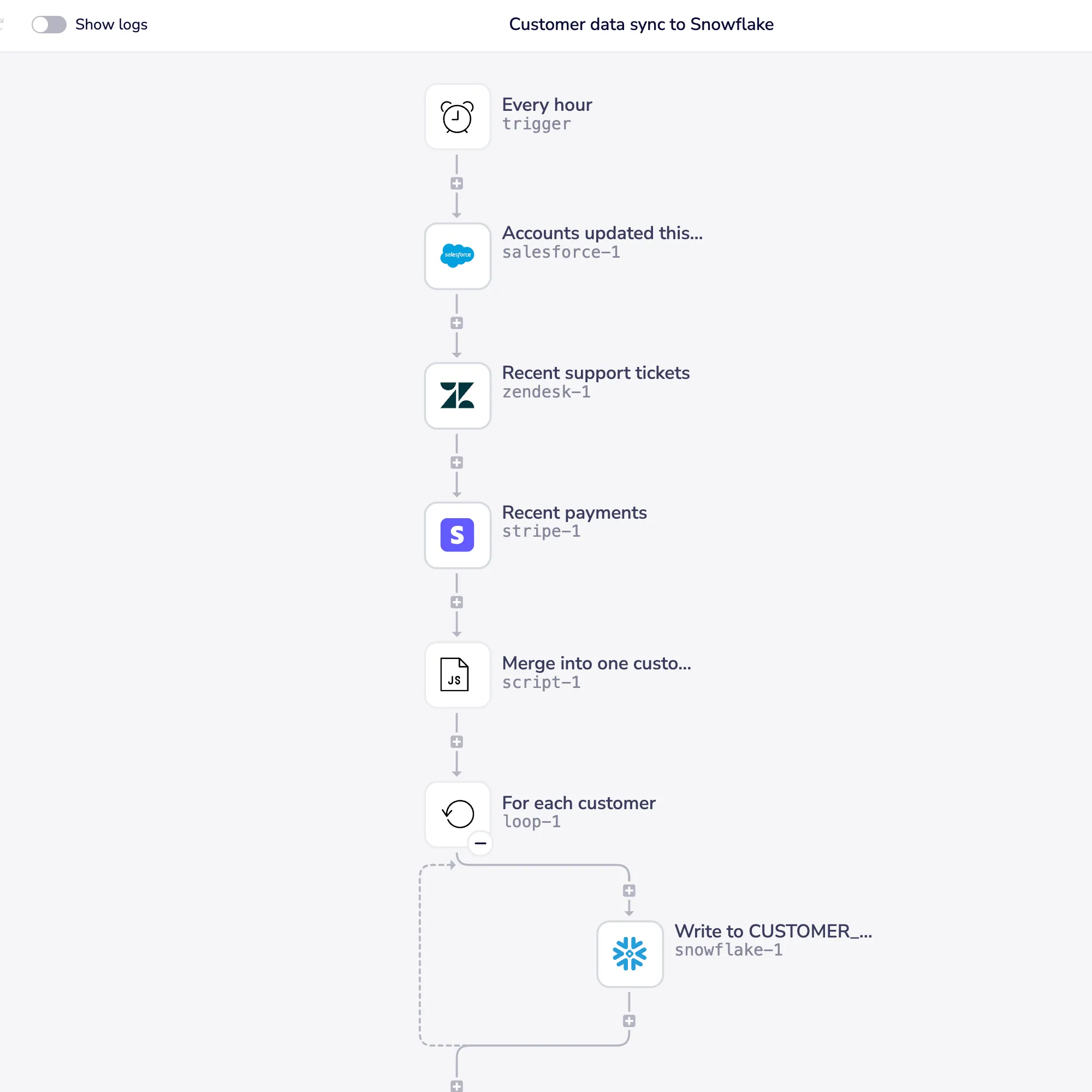

- an 8-person team's weekly data pull, now 5 minutes a day
- 40 hrs → 5 min
“We were struggling with pulling [data] out of our production environment, which took an 8-person team 40 hours a week. We got that down to 5 minutes a day, and it's fantastic.”

Prepare the data in the same pipeline
Data integration moves the data. The SQL Transformer prepares it in the same pipeline, with no separate ETL system to run. Reshape, join and transform bulk data in flight with ANSI SQL. Build pipelines on the Tray Build canvas, or describe them to Claude Code or Codex and let Tray Headless build them. The Development page covers both.
- SQL Transformer: reshape, join and transform in flight using ANSI SQL
- No separate ETL system, because transformation runs where the workflow runs
- Feeds Snowflake, Redshift, BigQuery and Databricks
- Build on Tray Build or with Claude Code and Codex through Tray Headless
What you can build
See what teams build with Data Integration.
-
Salesforce data in Snowflake, kept current
Sync accounts, contacts and opportunities to Snowflake as they change, so sales and data teams read the same number.
-
Six sources into one schema
Pull Salesforce, Zendesk, Stripe and Marketo into a single Snowflake schema instead of stitching exports together in a spreadsheet.
-
NetSuite and Salesforce in sync
Move orders, invoices and account data both ways with conflict resolution, so finance and sales work from the same record.
-
A clean reporting schema, on a schedule
Pull operational data, reshape it into a reporting schema each night and load it to BigQuery or Redshift for analysts.
Frequently asked questions
What are data integration tools?
Data integration tools move data between systems and prepare it on the way, for example from Salesforce and Stripe into a warehouse like Snowflake. Tray does this with visual pipelines that run in real time, on a schedule or on demand.
What is a data integration platform, and how is it different from ETL?
A data integration platform connects your systems and moves data in either direction. Classic ETL tools mostly load a warehouse in batches. Tray also syncs operational systems and transforms data in flight with the SQL Transformer, so you do not run a separate ETL system.
How much technical skill does it require?
Most data flows are built visually with no code. Custom JavaScript is available for transformations that need it, and most use cases never get there.
How does it handle schema changes?
Field mapping lives in the workflow, so when a source API changes you update the mapping in one place. Alerts flag unexpected changes before they break a pipeline.
Which warehouses and sources does it connect to?
Tray connects to Snowflake, Redshift, BigQuery and Databricks, and to 12,000+ apps, databases, APIs, and services as sources, including Salesforce, Zendesk, Stripe and NetSuite.
Is data secure in transit?
Credentials are stored securely and access is controlled by role. Tray is SOC 1 and SOC 2 Type 2 audited, with audit logs for every run.
How do I build a data pipeline on Tray?
Use the Tray Build canvas, or describe the pipeline to Claude Code or Codex and let Tray Headless build it. You can open and edit the result on the canvas either way.
How is data integration priced?
Pricing is usage-based, and one usage balance covers integrations, AI-built apps and document AI. You can start free and talk to us when your pipelines grow.
Build it
Step by step guides with copy-paste prompts for your coding assistant, and what it takes to run each one in production.








Solutions that run on Data Integration.
Data Integration
Data integration in seven stages, from database changes to the warehouse and back out through APIs. What breaks at each stage and how to build it.
Reverse ETL
How reverse ETL moves warehouse data from Snowflake, BigQuery and Databricks into the CRM and other tools, where it breaks, and how to build each stage.
Customer 360
How to build a customer 360, or single customer view, in seven stages. What breaks at each stage and how to match records and put the result back in the CRM.
One platform
Six capabilities, built as one iPaaS.
Process automation, data integration, API management and MCP, connectivity, embedded integration and document processing , all in Tray iPaaS, sharing the same connectivity, governance layer and data model. Not acquired and stitched. Built as one.
See Data Integration in action.
Walk through a scenario from your stack with a Tray.ai expert.
Thanks. Someone from our team will be in touch soon.