
Tray iPaaS / Intelligent Document Processing
Intelligent document processing that reads invoices, contracts and forms inside your workflows.
Avid Property Group: 3,000+ monthly invoices automated and $6M in consulting and software costs avoided. IDP software that extracts fields from invoices, contracts and forms, validates them against your rules and posts them to NetSuite or Salesforce.
Thanks. Someone from our team will be in touch soon.
What it does.
AI extraction
Pull structured fields from invoices, contracts, purchase orders and forms with LLMs and OCR. One setup reads many layouts, so you do not build a template per supplier.
Layouts, forms and tables
Read the body text, the form fields and the line-item tables of a document, so an invoice arrives as a vendor, a total and every line, not a block of text.
Document classification
Sort incoming documents by type, so invoices go to AP, contracts to legal and forms to the right team, before any extraction runs.
Validation rules
Check required fields, value ranges and formats, and cross-check against master data such as the vendor record or the purchase order.
Masking sensitive fields
Mask values such as bank details before they are logged or passed on, so a workflow can route a document without exposing everything in it.
Human review
Flag low-confidence fields for a person to correct and approve in Slack, email or a form, then the workflow resumes where it stopped.
Part of the workflow
Extracted data goes straight into NetSuite, Salesforce, SharePoint or any of the 12,000+ apps, databases, APIs and services Tray connects to, in the same run.
Audit trail
Every document, extraction and human correction is logged in the run history, for compliance and reconciliation.
Usage-based pages
Document AI is billed by the page from the same usage balance as integrations and AI-built apps, with nothing extra to buy.
Documents in, structured data out, inside the workflow
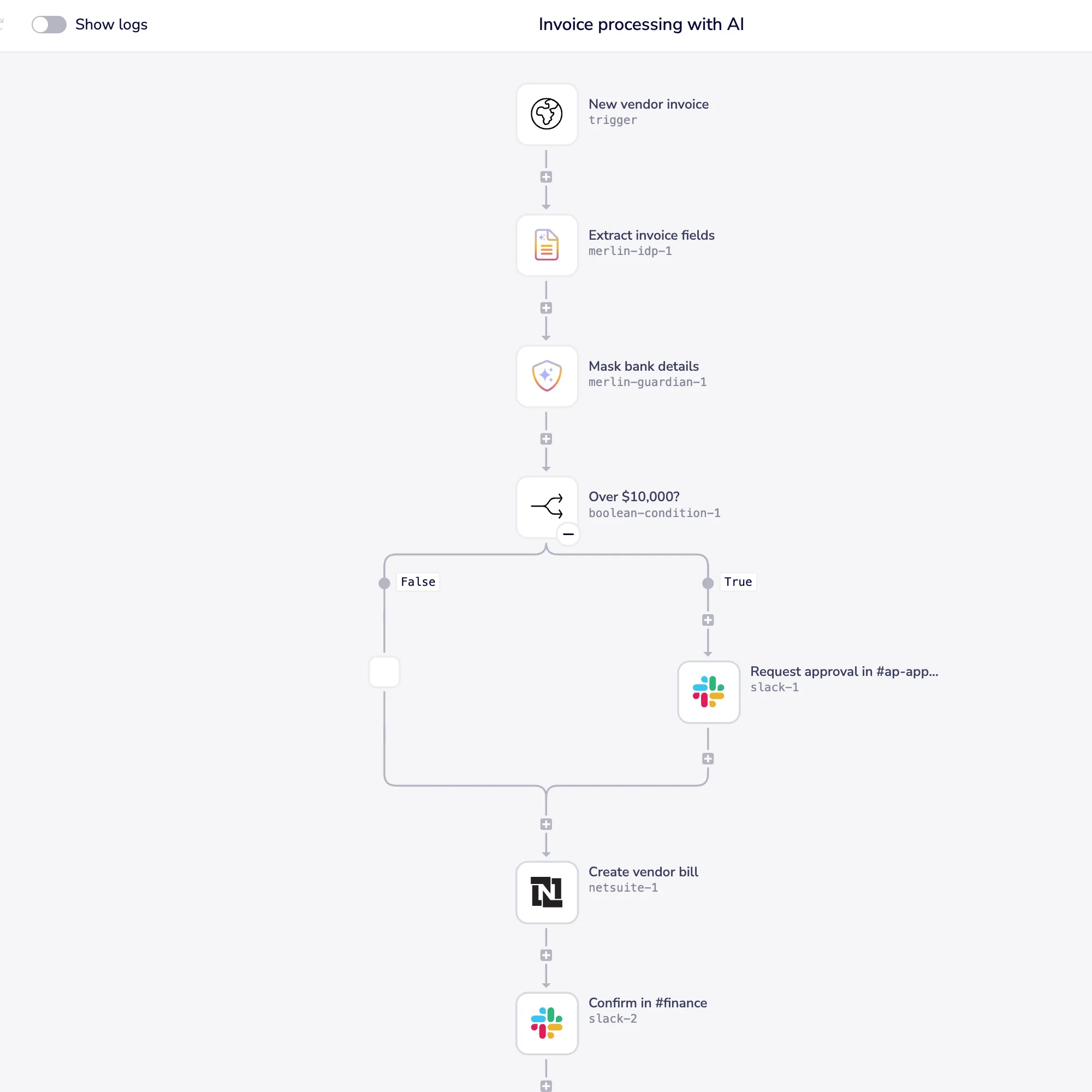
How intelligent document processing works in Tray
A document arrives, is classified, has its fields extracted, is checked against your rules, goes to a person only if something is uncertain, and is posted to the system that needs it. Each stage is a step on the canvas, so you can open a run and see exactly what was read and what happened next.
- Capture: a trigger watches email, SFTP, a shared folder or an API call for new files
- Classify and extract: AI reads the document type, then pulls the fields and line items
- Validate: rules and master-data lookups check the values before anything is posted
- Review and post: uncertain fields go to a person, clean ones go to NetSuite, Salesforce or SharePoint
- Build it on the Tray Build canvas, or describe it to Claude Code or Codex and let Tray Headless build it. The Development page covers both.
What you can build
See what teams build with Intelligent Document Processing.
-
Invoice processing
A supplier invoice lands in an inbox. Tray extracts the vendor and line items, masks the bank details, sends anything over $10,000 to Slack for approval and creates the bill in NetSuite. Finance teams run the whole flow as accounts payable automation.
-
Contract data extraction
Extract key terms, renewal dates and obligations from contracts into Salesforce, so legal stops reading every file to answer a renewal question.
-
Expense receipts
Extract merchant, amount and category from receipts, check them against policy and post to Concur or Workday.
-
New vendor onboarding
Extract data from supplier forms, validate required fields and create the vendor record in your ERP.
-
Purchase order matching
Read a purchase order and an invoice, compare quantities and prices line by line, and hold any mismatch for a buyer to resolve.
-
Inbound forms and applications
Turn scanned forms, onboarding packets and applications into records, and route each one to the team that owns it.
Frequently asked questions
What is intelligent document processing?
Intelligent document processing (IDP) turns unstructured documents like invoices, contracts and forms into structured data. It classifies a document, extracts its fields, checks them against your rules and sends the result to the system that needs it. Tray runs IDP as steps inside a workflow, so the data lands in NetSuite, Salesforce or SharePoint without anyone retyping it.
What is the difference between IDP and OCR?
OCR turns an image of a page into text and stops there. IDP also works out what the text means: which number is the total, which block is the vendor, which rows are line items. Tray uses OCR and LLMs together, so a layout it has not seen before still comes out as clean fields.
What should I look for in IDP software?
Look for extraction without per-supplier templates, validation against your own data, human review for uncertain fields, an audit trail, and a way to send the result into your systems. In Tray, IDP is a step in a workflow, so classification, review, approval and posting sit in the same run.
What can intelligent document processing be used for?
The most common uses are invoice and accounts payable processing, purchase order matching, contract data extraction, expense receipts, vendor onboarding forms and inbound applications. Any process where a person reads a document and types values into a system is a candidate.
Does IDP need document templates?
No. AI extraction handles variation in layout, so one setup can read invoices from many suppliers without a template for each. When a supplier changes their format, nothing needs rebuilding.
How accurate is the extraction?
Accuracy depends on document quality and type, so test with your own documents. Low-confidence fields are flagged for human review instead of failing silently, and every correction is logged, so you can see which fields people fix most.
How does human review work?
The workflow pauses on the uncertain field and sends it to a person in Slack, email or a form. They correct or approve it, and the workflow resumes from that point. Clean documents never wait for a person.
How do I stop a wrong value reaching my ERP?
Validate before you post. Add rules for required fields and formats, look the vendor up against your master record, and compare totals to the purchase order. Anything that fails goes to review instead of to NetSuite.
Where does the extracted data go?
Into any of the 12,000+ apps, databases, APIs and services Tray connects to, including NetSuite, Salesforce, SharePoint and Workday. You can also write it to a warehouse such as Snowflake for reporting.
How is IDP different from RPA?
RPA repeats clicks on a screen, so a layout change breaks it. IDP reads the document itself and passes clean data to the next step through the system's API, which does not depend on what the screen looks like.
Is document data kept secure?
Access is controlled by role, sensitive fields such as bank details can be masked, and every run is logged. Tray is SOC 1 and SOC 2 Type 2 audited.
How do I build document processing on Tray?
Add the extraction steps on the Tray Build canvas, or describe the process to Claude Code or Codex and let Tray Headless build it. Either way you can open the result on the canvas and edit it.
Can I use IDP for accounts payable?
Yes. Invoice capture, extraction, matching, approval and posting to the ledger run as one workflow. The accounts payable automation page walks through each stage and where invoices stall.
How is IDP priced?
Document AI is billed by the page and draws on the same usage balance as integrations and AI-built apps, with no add-ons. You can start on Tray Free and talk to us when document volume grows.
Build it
Step by step guides with copy-paste prompts for your coding assistant, and what it takes to run each one in production.









Solutions that run on Intelligent Document Processing.
Accounts Payable and Invoice Automation
Invoice processing and accounts payable automation, inbox to payment: where invoices stall, the systems involved, and how to build each stage.
Compliance Automation
Compliance automation in seven stages, from policy acknowledgment to audit evidence. What breaks at each stage and how to build each control.
One platform
Six capabilities, built as one iPaaS.
Process automation, data integration, API management and MCP, connectivity, embedded integration and document processing , all in Tray iPaaS, sharing the same connectivity, governance layer and data model. Not acquired and stitched. Built as one. Finance teams run it as accounts payable automation.
See Intelligent Document Processing in action.
Walk through a scenario from your stack with a Tray.ai expert.
Thanks. Someone from our team will be in touch soon.