
Tray iPaaS / Process Automation
Business process automation software with approvals, retries and an audit trail built in.
DocuSign gets 99% of leads to sales in under 3 minutes, up from 90% in under 10. Route a Jira request through Slack approval, provision in Okta and close the ticket in one workflow with branches, retries and human sign-off.
Thanks. Someone from our team will be in touch soon.
What it does.
Visual workflow builder
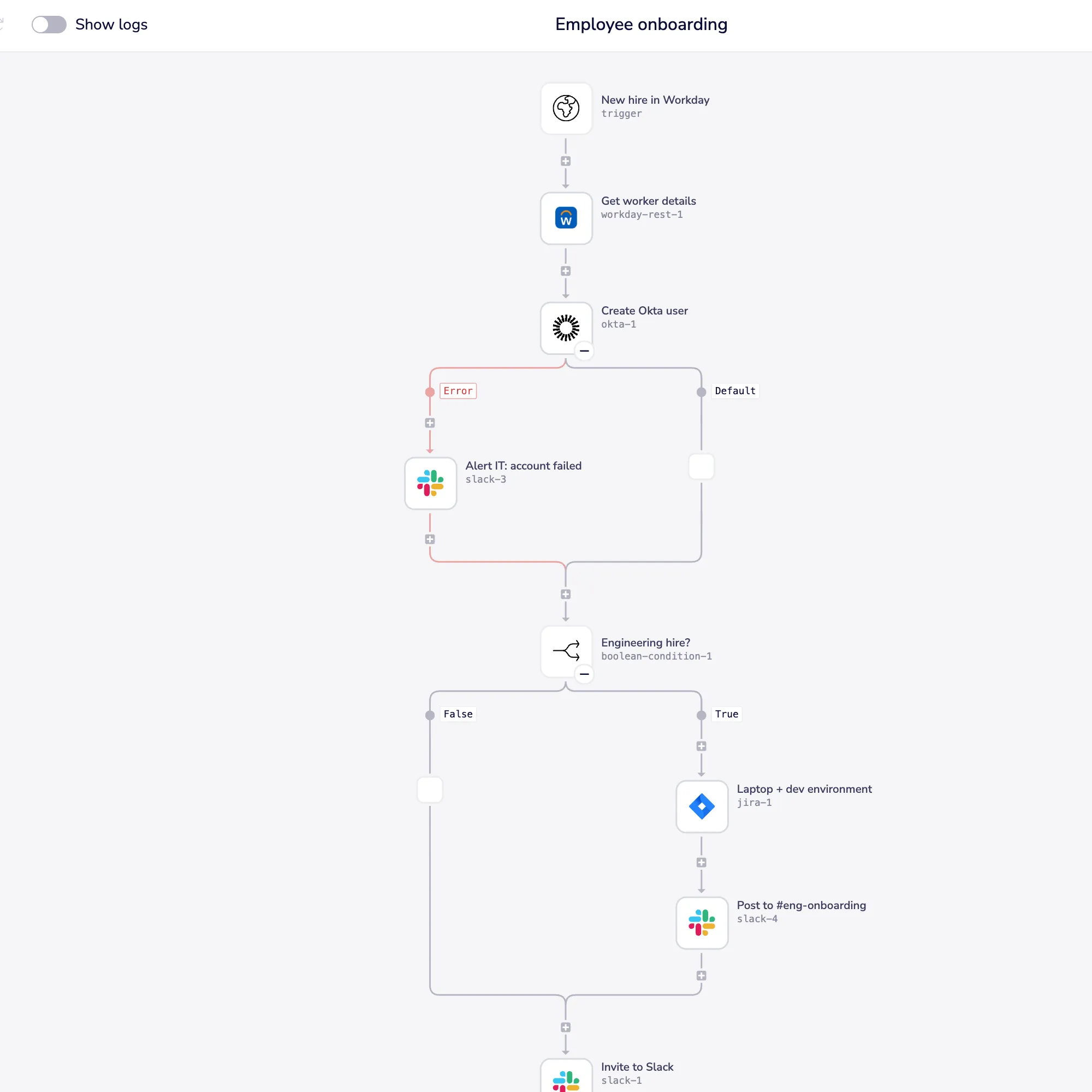
Build multi-step processes with branching, loops, conditions and parallel steps, with no code required.
Human approvals
Add an approval step anywhere, send it to Slack, email or a form, and the workflow resumes when someone approves.
Error handling and retry
Set error paths, retry rules and fallback actions, and get an alert when a person needs to step in.
Event-driven triggers
Start a workflow from a webhook, a schedule, polling or an event in another system.
Reusable sub-workflows
Package common logic once and share it, so teams stop rebuilding the same pattern.
Loop-level audit trail
A run's history shows each iteration of a loop, so you can see what happened to one record in a batch without rerunning the whole run.
Run data in your own dashboards
The Insights API returns active workflows, run volumes, failed runs by workflow and MCP tool-call totals, so a BI tool or an alert can read what the Insights Hub shows.
AI steps in the workflow
Add LLM calls, classification and extraction as steps, so the workflow automates the decision and not only the data movement.
Branches, error paths and approvals, on one canvas

- of leads to sales in under 3 minutes, up from 90% in under 10
- 99%
“Before implementing Tray we were sending 90% of our leads to our sales team in under 10 minutes. After implementing Tray we are sending 99% of our leads to the sales team in under 3 minutes.”

How you build process automation
Build on the Tray Build canvas, or describe the process to Claude Code or Codex and let Tray Headless build and run it. Both produce the same workflows, which you can see and edit on the canvas. The Development page covers both.
- Tray Build: a visual canvas for ops, analysts and developers
- Claude Code and Codex with Tray Headless: describe the process in plain language
- Every step, branch and condition stays visible, so what you see is what runs
- The Development page covers both ways to build.
What you can build
See what teams build with Process Automation.
-
IT request automation
Route a Jira request through Slack approval, provision in Okta and close the ticket.
-
Contract approval
Route a contract through legal, finance and executive sign-off by value, and let DocuSign trigger the next step as each party signs.
-
Invoice processing
Extract invoice data, match it to purchase orders, flag exceptions for review and post approved invoices to NetSuite.
-
Employee offboarding
Deprovision accounts in Okta, Google Workspace, Slack and Jira the moment HR closes the departure in Workday.
Frequently asked questions
What is business process automation software?
It runs a multi-step business process across your systems without manual handoffs. For example, a request arrives in Jira, a manager approves it in Slack, access is granted in Okta and the ticket closes. Tray runs that as one workflow.
What is AI workflow automation?
It is a workflow that uses AI for the judgment calls inside a fixed process. A support email arrives, an LLM step classifies it and extracts the order number, the workflow routes it, and a person approves any refund over your limit. The steps, branches and approvals are the ones you built. The AI step does the classification or extraction, and every run is logged.
How is this different from Zapier or Make?
Tray is built for processes that run a department, not a single task: branching across many systems, human approvals, retries when a system fails, and an audit trail for every run, with role-based access across workflows. Teams use it when a process has to be reliable and reviewed by IT.
Can non-technical teams build automations?
Yes. Ops and business teams can use the visual builder. Low-code steps and custom code are there for builders who need them, and most customers have a mix.
What happens when a workflow fails?
You define the error path: retry, alert, fallback action or escalation to a person. Workflows do not fail silently, and every run is logged with its full execution history.
How do I get told when a workflow fails, before the business does?
Add an alert to the workflow's error path, so a failed run posts to Slack, opens a ticket or emails the owner the moment it fails. The Insights Hub lists failed runs across all your workflows in one place, and the Insights API sends the same counts to your dashboard or a daily Slack post.
How do approvals work?
An approval step pauses the workflow and sends the request to Slack, email or a form. When the approver responds, the workflow picks up where it stopped.
Can AI agents call my workflows and still keep fixed steps for risky changes?
Yes. Publish a workflow as an MCP tool and an agent can call it, but the workflow still runs the steps you built, in your order. The agent decides when to call it. For a risky change, such as a firewall rule or a payment, add an approval step so a person signs off before it runs.
Can I see what happened in each pass of a loop?
Yes. Tray keeps a loop-level audit trail, so a run's history shows each iteration of a loop. If one invoice in a batch of 500 fails, you open the run, go to that iteration and see what happened, without rerunning the other 499.
How do I monitor workflows and report on them?
The Insights Hub shows active workflows, task runs, data volume and failed runs. The documented Insights API returns the same figures, so you can fill a dashboard in your BI tool or post the workflows with the most failed runs to Slack each morning. Call it with an API user's token.
How do I build a process automation?
Use the Tray Build canvas, or describe the process to Claude Code or Codex and let Tray Headless build it. Either way you can open the result on the canvas and edit it.
How do I move workflows between environments and keep them in Git?
The Tray CLI pulls a project to a directory of files and promotes it to another workspace with one command, so the integrations, agents and MCP servers in that project arrive together. The files belong in your repository, and you can run the command from GitHub Actions, GitLab CI, Jenkins or Argo under your usual approvals. The CLI never touches Git itself, so it works with the version control you already use. Authoring stays in the builder.
How is process automation priced?
Pricing is usage-based, and one usage balance covers integrations, AI-built apps and document AI. You can start free and talk to us when you are ready to scale.
Build it
Step by step guides with copy-paste prompts for your coding assistant, and what it takes to run each one in production.










Solutions that run on Process Automation.
Process automation
How process automation works from request to audit trail, where cross-team processes break, the systems they run on, and how to automate each stage.
Order-to-Cash Automation
Order-to-cash automation in eight stages, from quote to cash applied. What breaks at each stage and how to build the handoffs between CRM, ERP, and billing.
Procure-to-Pay Automation
Procurement automation in seven stages, from purchase request to paid supplier. What breaks at each stage and how to build the handoffs between systems.
Employee Lifecycle Automation
Employee lifecycle automation in eight stages, from accepted offer to offboarding. What breaks between the ATS, HRIS, payroll, and identity, and how to fix it.
One platform
Six capabilities, built as one iPaaS.
Process automation, data integration, API management and MCP, connectivity, embedded integration and document processing , all in Tray iPaaS, sharing the same connectivity, governance layer and data model. Not acquired and stitched. Built as one.
See Process Automation in action.
Walk through a scenario from your stack with a Tray.ai expert.
Thanks. Someone from our team will be in touch soon.